NotionSocial
Preview & Schedule social media posts inside Notion.
什么是NotionSocial?
NotionSocial是由https://notionsocial.app开发的Chrome扩展程序,该扩展的主要功能是“Preview & Schedule social media posts inside Notion.”。
扩展截图
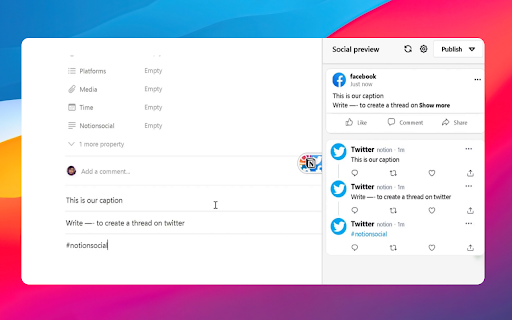


下载NotionSocial扩展crx文件
下载NotionSocial扩展crx格式的文件,手动将Chrome插件安装到浏览器中,也可以将crx文件分享给朋友,轻松安装Chrome插件。
扩展使用说明
                        Preview how your post will look like on social platforms, While creating it inside Notion.

Features:
🔌Plug & Play; Works for any database.
 👀 Preview posts on Facebook,Instagram, and Twitter.
⚠️ Highlights any content issues beforehand.
🎉 Schedule & Publish posts by connecting with NotionSocial.
✍️ Guides you step by step while creating a post.

Powered by NotionSocial, a tool that allows you to schedule posts from Notion to multiple social platforms,
Visit https://notionsocial.app to learn more.
扩展基本信息
| 名称 |  NotionSocial NotionSocial |
| ID | hmekccbjjdndlipophapbddilacniidn |
| 官方URL | https://chromewebstore.google.com/detail/notionsocial/hmekccbjjdndlipophapbddilacniidn |
| 简介 | Preview & Schedule social media posts inside Notion. |
| 文件大小 | 3.11 MB |
| 安装次数 | 225 |
| 当前版本 | 1.1.1 |
| 更新时间 | 2023-04-03 |
| 上架时间 | 2023-03-14 |
| 评分 | 5.00/5 共1次评分 |
| 开发者 | https://notionsocial.app |
| 电子邮箱 | [email protected] |
| 付费类型 | in_app |
| 扩展官网 | https://notionsocial.app/ |
| 帮助页面URL | https://notionsocial.app/contact |
| 支持的语言 | en-US |
| manifest.json | |
{
    "update_url": "https:\/\/clients2.google.com\/service\/update2\/crx",
    "icons": {
        "16": "icon16.plasmo.00ac8b83.png",
        "32": "icon32.plasmo.9ad0c5b6.png",
        "48": "icon48.plasmo.cae3a6b3.png",
        "64": "icon64.plasmo.e4b604fc.png",
        "128": "icon128.plasmo.b89b7dfa.png"
    },
    "manifest_version": 3,
    "action": {
        "default_icon": {
            "16": "icon16.plasmo.00ac8b83.png",
            "32": "icon32.plasmo.9ad0c5b6.png",
            "48": "icon48.plasmo.cae3a6b3.png",
            "64": "icon64.plasmo.e4b604fc.png",
            "128": "icon128.plasmo.b89b7dfa.png"
        },
        "default_popup": "popup.html"
    },
    "version": "1.1.1",
    "author": "pul",
    "name": "NotionSocial",
    "description": "Preview & Schedule social media posts inside Notion.",
    "background": {
        "service_worker": "background.5fadff2f.js"
    },
    "permissions": [
        "storage",
        "activeTab",
        "tabs"
    ],
    "content_scripts": [
        {
            "matches": [
                "https:\/\/www.notion.so\/*"
            ],
            "js": [
                "contents.77d90920.js"
            ],
            "css": [
                "style.db33e7dc.css",
                "contents.9cda656c.css"
            ]
        }
    ],
    "host_permissions": [
        "https:\/\/*.notion.so\/*",
        "https:\/\/*.notion.com\/*",
        "https:\/\/us-central1-notionsocial.cloudfunctions.net\/*"
    ],
    "optional_host_permissions": [
        "https:\/\/*\/*",
        "http:\/\/*\/*"
    ],
    "externally_connectable": {
        "matches": [
            "https:\/\/*.notion.so\/"
        ]
    },
    "web_accessible_resources": [
        {
            "resources": [
                "assets\/*"
            ],
            "extension_ids": [],
            "matches": [
                "https:\/\/www.notion.so\/*"
            ]
        },
        {
            "matches": [
                "https:\/\/www.notion.so\/*"
            ],
            "resources": [
                "sidebar-button-bg.63ce33e1.svg",
                "contents.d5ab6069.css",
                "contents.0620923b.css",
                "contents.e420a7cd.css",
                "contents.97514675.css",
                "contents.00190e40.css",
                "contents.28e75465.css"
            ]
        }
    ]
} | |