Highlight Keywords
Highlight keywords on webpage that you visited after searching for a keyword on a search engine.
什么是Highlight Keywords?
Highlight Keywords是由http://sites.google.com/site/extensionshub开发的Chrome扩展程序,该扩展的主要功能是“Highlight keywords on webpage that you visited after searching for a keyword on a search engine.”。
扩展截图

下载Highlight Keywords扩展crx文件
下载Highlight Keywords扩展crx格式的文件,手动将Chrome插件安装到浏览器中,也可以将crx文件分享给朋友,轻松安装Chrome插件。
扩展使用说明
                        Supported search engines are
✓ Google
✓ Yahoo
✓ Bing
✓ Yandex
✓ Baidu

How to On/Off the highlighter?
Click extension icon to on/off the highlighter.

How it works?

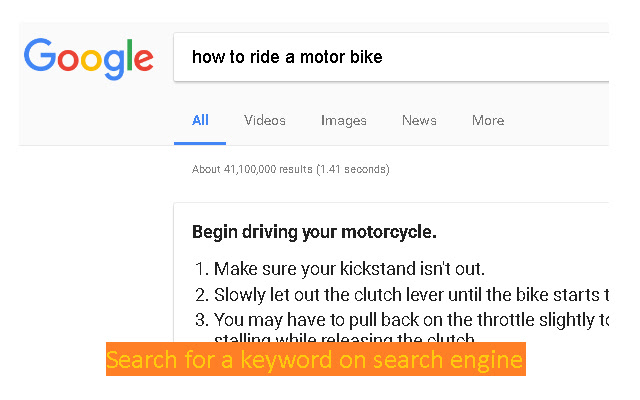
You search for a keyword on a search engine.
Then visit a webpage from returned results.
Keywords will be highlighted on that page.
To on/off the highlighter, just click extension icon.

What you will get with Highlight Keywords?
✓ A great highlighting extension.
✓ New tab page which includes links to popular sites.
扩展基本信息
| 名称 |  Highlight Keywords Highlight Keywords |
| ID | ifboknkcilomhlninjdnphlphadpcjli |
| 官方URL | https://chrome.google.com/webstore/detail/highlight-keywords/ifboknkcilomhlninjdnphlphadpcjli |
| 简介 | Highlight keywords on webpage that you visited after searching for a keyword on a search engine. |
| 文件大小 | 30.43 KB |
| 安装次数 | 355 |
| 当前版本 | 1.0 |
| 更新时间 | 2017-12-20 |
| 上架时间 | 2017-12-20 |
| 评分 | 3.43/5 共7次评分 |
| 开发者 | http://sites.google.com/site/extensionshub |
| 电子邮箱 | [email protected] |
| 付费类型 | free |
| 隐私政策页面URL | https://freepicturesolutions.com/privacy_policy.html |
| 支持的语言 | en |
| manifest.json | |
{
"update_url": "https:\/\/clients2.google.com\/service\/update2\/crx",
"manifest_version": 2,
"name": "Highlight Keywords",
"default_locale": "en",
"description": "Highlight keywords on webpage that you visited after searching for a keyword on a search engine.",
"background": {
"scripts": [
"background.js"
]
},
"version": "1.0",
"icons": {
"128": "images\/icon.png"
},
"browser_action": {
"default_icon": "images\/icon.png"
},
"permissions": [
"tabs",
"storage"
],
"content_scripts": [
{
"js": [
"content.js"
],
"matches": [
" | |