Side-by-side diff view in Github
Adds the option to view diffs side-by-side in Github
什么是Side-by-side diff view in Github?
Side-by-side diff view in Github是由smike开发的Chrome扩展程序,该扩展的主要功能是“Adds the option to view diffs side-by-side in Github”。
扩展截图
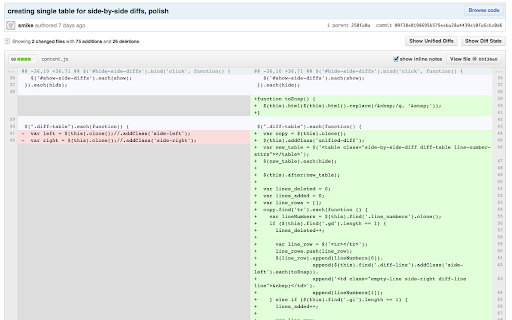
下载Side-by-side diff view in Github扩展crx文件
下载Side-by-side diff view in Github扩展crx格式的文件,手动将Chrome插件安装到浏览器中,也可以将crx文件分享给朋友,轻松安装Chrome插件。
扩展使用说明
                        This extension will transform the diff view on Github to a side-by-side view. Just load a commit page and click the "Show Side-By-Side Diffs" button.

Things that work:
  - Switch between side-by-side and unified diffs
  - Previous comments are shown
  - New comments can be added to any line, but they look funky until you reload.

Found a bug? Have a feature you'd like but isn't working? Please contribute at http://github.com/smike/diffhub.
扩展基本信息
| 名称 |  Side-by-side diff view in Github Side-by-side diff view in Github |
| ID | ihmhmdmhllhleioijdeoocgoddjckbcd |
| 官方URL | https://chromewebstore.google.com/detail/side-by-side-diff-view-in/ihmhmdmhllhleioijdeoocgoddjckbcd |
| 简介 | Adds the option to view diffs side-by-side in Github |
| 文件大小 | 51.96 KB |
| 安装次数 | 118 |
| 当前版本 | 1.0.1 |
| 更新时间 | 2013-03-26 |
| 上架时间 | 2013-03-26 |
| 评分 | 2.40/5 共10次评分 |
| 开发者 | smike |
| 电子邮箱 | [email protected] |
| 付费类型 | free |
| 扩展官网 | http://github.com/smike/diffhub |
| 支持的语言 | en |
| manifest.json | |
{
    "update_url": "http:\/\/clients2.google.com\/service\/update2\/crx",
    "manifest_version": 2,
    "name": "Side-by-side diff view in Github",
    "version": "1.0.1",
    "description": "Adds the option to view diffs side-by-side in Github",
    "icons": {
        "128": "icon.png"
    },
    "background": {
        "scripts": [
            "secrets.js",
            "bg.js"
        ],
        "persistent": true
    },
    "content_scripts": [
        {
            "matches": [
                "https:\/\/github.com\/*",
                "http:\/\/github.com\/*"
            ],
            "js": [
                "lib\/jquery-1.9.1.min.js",
                "content.js"
            ],
            "css": [
                "lib\/diffhub.css"
            ]
        }
    ],
    "content_security_policy": "script-src 'self' https:\/\/ssl.google-analytics.com; object-src 'self'"
} | |


