AltoConvertPDFtoWord: Free PDF to DOC Tool
Change PDF to Word with a perfect free tool and simple interface
什么是AltoConvertPDFtoWord: Free PDF to DOC Tool?
AltoConvertPDFtoWord: Free PDF to DOC Tool是由https://www.pdffiller.com开发的Chrome扩展程序,该扩展的主要功能是“Change PDF to Word with a perfect free tool and simple interface”。
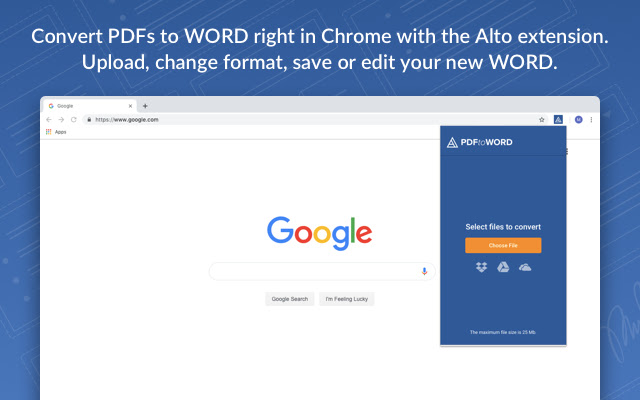
扩展截图


下载AltoConvertPDFtoWord: Free PDF to DOC Tool扩展crx文件
下载AltoConvertPDFtoWord: Free PDF to DOC Tool扩展crx格式的文件,手动将Chrome插件安装到浏览器中,也可以将crx文件分享给朋友,轻松安装Chrome插件。
扩展使用说明
                        PDFs are good for sharing non-editable texts and protected files. If you want to use some information it contains or edit it, you’ll realize that it’s impossible without special software. A lite converter is a perfect solution to this problem. And there’s no need to install expensive and heavy programs. Our app works perfectly well and costs nothing. With the user-friendly PDF to Word converter, you get what you need without any extra effort.

It is one of the best converters due to its numerous features. This provides you with a perfect conversion process:

➤ Easy to install and work with. By adding this extension you get a powerful tool that is located in the cloud and has a smart and simple interface.
➤ Add files from wherever you want. It works perfectly well with both internal and cloud storages. Are you saving docs in the cloud? Then just select the store logo and import PDF from it.
➤ Complete protection on all conversion steps. We use the latest data encryption and decryption methods.
➤ No registration and sign up. We respect your privacy and have no access to your personal information nor to the content of your files. The system automatically removes files. There are no more processes after a page refreshes or a new operation starts.
➤ Fast file transformation and high-quality results. The converter recognizes every file format, font, spreadsheet, image, as well as their position on pages and formatting. After you save the final document version you will see that all needed elements and positionings remain absolutely the same, but you can easily rearrange or edit them.
➤ To transform a file you have into the one you need, you don’t need to spend a lot of time familiarizing with its capabilities. It is equipped with a step by step manual which saves you time.

The operation is completed in several simple steps. Open the app, import files and convert them wherever you are. Try this solution yourself and never have to deal with document format transformation problems anymore!
扩展基本信息
| 名称 |  AltoConvertPDFtoWord: Free PDF to DOC Tool AltoConvertPDFtoWord: Free PDF to DOC Tool |
| ID | ioaomfoojokoeimgoacpdjchmjhjlinp |
| 官方URL | https://chrome.google.com/webstore/detail/altoconvertpdftoword-free/ioaomfoojokoeimgoacpdjchmjhjlinp |
| 简介 | Change PDF to Word with a perfect free tool and simple interface |
| 文件大小 | 1.07 MB |
| 安装次数 | 7,000 |
| 当前版本 | 1.0.12 |
| 更新时间 | 2021-04-08 |
| 上架时间 | 2020-04-13 |
| 评分 | 4.79/5 共14次评分 |
| 开发者 | https://www.pdffiller.com |
| 电子邮箱 | [email protected] |
| 付费类型 | free |
| 隐私政策页面URL | https://altopdf.com/privacy_policy |
| 支持的语言 | en |
| manifest.json | |
{
    "name": "AltoConvertPDFtoWord: Free PDF to DOC Tool",
    "version": "1.0.12",
    "description": "Change PDF to Word with a perfect free tool and simple interface",
    "author": "PDFfiller",
    "manifest_version": 2,
    "icons": {
        "16": "icons\/16.png",
        "48": "icons\/48.png",
        "128": "icons\/128.png"
    },
    "permissions": [
        "*:\/\/*.amazonaws.com\/*",
        "*:\/\/*.pdffillers.com\/*",
        "*:\/\/*.pdffiller.com\/*",
        "https:\/\/www.googleapis.com\/",
        "background",
        "identity",
        "storage",
        "*:\/\/altoconvertpdftoword.com\/*"
    ],
    "browser_action": {
        "default_title": "AltoConvertPDFtoWord: Free PDF to DOC Tool",
        "default_popup": "pages\/popup.html"
    },
    "background": {
        "persistent": false,
        "scripts": [
            "js\/background.js"
        ]
    },
    "content_security_policy": "script-src 'self' 'unsafe-eval' https:\/\/content.googleapis.com https:\/\/ajax.googleapis.com https:\/\/www.googleapis.com https:\/\/apis.google.com; object-src 'self'",
    "update_url": "https:\/\/clients2.google.com\/service\/update2\/crx",
    "oauth2": {
        "client_id": "1060620009036-15tab91ko6uuuqrr8go14i944bd3oeg1.apps.googleusercontent.com",
        "scopes": [
            "https:\/\/www.googleapis.com\/auth\/drive"
        ]
    }
} | |