Hover inspector like in Zeplin , Figma
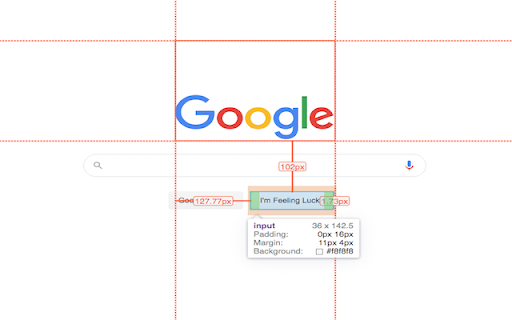
Inspector is the tool which mimic display dimension between selected and hover element. It would be good for designers, QA
什么是Hover inspector like in Zeplin , Figma?
Hover inspector like in Zeplin , Figma是由Liubomyr Kozak开发的Chrome扩展程序,该扩展的主要功能是“Inspector is the tool which mimic display dimension between selected and hover element. It would be good for designers, QA”。
扩展截图



下载Hover inspector like in Zeplin , Figma扩展crx文件
下载Hover inspector like in Zeplin , Figma扩展crx格式的文件,手动将Chrome插件安装到浏览器中,也可以将crx文件分享给朋友,轻松安装Chrome插件。
扩展使用说明
                        Extension behavior closed like in Zeplin, Figma.

version 3.0.2
- fix bug:  prevent click(thanks Marcelo Alejandro)
- add background rule permission for save setting

version 3.0.1
- fix bug: extension dropped (thanks @invisioN7)

version 3.0.0
- refactor core(prepare for the new features)
- add sidebar (setting, more details of selected element)
- add freezing selected element after 2 click
- press 'space' for unfreeze selected element
- add link to discord
- add uninstall form
- fixed calculation position of popup

version 2.0.0
- used ReactJS (expected simplifying of maintain and support)
- add data: padding, margin, font, color, background, line-height, class, id
- fixed calculation position of popup

version 1.1.0
- add highline padding(green color) and margin(orange color).
- fix bugs

version 1.0.5.1
- minify file for more faster loading

version 1.0.5
- add top bar with styles(padding, margin, font-size, height, width) for hover and selected element
- fixed  bugs (when user scroll label and lines position not display correctly)
- add change style for label which display height and width hovered element
- change active and regular icon:
- add 2 hotkeys:
-- command + enter / ctrl + enter - for hide/show topbar
-- esc for close extension

version 1.0.4
- add functionality when start scroll
- change color of labels
- add dimension calculating when selected located in hovered element

version 1.0.3
- add dimension calculating when hovered located outside selected element
扩展基本信息
| 名称 |  Hover inspector like in Zeplin , Figma Hover inspector like in Zeplin , Figma |
| ID | jbhnejndccdjigppalbbiphlbaaehpln |
| 官方URL | https://chromewebstore.google.com/detail/hover-inspector-like-in-z/jbhnejndccdjigppalbbiphlbaaehpln |
| 简介 | Inspector is the tool which mimic display dimension between selected and hover element. It would be good for designers, QA |
| 文件大小 | 122 KB |
| 安装次数 | 9,405 |
| 当前版本 | 3.0.2 |
| 更新时间 | 2023-09-25 |
| 上架时间 | 2019-06-09 |
| 评分 | 4.76/5 共29次评分 |
| 开发者 | Liubomyr Kozak |
| 电子邮箱 | [email protected] |
| 付费类型 | free |
| 扩展官网 | https://liubomyr.me |
| 帮助页面URL | https://github.com/liubomyr-kozak/HoverInspectorSupport |
| 隐私政策页面URL | https://liubomyr.me/projects/privacyPolicy |
| 支持的语言 | en |
| manifest.json | |
{
    "name": "Hover inspector like in Zeplin , Figma",
    "short_name": "Inspector",
    "description": "Inspector is the tool which mimic display dimension between selected and hover element. It would be good for designers, QA",
    "version": "3.0.2",
    "manifest_version": 3,
    "update_url": "https:\/\/clients2.google.com\/service\/update2\/crx",
    "author": "Liubomyr Kozak",
    "icons": {
        "16": "images\/new_logo2\/zTool-16.png",
        "32": "images\/new_logo2\/zTool-32.png",
        "48": "images\/new_logo2\/zTool-64-active.png",
        "128": "images\/new_logo2\/zTool-128-active.png"
    },
    "background": {
        "service_worker": ".\/browser_action_script.bundle.js"
    },
    "action": {
        "default_icon": {
            "16": "images\/new_logo2\/zTool-16.png",
            "32": "images\/new_logo2\/zTool-32.png"
        },
        "default_title": "Inspector [3.0.2]"
    },
    "host_permissions": [
        "*:\/\/*\/*"
    ],
    "permissions": [
        "activeTab",
        "background",
        "scripting",
        "storage"
    ]
} | |