Wiki It
Easily Wikipedia anything on the web without having to leave the page
什么是Wiki It?
Wiki It是由dlask开发的Chrome扩展程序,该扩展的主要功能是“Easily Wikipedia anything on the web without having to leave the page”。
扩展截图
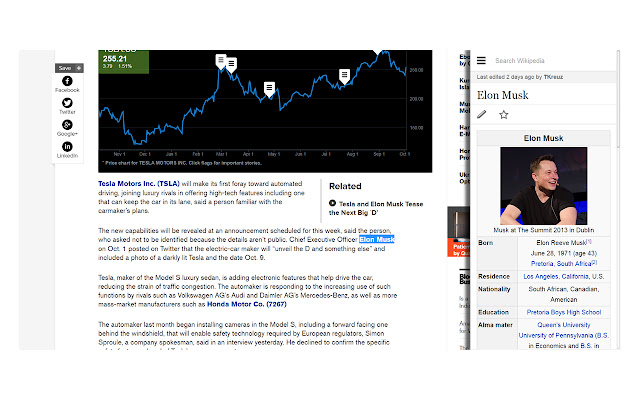
下载Wiki It扩展crx文件
下载Wiki It扩展crx格式的文件,手动将Chrome插件安装到浏览器中,也可以将crx文件分享给朋友,轻松安装Chrome插件。
扩展使用说明
                        Wiki It allows you to easily Wikipedia anything on a website without having to leave the page or open a new tab.

+Highlight your desired word(s) (you can do this easily by double clicking)

+Then use the shortcut CTRL + SHIFT + S or click the icon in the top right.(You can change the keyboard shortcut to whatever you want in the extension manager)

+Watch your info slide in! It is that easy!
扩展基本信息
| 名称 |  Wiki It Wiki It |
| ID | jcmckdmbneffdllfpndkgidingockofb |
| 官方URL | https://chrome.google.com/webstore/detail/wiki-it/jcmckdmbneffdllfpndkgidingockofb |
| 简介 | Easily Wikipedia anything on the web without having to leave the page |
| 文件大小 | 44.26 KB |
| 安装次数 | 447 |
| 当前版本 | 2.0 |
| 更新时间 | 2014-10-05 |
| 上架时间 | 2014-10-05 |
| 评分 | 4.60/5 共25次评分 |
| 开发者 | dlask |
| 付费类型 | free |
| 支持的语言 | en-US |
| manifest.json | |
{
    "update_url": "https:\/\/clients2.google.com\/service\/update2\/crx",
    "name": "Wiki It",
    "description": "Easily Wikipedia anything on the web without having to leave the page",
    "version": "2.0",
    "permissions": [
        "activeTab"
    ],
    "background": {
        "scripts": [
            "background.js"
        ],
        "persistent": false
    },
    "browser_action": {
        "default_title": "Wiki It",
        "default_icon": "icon.png"
    },
    "manifest_version": 2,
    "icons": {
        "16": "icon.png",
        "48": "icon.png",
        "128": "icon.png"
    },
    "commands": {
        "_execute_browser_action": {
            "suggested_key": {
                "windows": "Ctrl+Shift+S",
                "mac": "Command+Shift+S",
                "chromeos": "Ctrl+Shift+S",
                "linux": "Ctrl+Shift+S"
            }
        }
    }
} | |