Lookup Word in Dictionary
Looks up the selected text on a world famous online dictionary.
什么是Lookup Word in Dictionary?
Lookup Word in Dictionary是由baspeti开发的Chrome扩展程序,该扩展的主要功能是“Looks up the selected text on a world famous online dictionary.”。
扩展截图
下载Lookup Word in Dictionary扩展crx文件
下载Lookup Word in Dictionary扩展crx格式的文件,手动将Chrome插件安装到浏览器中,也可以将crx文件分享给朋友,轻松安装Chrome插件。
扩展使用说明
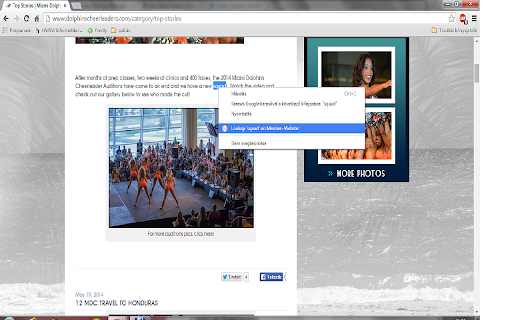
                        Just right-click on the selected text and choose
* Lookup 'text' on the world famous, blue and red colored online dictionary
context menu item and there you go!

It was easy, huh?

Or alternatively you can hit "Alt + W" shortcut to get the selected text looked up or if there is nothing selected, then the online dictionary is started up on a new tab. (Since version 1.2)

HINT: Just be careful not hitting "Ctrl (Cmd on Mac) + W" instead, because it will close your active tab. But in case if you did so, don't panic, you can recover that tab by pressing "Ctrl (Cmd on Mac) + Shift + T".

Buy me a coffee :)
https://www.buymeacoffee.com/baspeti
扩展基本信息
| 名称 |  Lookup Word in Dictionary Lookup Word in Dictionary |
| ID | kbkglbhikjonodlofbcomogfcbfjipog |
| 官方URL | https://chromewebstore.google.com/detail/lookup-word-in-dictionary/kbkglbhikjonodlofbcomogfcbfjipog |
| 简介 | Looks up the selected text on a world famous online dictionary. |
| 文件大小 | 31.97 KB |
| 安装次数 | 15,209 |
| 当前版本 | 1.7 |
| 更新时间 | 2022-05-21 |
| 上架时间 | 2015-03-16 |
| 评分 | 4.38/5 共85次评分 |
| 开发者 | baspeti |
| 电子邮箱 | [email protected] |
| 付费类型 | free |
| 支持的语言 | en |
| manifest.json | |
{
    "update_url": "https:\/\/clients2.google.com\/service\/update2\/crx",
    "name": "Lookup Word in Dictionary",
    "description": "Looks up the selected text on a world famous online dictionary.",
    "version": "1.7",
    "permissions": [
        "contextMenus",
        "http:\/\/*\/",
        "https:\/\/*\/"
    ],
    "icons": {
        "16": "w_logo_16x16.png",
        "48": "w_logo_48x48.png",
        "128": "w_logo_128x128.png"
    },
    "background": {
        "persistent": false,
        "scripts": [
            "lookupW.js"
        ]
    },
    "commands": {
        "lookup-on-MW": {
            "suggested_key": {
                "default": "Alt+W"
            },
            "description": "Lookup Word"
        }
    },
    "manifest_version": 2,
    "content_security_policy": "script-src 'self' https:\/\/ssl.google-analytics.com; object-src 'self'"
} | |