URLocker
URLocker can be used to password protect a specific URL. Many times you have to willingly or unwillingly share your laptop with…
什么是URLocker?
URLocker是由Aman Raj开发的Chrome扩展程序,该扩展的主要功能是“URLocker can be used to password protect a specific URL. Many times you have to willingly or unwillingly share your laptop with…”。
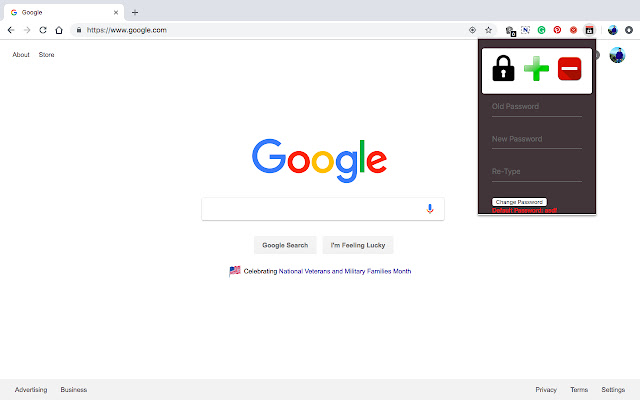
扩展截图

下载URLocker扩展crx文件
下载URLocker扩展crx格式的文件,手动将Chrome插件安装到浏览器中,也可以将crx文件分享给朋友,轻松安装Chrome插件。
扩展使用说明
URLocker can be used to password protect a specific URL.
Many times you have to willingly or unwillingly share your laptop with some friend. And your friend will have all the access to your logged in websites. This can be prevented
Unlocking persists among websites, i.e if you have unlocked a website, then all the other locked websites are also unlocked.
WorkFlow:
Add Button: Adding a website to password protected list
1. Open the website which you want to password protect
2. Once the website loading is complete, open the extension menu by clicking the
extension icon on the browser
3. Click on the green “+” button in the menu
4. If you reload the website, you will be asked for the password if you have not entered the
password for any other website or if you have used lockall option(explained later)
Remove Button: Removing a website from password protected list
1. Steps to remove a website are similar to adding except for the 3rd step, where instead of clicking the green “+” button, you need to click on the red “” (minus) button
2. From now on, you will not be asked to enter the password for this website
Lock Button: Locking the passwordprotected website after successful login
1. After you have entered the correct password and successfully accessed the website, you can access all the websites which you have added to the passwordprotected list earlier
2. Click on the lock button to reset the lock the websites again
Change Password: To change the password
1. Enter the old password. The default password is “asdf” (without quotes)
2. Enter new password
3. Reenter new password
4. Click on “change password” button. You will be shown a message for successful change
or if something went wrong 扩展基本信息
| 名称 |  URLocker URLocker |
| ID | kllapfdedgneblamambjbbnecahlpdla |
| 官方URL | https://chrome.google.com/webstore/detail/urlocker/kllapfdedgneblamambjbbnecahlpdla |
| 简介 | URLocker can be used to password protect a specific URL. Many times you have to willingly or unwillingly share your laptop with… |
| 文件大小 | 162 KB |
| 安装次数 | 222 |
| 当前版本 | 0.1 |
| 更新时间 | 2018-11-17 |
| 上架时间 | 2018-11-14 |
| 评分 | 3.40/5 共5次评分 |
| 开发者 | Aman Raj |
| 电子邮箱 | [email protected] |
| 付费类型 | free |
| 支持的语言 | en |
| manifest.json | |
{
"update_url": "https:\/\/clients2.google.com\/service\/update2\/crx",
"manifest_version": 2,
"name": "URLocker",
"version": "0.1",
"content_scripts": [
{
"matches": [
" | |