Monosnap
Capture pages or blocks with the awesome smart screen capture tool!
什么是Monosnap?
Monosnap是由https://monosnap.com开发的Chrome扩展程序,该扩展的主要功能是“Capture pages or blocks with the awesome smart screen capture tool!”。
扩展截图




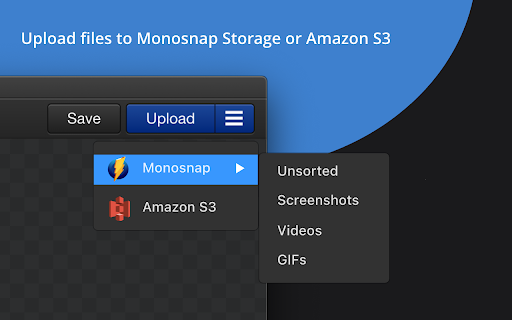
下载Monosnap扩展crx文件
下载Monosnap扩展crx格式的文件,手动将Chrome插件安装到浏览器中,也可以将crx文件分享给朋友,轻松安装Chrome插件。
扩展使用说明
                        Take screeshots in 1️⃣ click!

Capture and edit screenshots, upload files, record video and .GIFs! Share a visual explanation with your clients and colleagues.

📸 Capture:
▸ Desktop screenshots: fullscreen and window.
▸ Page: screenshots: area, visible content, and whole page.
▸ Taking timed screenshots.
▸ Customize hotkeys.

✏️ Annotate and edit:
▸ Highlight important details with arrows, pen, shapes, and text.
▸ Hide too personal and private information with the blur tool.
▸ Resize and crop screenshots.

☁️ Upload and share:
▸ Log in to get 2 GB in Monosnap Cloud storage.
▸ Amazon S3 storage (Non-Commercial and Commercial plans)

🎥 Record:
▸ Desktop, window or browser
▸ WebM and GIF
▸ Add audio to your videos
▸ Customize FPS

📧 Contact US:
▸ Twitter: https://twitter.com/monosnap
▸ Facebook: https://www.facebook.com/Monosnap/
▸ Support:  [email protected]


ℹ️ Info:
▸ Pricing and Plans: https://monosnap.com/pay
▸ Support Docs: https://medium.com/@monosnap
▸ Terms of Service: https://monosnap.com/tos
▸ Privacy Policy: https://monosnap.com/privacy


❓Changelog:
▸ closed beta for new image and video editors


Contact [email protected] to learn more about Enterprise plans.
扩展基本信息
| 名称 |  Monosnap Monosnap |
| ID | lhgadannddhdpkfhfjjgcpdjhpmjhkfm |
| 官方URL | https://chromewebstore.google.com/detail/monosnap/lhgadannddhdpkfhfjjgcpdjhpmjhkfm |
| 简介 | Capture pages or blocks with the awesome smart screen capture tool! |
| 文件大小 | 10.22 MB |
| 安装次数 | 60,347 |
| 当前版本 | 1.8.11 |
| 更新时间 | 2023-02-07 |
| 上架时间 | 2020-05-05 |
| 评分 | 3.51/5 共35次评分 |
| 开发者 | https://monosnap.com |
| 电子邮箱 | [email protected] |
| 付费类型 | free |
| 扩展官网 | https://monosnap.com/ |
| 帮助页面URL | https://medium.com/@monosnap |
| 隐私政策页面URL | https://monosnap.com/privacy |
| 支持的语言 | en,ru |
| manifest.json | |
{
"update_url": "https:\/\/clients2.google.com\/service\/update2\/crx",
"manifest_version": 2,
"name": "__MSG_app_name__",
"description": "__MSG_app_description__",
"version": "1.8.11",
"homepage_url": "https:\/\/monosnap.com",
"default_locale": "en",
"icons": {
"32": "\/images\/logo_32.png",
"48": "\/images\/logo_48.png",
"128": "\/images\/logo_128.png"
},
"minimum_chrome_version": "50",
"incognito": "split",
"background": {
"page": "background.html",
"scripts": [],
"persistent": false
},
"browser_action": {
"default_icon": "\/images\/logo_128.png",
"default_popup": "popup.html",
"default_title": "__MSG_app_default_title__"
},
"options_ui": {
"page": "settings.html"
},
"content_scripts": [
{
"js": [
"\/content_scripts\/resnap.js"
],
"all_frames": false,
"run_at": "document_end",
"matches": [
"*:\/\/*.monosnap.com\/file\/*"
]
},
{
"all_frames": true,
"js": [
"\/content_scripts\/chromeOSPlugin.js"
],
"run_at": "document_start",
"matches": [
" | |