YT Transcript Downloader
Download transcript of youtube video
什么是YT Transcript Downloader?
YT Transcript Downloader是由Mizan Rifat开发的Chrome扩展程序,该扩展的主要功能是“Download transcript of youtube video”。
扩展截图
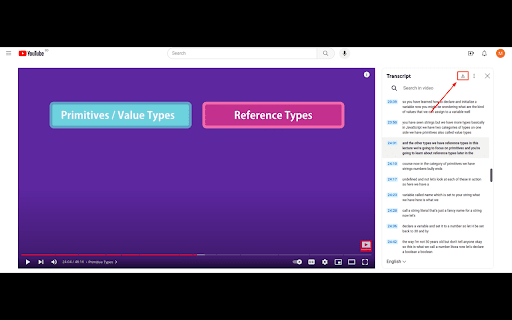
下载YT Transcript Downloader扩展crx文件
下载YT Transcript Downloader扩展crx格式的文件,手动将Chrome插件安装到浏览器中,也可以将crx文件分享给朋友,轻松安装Chrome插件。
扩展使用说明
                        The YT Transcript Downloader is a handy Chrome extension that enhances your YouTube experience by adding a convenient download button to video transcripts. Say goodbye to the hassle of copying and pasting transcript text – with this extension, you can effortlessly download the transcript in a simple text (txt) format with just a click.

Key Features:

Download Transcripts: Seamlessly download YouTube video transcripts in text (txt) format for easy reference and offline reading.

Enhanced Convenience: The extension integrates a download button directly into the YouTube interface, simplifying the transcript retrieval process.

Time-Saving: No need to manually copy and paste transcript content – save time and effort by downloading transcripts with a single click.

Unlock a new level of convenience when using YouTube by adding the YouTube Transcript Downloader to your Chrome browser today!
扩展基本信息
| 名称 |  YT Transcript Downloader YT Transcript Downloader |
| ID | liakknlpjigmkploknohgomhgaenjpom |
| 官方URL | https://chromewebstore.google.com/detail/yt-transcript-downloader/liakknlpjigmkploknohgomhgaenjpom |
| 简介 | Download transcript of youtube video |
| 文件大小 | 11.46 KB |
| 安装次数 | 264 |
| 当前版本 | 1.0 |
| 更新时间 | 2023-11-30 |
| 上架时间 | 2023-09-18 |
| 评分 | 4.00/5 共3次评分 |
| 开发者 | Mizan Rifat |
| 电子邮箱 | [email protected] |
| 付费类型 | free |
| 支持的语言 | en-US |
| manifest.json | |
{
    "update_url": "https:\/\/clients2.google.com\/service\/update2\/crx",
    "name": "YT Transcript Downloader",
    "description": "Download transcript of youtube video",
    "version": "1.0",
    "manifest_version": 3,
    "background": {
        "service_worker": "background.js"
    },
    "content_scripts": [
        {
            "matches": [
                "https:\/\/youtube.com\/*",
                "https:\/\/www.youtube.com\/*"
            ],
            "js": [
                "content_script.js"
            ],
            "css": [
                "content_script.css"
            ]
        }
    ],
    "permissions": [
        "tabs"
    ],
    "action": {
        "default_icon": {
            "16": "\/images\/logo-16x16.png",
            "32": "\/images\/logo-32x32.png",
            "48": "\/images\/logo-48x48.png",
            "128": "\/images\/logo-128x128.png"
        }
    },
    "icons": {
        "16": "\/images\/logo-16x16.png",
        "32": "\/images\/logo-32x32.png",
        "48": "\/images\/logo-48x48.png",
        "128": "\/images\/logo-128x128.png"
    }
} | |