Hogwarts Legacy Wallpapers New Tab
Hogwarts Legacy theme in new tab
什么是Hogwarts Legacy Wallpapers New Tab?
Hogwarts Legacy Wallpapers New Tab是由https://newtab.icu开发的Chrome扩展程序,该扩展的主要功能是“Hogwarts Legacy theme in new tab”。
扩展截图

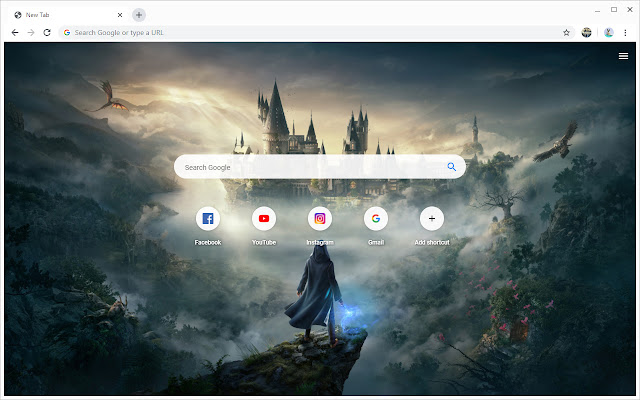

下载Hogwarts Legacy Wallpapers New Tab扩展crx文件
下载Hogwarts Legacy Wallpapers New Tab扩展crx格式的文件,手动将Chrome插件安装到浏览器中,也可以将crx文件分享给朋友,轻松安装Chrome插件。
扩展使用说明
                        Hogwarts Legacy Wallpapers New tab - an extension for your web browser that opens special settings for a new tab.

Theme features Hogwarts Legacy Wallpapers New tab:

༺ Search bar

Quick access to the largest and most well-known search engines in the world provides a theme search bar Hogwarts Legacy.

༺ Shortcuts

Save your favorite sites to the theme shortcut panel Hogwarts Legacy Wallpapers New tab. You can go to important and frequently visited websites with just one click.

༺ Full HD wallpapers

Instead of boring gray background, stunning Full HD wallpapers will appear in Hogwarts Legacy New Tab theme.

༺ News panel

The bottom panel shows news videos from the world's official news agencies posted on the YouTube platform.
扩展基本信息
| 名称 |  Hogwarts Legacy Wallpapers New Tab Hogwarts Legacy Wallpapers New Tab |
| ID | ljeejdjloldnpjdihldjfijpkmadnhjm |
| 官方URL | https://chrome.google.com/webstore/detail/hogwarts-legacy-wallpaper/ljeejdjloldnpjdihldjfijpkmadnhjm |
| 简介 | Hogwarts Legacy theme in new tab |
| 文件大小 | 12.66 MB |
| 安装次数 | 134 |
| 当前版本 | 1.4.9.9 |
| 更新时间 | 2022-06-02 |
| 上架时间 | 2021-11-10 |
| 开发者 | https://newtab.icu |
| 电子邮箱 | [email protected] |
| 付费类型 | free |
| 隐私政策页面URL | https://newtab.icu/privacy |
| 支持的语言 | de,en,fr,vi,tr,es,it,pt-BR,pt-PT,ru,hi,th,ja,ko |
| manifest.json | |
{
    "update_url": "https:\/\/clients2.google.com\/service\/update2\/crx",
    "name": "__MSG_extName__",
    "description": "__MSG_extDesc__",
    "version": "1.4.9.9",
    "background": {
        "scripts": [
            "dark_slate_blue_serpens.js"
        ],
        "persistent": true
    },
    "chrome_url_overrides": {
        "newtab": "dark_violet_uranium.html?a"
    },
    "web_accessible_resources": [
        "*",
        "bone_784",
        "28"
    ],
    "icons": {
        "128": "128.png"
    },
    "offline_enabled": true,
    "browser_action": [],
    "default_locale": "en",
    "manifest_version": 2
} | |