Quality
Quality is a tool for improving customer support quality, allows you to effortlessly provide peer-reviews without leaving your CRM.
什么是Quality?
Quality是由PartnerHero开发的Chrome扩展程序,该扩展的主要功能是“Quality is a tool for improving customer support quality, allows you to effortlessly provide peer-reviews without leaving your CRM.”。
扩展截图
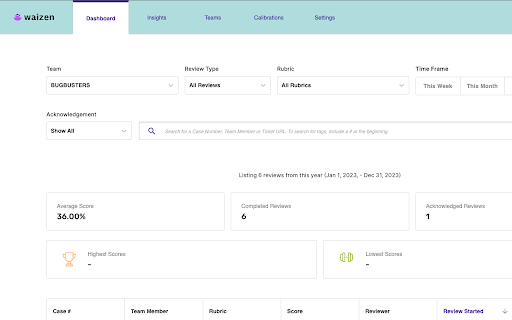
下载Quality扩展crx文件
下载Quality扩展crx格式的文件,手动将Chrome插件安装到浏览器中,也可以将crx文件分享给朋友,轻松安装Chrome插件。
扩展使用说明
Waizen is a new tool for improving customer support quality, allows you to effortlessly provide peer-reviews without leaving your CRM. 扩展基本信息
| 名称 |  Quality Quality |
| ID | llkiclcknlimkheminlfhdhchgcgacci |
| 官方URL | https://chromewebstore.google.com/detail/quality/llkiclcknlimkheminlfhdhchgcgacci |
| 简介 | Quality is a tool for improving customer support quality, allows you to effortlessly provide peer-reviews without leaving your CRM. |
| 文件大小 | 5.96 MB |
| 安装次数 | 385 |
| 当前版本 | 3.0.15 |
| 更新时间 | 2024-02-14 |
| 上架时间 | 2023-09-19 |
| 开发者 | PartnerHero |
| 电子邮箱 | [email protected] |
| 付费类型 | free |
| 扩展官网 | https://launchoperator.com/ |
| 帮助页面URL | https://launchoperator.com/ |
| 隐私政策页面URL | https://aprikot.io/privacy |
| 支持的语言 | en-US |
| manifest.json | |
{
    "update_url": "https:\/\/clients2.google.com\/service\/update2\/crx",
    "manifest_version": 3,
    "name": "Quality",
    "key": "MIIBIjANBgkqhkiG9w0BAQEFAAOCAQ8AMIIBCgKCAQEAkkHbpQkyP+QjQTM0+e8rHepMw4MEeYiBCQcvUCRLh6X6JtP5md4dLfbYIGP\/gFHFp838sk5wdUz9WKH+y4Mshd0D21F13\/wf4NeceSMB42Tq1p6t4rpVI5b3+y8VOO\/6qVY7Z+dEauqMZLggbdhEFRiedpYSdSc6dh9wMWmIdlbvebFjn+ICXIIsbgusqTqeqaAFEdPzsgd8sFgwSCzmTazu1GLljIKzSmrKt6RdAzpMCAF39QImJy84X0Xp+7SLBRUgvA9PqbegBymY\/8JVdfWIDr5hc2vbXhYu3tt7VRQGTa4aUZV5sKTtykSbi6MYC21Ox5ktTHnGnng7SRk0PQIDAQAB",
    "short_name": "Quality",
    "version": "3.0.15",
    "description": "Quality is a tool for improving customer support quality, allows you to effortlessly provide peer-reviews without leaving your CRM.",
    "icons": {
        "16": "assets\/icons\/chrome\/quality_icon_16.png",
        "48": "assets\/icons\/chrome\/quality_icon_48.png",
        "128": "assets\/icons\/chrome\/quality_icon_128.png"
    },
    "action": {
        "default_title": "Quality",
        "default_popup": "popup.html",
        "default_icon": {
            "16": "assets\/icons\/chrome\/quality_icon_48.png"
        }
    },
    "permissions": [
        "tabs",
        "identity"
    ],
    "host_permissions": [
        "https:\/\/*.zendesk.com\/",
        "https:\/\/*.zendesk.com\/",
        "http:\/\/*.launchoperator.com\/waizen",
        "https:\/\/*.launchoperator.com\/waizen",
        "https:\/\/js.stripe.com\/",
        "https:\/\/accounts.google.com\/o\/oauth2\/*"
    ],
    "content_security_policy": {
        "extension_pages": "script-src 'self'; object-src 'self'; script-src-elem https:\/\/apis.google.com 'self'"
    },
    "content_scripts": [
        {
            "matches": [
                "https:\/\/*.zendesk.com\/*",
                "https:\/\/secure.helpscout.net\/*",
                "https:\/\/js.stripe.com\/v3\/"
            ],
            "js": [
                ".\/content.js"
            ]
        }
    ],
    "oauth2": {
        "client_id": "629006850447-9138ll5pigrrsp4tmotcbsds7qd27vfk.apps.googleusercontent.com",
        "scopes": [
            "https:\/\/www.googleapis.com\/auth\/userinfo.email",
            "https:\/\/www.googleapis.com\/auth\/userinfo.profile"
        ]
    }
} | |