Falcon
To activate, type 'f' followed by a tab or space into the Omnibox. Then enter your term and press enter to submit.
什么是Falcon?
Falcon是由Logan Engstrom开发的Chrome扩展程序,该扩展的主要功能是“To activate, type 'f' followed by a tab or space into the Omnibox. Then enter your term and press enter to submit.”。
扩展截图
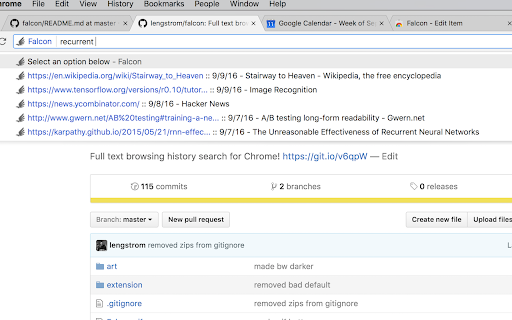
下载Falcon扩展crx文件
下载Falcon扩展crx格式的文件,手动将Chrome插件安装到浏览器中,也可以将crx文件分享给朋友,轻松安装Chrome插件。
扩展使用说明
                        Flexible full text browsing history search in Chrome! Press f, then space or tab, in the omnibar to start searching your previously visited websites! Every time you visit a website in Chrome, Falcon indexes all the text on the page so that the site can be easily found later.

More information here: https://github.com/lengstrom/falcon/.

**If you know how, I strongly recommend installing "from source" manually rather than through the Chrome Webstore**
扩展基本信息
| 名称 |  Falcon Falcon |
| ID | mmifbbohghecjloeklpbinkjpbplfalb |
| 官方URL | https://chromewebstore.google.com/detail/falcon/mmifbbohghecjloeklpbinkjpbplfalb |
| 简介 | To activate, type 'f' followed by a tab or space into the Omnibox. Then enter your term and press enter to submit. |
| 文件大小 | 323 KB |
| 安装次数 | 6,557 |
| 当前版本 | 0.2.4 |
| 更新时间 | 2019-03-08 |
| 上架时间 | 2019-03-08 |
| 评分 | 4.58/5 共33次评分 |
| 开发者 | Logan Engstrom |
| 付费类型 | free |
| 扩展官网 | http://github.com/lengstrom/falcon |
| 帮助页面URL | http://github.com/lengstrom/falcon/ |
| 支持的语言 | en |
| manifest.json | |
{
"update_url": "https:\/\/clients2.google.com\/service\/update2\/crx",
"manifest_version": 2,
"name": "Falcon",
"short_name": "Falcon",
"description": "To activate, type 'f' followed by a tab or space into the Omnibox. Then enter your term and press enter to submit.",
"version": "0.2.4",
"content_scripts": [
{
"matches": [
" | |