Simple NTP
Simple NTP for Chrome
什么是Simple NTP?
Simple NTP是由https://yuhapps.dev开发的Chrome扩展程序,该扩展的主要功能是“Simple NTP for Chrome”。
扩展截图

下载Simple NTP扩展crx文件
下载Simple NTP扩展crx格式的文件,手动将Chrome插件安装到浏览器中,也可以将crx文件分享给朋友,轻松安装Chrome插件。
扩展使用说明
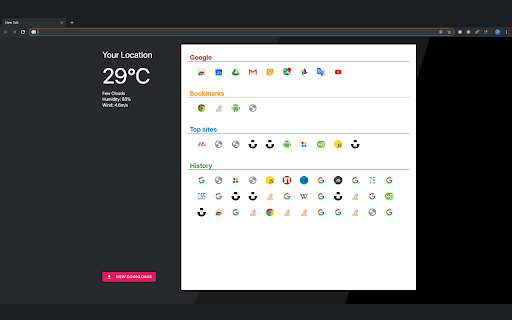
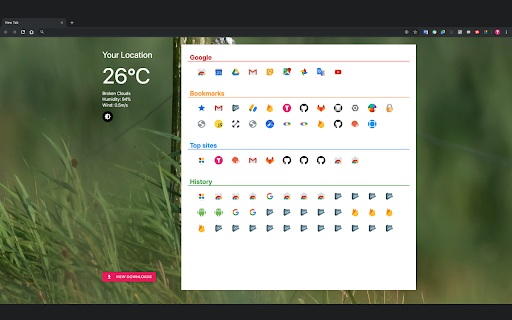
                        This extension brings an all new exprience to your Chrome New Tab Page with rich information that the inbuilt one should have provided. Weather for your location, Bookmarks, and Recent visits, all are displayed in Material Design cards and ready when you open any new tabs. You don't have to go through many menu items to find a bookmark, or press key combination to open your history page. They are right there when Chrome launches or a new tab is created.

Want more control? Visit Settings to change temperature unit to Farenheit or use a random background from Unsplash.

NOTES:
1. The extension needs your location and uses cookies to request and save weather info. That's all. It does not collect any personal data of yours.
2. Dark mode is only supported in Chrome 75 and later on Windows 10 May 2019 and macOS Mojave onwards.
扩展基本信息
| 名称 |  Simple NTP Simple NTP |
| ID | ncjdkoaahnkjajcbllgjfekdnefphafj |
| 官方URL | https://chromewebstore.google.com/detail/simple-ntp/ncjdkoaahnkjajcbllgjfekdnefphafj |
| 简介 | Simple NTP for Chrome |
| 文件大小 | 26.06 MB |
| 安装次数 | 175 |
| 当前版本 | 1.4.0 |
| 更新时间 | 2024-01-30 |
| 上架时间 | 2019-09-01 |
| 评分 | 4.56/5 共9次评分 |
| 开发者 | https://yuhapps.dev |
| 电子邮箱 | [email protected] |
| 付费类型 | free |
| 扩展官网 | https://yuhapps.dev |
| 帮助页面URL | https://yuhapps.dev |
| 隐私政策页面URL | https://yuhapps.dev |
| 支持的语言 | en |
| manifest.json | |
{
    "update_url": "https:\/\/clients2.google.com\/service\/update2\/crx",
    "manifest_version": 3,
    "name": "Simple NTP",
    "version": "1.4.0",
    "version_name": "1.4.0",
    "description": "Simple NTP for Chrome",
    "author": "YUH APPS",
    "chrome_url_overrides": {
        "newtab": "ntp.html"
    },
    "host_permissions": [
        "https:\/\/yuhapps.github.io\/"
    ],
    "permissions": [
        "bookmarks",
        "cookies",
        "favicon",
        "downloads",
        "geolocation",
        "history",
        "https:\/\/yuhapps.github.io\/*",
        "storage",
        "topSites"
    ],
    "action": {
        "default_icon": "app_icon.png"
    },
    "icons": {
        "128": "app_icon.png"
    },
    "options_page": "settings.html"
} | |