New Tab
speed dial with websites catalog, that helps people to bookmark desired websites and also find popular.
什么是New Tab?
New Tab是由http://oho.ge开发的Chrome扩展程序,该扩展的主要功能是“speed dial with websites catalog, that helps people to bookmark desired websites and also find popular.”。
扩展截图
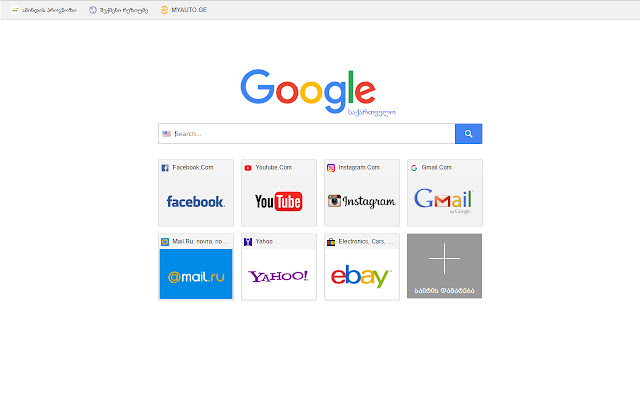

下载New Tab扩展crx文件
下载New Tab扩展crx格式的文件,手动将Chrome插件安装到浏览器中,也可以将crx文件分享给朋友,轻松安装Chrome插件。
扩展使用说明
                        The Speed Dial expansion changes standard browser tab to beautiful new tab page with Visual Bookmarks.

The main advantage of Speed Dial in comparison with the standard page is that you can add the links to the websites of your choice so you always have direct access to them. And also you can sort the icons of already added links.

Our expansion also adds the search bar. The page layout can be changed in the expansion settings, you can also change the search engine used for the search bar.

Thanks to "import and export" function your visual bookmarks will not be lost after browser or system reinstallation. This function also allows you to transfer your saved bookmarks to other computers with New Tab Page installed instead of standard page.
扩展基本信息
| 名称 |  New Tab New Tab |
| ID | nfgknffehbeogamfmkjbmhiifppdljoa |
| 官方URL | https://chrome.google.com/webstore/detail/new-tab/nfgknffehbeogamfmkjbmhiifppdljoa |
| 简介 | speed dial with websites catalog, that helps people to bookmark desired websites and also find popular. |
| 文件大小 | 14.73 KB |
| 安装次数 | 570 |
| 当前版本 | 0.1 |
| 更新时间 | 2018-01-17 |
| 上架时间 | 2018-01-17 |
| 评分 | 3.67/5 共3次评分 |
| 开发者 | http://oho.ge |
| 电子邮箱 | [email protected] |
| 付费类型 | free |
| 扩展官网 | http://tab.oho.ge |
| 帮助页面URL | http://tab.oho.ge/faq |
| 支持的语言 | en |
| manifest.json | |
{
    "update_url": "https:\/\/clients2.google.com\/service\/update2\/crx",
    "chrome_url_overrides": {
        "newtab": "tab.html"
    },
    "description": "speed dial with websites catalog, that helps people to bookmark desired websites and also find popular.",
    "icons": {
        "128": "i\/icon128.png",
        "16": "i\/icon16.png",
        "19": "i\/icon19.png",
        "32": "i\/icon32.png",
        "48": "i\/icon48.png"
    },
    "manifest_version": 2,
    "name": "New Tab",
    "short_name": "New Tab - Speed Deals",
    "version": "0.1",
    "web_accessible_resources": [
        "icon48.png"
    ]
} | |