More Interestingness
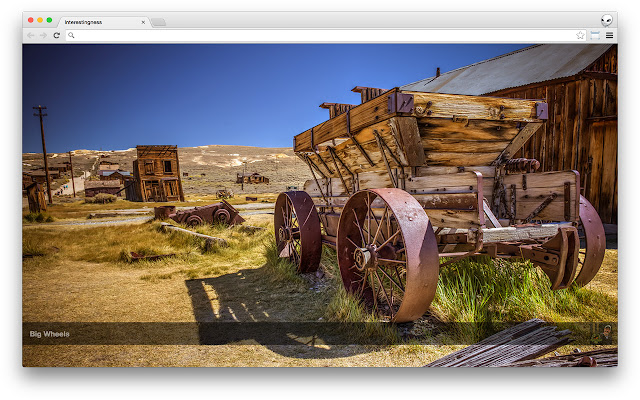
Explore the world through the lens of the Flickr Interestingness stream. New photo loads every time you open a new tab.
什么是More Interestingness?
More Interestingness是由Jake Dahn (http://jake.ai)开发的Chrome扩展程序,该扩展的主要功能是“Explore the world through the lens of the Flickr Interestingness stream. New photo loads every time you open a new tab.”。
扩展截图


下载More Interestingness扩展crx文件
下载More Interestingness扩展crx格式的文件,手动将Chrome插件安装到浏览器中,也可以将crx文件分享给朋友,轻松安装Chrome插件。
扩展使用说明
                        Whenever you open a new tab a new interesting photo is displayed. This extension keeps an up-to-date list of the most recent photos on Flickr.com that are in the interestingness stream - http://www.flickr.com/explore/interesting

Clicking on the flickr user's icon will take you to that user's page, clicking on the title will take you to the photo on flickr.com

You can navigate forward/backwards by pressing j to go forward, or k to go backwards (standard vim up/down)

__

If you're a developer and find a bug, or have a feature to contribute - feel free to send a pull request: https://github.com/angst/moreinterestingness
扩展基本信息
| 名称 |  More Interestingness More Interestingness |
| ID | ngddmdmkjnnefgggjnnnepijkcighifa |
| 官方URL | https://chrome.google.com/webstore/detail/more-interestingness/ngddmdmkjnnefgggjnnnepijkcighifa |
| 简介 | Explore the world through the lens of the Flickr Interestingness stream. New photo loads every time you open a new tab. |
| 文件大小 | 82.95 KB |
| 安装次数 | 33 |
| 当前版本 | 1.6 |
| 更新时间 | 2014-10-19 |
| 上架时间 | 2014-10-19 |
| 评分 | 4.54/5 共13次评分 |
| 开发者 | Jake Dahn (http://jake.ai) |
| 付费类型 | free |
| 扩展官网 | https://github.com/angst/moreinterestingness |
| 帮助页面URL | https://github.com/angst/moreinterestingness |
| 支持的语言 | en |
| manifest.json | |
{
    "update_url": "https:\/\/clients2.google.com\/service\/update2\/crx",
    "manifest_version": 2,
    "name": "More Interestingness",
    "version": "1.6",
    "description": "Explore the world through the lens of the Flickr Interestingness stream. New photo loads every time you open a new tab.",
    "background": {
        "page": "service.html"
    },
    "chrome_url_overrides": {
        "newtab": "newtab.html"
    },
    "permissions": [
        "tabs",
        "http:\/\/api.flickr.com\/"
    ],
    "content_security_policy": "script-src 'self' https:\/\/ssl.google-analytics.com; object-src 'self'"
} | |