Screen Grabber
ScreenGrabber provides awesome features of screen capturing of your desired web page area.
什么是Screen Grabber?
Screen Grabber是由info.screengrabr开发的Chrome扩展程序,该扩展的主要功能是“ScreenGrabber provides awesome features of screen capturing of your desired web page area.”。
扩展截图

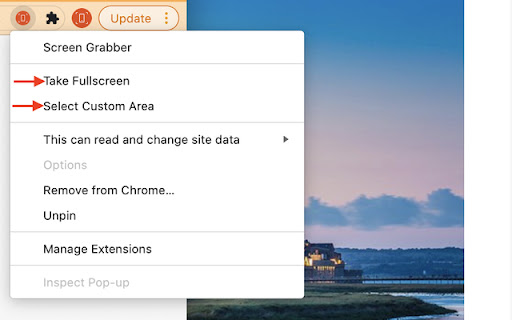

下载Screen Grabber扩展crx文件
下载Screen Grabber扩展crx格式的文件,手动将Chrome插件安装到浏览器中,也可以将crx文件分享给朋友,轻松安装Chrome插件。
扩展使用说明
                        Screen Grabber gives you a fast and affective screen capturing tool.
We ensured this tool was basic and made with one thing in mind,

1.	Capture the whole screen
2.	A selectable Area

You can also email your saved image.

By clicking "Add to Chrome", I accept and agree to install the Screen Grabber Chrome extension and setting Chrome New Tab Search to that provided by Terms of Use and Privacy Policy. We recommend pinning the extension to your browser toolbar by clicking on the for fast and efficient access.

Website: https://www.screengrabr.com
Privacy Policy: https://www.screengrabr.com/privacy.html
Terms of Use: https://www.screengrabr.com/term.html

For all support, please email our customer service team who will be happy to help you, please email us at [email protected]
扩展基本信息
| 名称 |  Screen Grabber Screen Grabber |
| ID | nhcgejenbogeimhladggplmkbimcfemb |
| 官方URL | https://chromewebstore.google.com/detail/screen-grabber/nhcgejenbogeimhladggplmkbimcfemb |
| 简介 | ScreenGrabber provides awesome features of screen capturing of your desired web page area. |
| 文件大小 | 536 KB |
| 安装次数 | 1,577 |
| 当前版本 | 1.1 |
| 更新时间 | 2021-11-09 |
| 上架时间 | 2021-03-26 |
| 评分 | 3.20/5 共5次评分 |
| 开发者 | info.screengrabr |
| 电子邮箱 | [email protected] |
| 付费类型 | free |
| 支持的语言 | en-US |
| manifest.json | |
{
"update_url": "https:\/\/clients2.google.com\/service\/update2\/crx",
"manifest_version": 2,
"name": "Screen Grabber",
"description": "ScreenGrabber provides awesome features of screen capturing of your desired web page area.",
"version": "1.1",
"content_scripts": [
{
"matches": [
" | |