Blueticks
Be in the know what happens to your emails after you press send with real-time feedback when any of the recipient opens your email.
什么是Blueticks?
Blueticks是由https://blueticks.io开发的Chrome扩展程序,该扩展的主要功能是“Be in the know what happens to your emails after you press send with real-time feedback when any of the recipient opens your email.”。
扩展截图
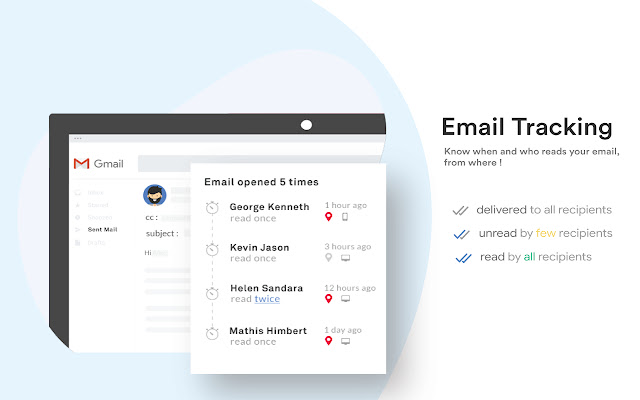

下载Blueticks扩展crx文件
下载Blueticks扩展crx格式的文件,手动将Chrome插件安装到浏览器中,也可以将crx文件分享给朋友,轻松安装Chrome插件。
扩展使用说明
                        Blueticks is the best free e-Mail tracking tool for both Gmail & GSuite.

Key features :
  - Per recipient Free Email tracking in Gmail
  - Attachment tracking
  - Link tracking
  - e-Mail Templates
  - Real-time alert notifications
  - e-Mail Performance dashboard

Who would need this ?
Anybody who wants to know when their e-Mails are read by recipients.

What per recipient tracking means ?
Blueticks tracks all individual recipients and notifies the sender in real time whenever the mail is read, attachements downloaded, links clicked.

What is send later mean ?
You can schedule your email to be sent on future date and time.
扩展基本信息
| 名称 |  Blueticks Blueticks |
| ID | nohebfplolhpgcgkkhokcfbgnnbdlaaf |
| 官方URL | https://chrome.google.com/webstore/detail/blueticks/nohebfplolhpgcgkkhokcfbgnnbdlaaf |
| 简介 | Be in the know what happens to your emails after you press send with real-time feedback when any of the recipient opens your email. |
| 文件大小 | 976 KB |
| 安装次数 | 445 |
| 当前版本 | 1.0.7 |
| 更新时间 | 2019-04-03 |
| 上架时间 | 2019-03-30 |
| 评分 | 4.00/5 共4次评分 |
| 开发者 | https://blueticks.io |
| 电子邮箱 | [email protected] |
| 付费类型 | free |
| 扩展官网 | https://blueticks.io |
| 隐私政策页面URL | https://adyog.com/privacy-policy |
| 支持的语言 | en-US |
| manifest.json | |
{
"update_url": "https:\/\/clients2.google.com\/service\/update2\/crx",
"manifest_version": 2,
"icons": {
"16": "images\/icon16.png",
"48": "images\/icon48.png",
"128": "images\/icon.png"
},
"browser_action": {
"default_icon": "images\/icon.png"
},
"background": {
"scripts": [
"js\/config.js",
"js\/background.js"
]
},
"content_scripts": [
{
"matches": [
"https:\/\/mail.google.com\/*",
"https:\/\/inbox.google.com\/*",
"https:\/\/us-central1-blueticks-v2.cloudfunctions.net\/*",
"https:\/\/maps.googleapis.com\/",
"https:\/\/blueticks.io\/*",
"https:\/\/sm.blueticks.io\/*",
"https:\/\/app.blueticks.io\/*",
"https:\/\/maps.googleapis.com\/*"
],
"js": [
"js\/inboxsdk.js",
"js\/config.js",
"js\/blueticks.js"
],
"css": [
"css\/flatpickr.min.css",
"css\/common.css"
],
"run_at": "document_start"
}
],
"permissions": [
"background",
"notifications",
"tabs",
"https:\/\/mail.google.com\/",
"https:\/\/www.inboxsdk.com\/",
"https:\/\/inbox.google.com\/",
"https:\/\/blueticks.io\/*",
"https:\/\/app.blueticks.io\/*",
"https:\/\/sm.blueticks.io\/*",
"*:\/\/us-central1-blueticks-v2.cloudfunctions.net\/*",
"https:\/\/maps.googleapis.com\/",
"https:\/\/fcm.googleapis.com\/*",
"*:\/\/*.google.com\/",
" | |