WhatCetra - Wapp Web for HubSpot
Access & Manage HubSpot users inside Wapp Web for contacts. Add notes to HubSpot users directly from Wapp
什么是WhatCetra - Wapp Web for HubSpot?
WhatCetra - Wapp Web for HubSpot是由http://www.whatcetra.com开发的Chrome扩展程序,该扩展的主要功能是“Access & Manage HubSpot users inside Wapp Web for contacts. Add notes to HubSpot users directly from Wapp”。
扩展截图
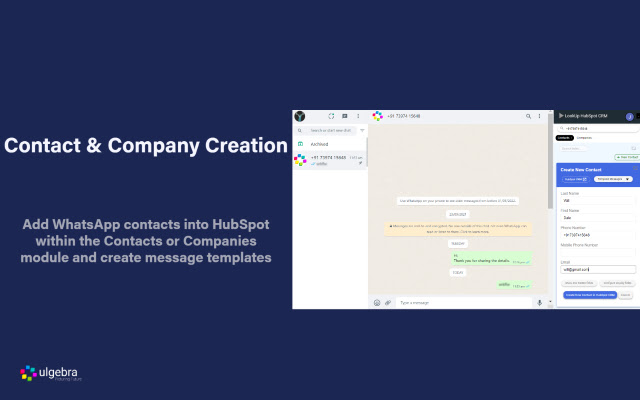


下载WhatCetra - Wapp Web for HubSpot扩展crx文件
下载WhatCetra - Wapp Web for HubSpot扩展crx格式的文件,手动将Chrome插件安装到浏览器中,也可以将crx文件分享给朋友,轻松安装Chrome插件。
扩展使用说明
                        Efficiently manage your HubSpot Contacts & Companies without leaving Wapp Web. Simplify communication with the help of the features listed below.

- Contact Creation
Add Contacts & Companies into HubSpot directly from Wapp Web and view the created contacts within HubSpot.

- Contact Search
Search for any Wapp number to view the contacts associated with the phone number.

- Contact Details
Access the details of any Wapp contact associated with HubSpot CRM.

- Field Search
Search for any HubSpot contact field and edit the fields from Wapp Web.

- Message Templates
Easily send predefined messages by creating message templates within Wapp Web. Edit or delete the template as and when required.

- Configure Displayed Fields
Customize the visible HubSpot fields through the 'Configure display fields' option.

- Access All Contact Fields
View and edit all the fields through the 'Show hidden fields' options.

- Notes
Add and view the list of notes associated with any contact.

For more information visit
https://apps.ulgebra.com/hubspot/hubspot-inside-whatsapp-web

Contact us at [email protected] in case of any assistance required.


Disclaimer:
This Chrome plugin is not endorsed or certified by WhatsApp Inc or HubSpot.
This is an unofficial enhancement tool for WhatsApp Web.

Our Extension Privacy policy:
https://ulgebra.com/privacy-policy/chrome-extensions/wa-web-zoho-crm.html
扩展基本信息
| 名称 |  WhatCetra - Wapp Web for HubSpot WhatCetra - Wapp Web for HubSpot |
| ID | oaioeafiobhcpckkockfndiekjkdklji |
| 官方URL | https://chrome.google.com/webstore/detail/whatcetra-wapp-web-for-hu/oaioeafiobhcpckkockfndiekjkdklji |
| 简介 | Access & Manage HubSpot users inside Wapp Web for contacts. Add notes to HubSpot users directly from Wapp |
| 文件大小 | 140 KB |
| 安装次数 | 576 |
| 当前版本 | 5.0 |
| 更新时间 | 2022-09-02 |
| 上架时间 | 2020-11-21 |
| 开发者 | http://www.whatcetra.com |
| 电子邮箱 | [email protected] |
| 付费类型 | free |
| 扩展官网 | https://apps.ulgebra.com/hubspot/hubspot-inside-whatsapp-web |
| 帮助页面URL | https://apps.ulgebra.com/contact |
| 隐私政策页面URL | https://apps.ulgebra.com/privacy-policy |
| 支持的语言 | en |
| manifest.json | |
{
    "update_url": "https:\/\/clients2.google.com\/service\/update2\/crx",
    "name": "WhatCetra - Wapp Web for HubSpot",
    "version": "5.0",
    "description": "Access & Manage HubSpot users inside Wapp Web for contacts. Add notes to HubSpot users directly from Wapp",
    "permissions": [
        "storage",
        "tabs",
        "unlimitedStorage",
        "https:\/\/web.whatsapp.com\/*",
        "https:\/\/app.hubspot.com\/*",
        "https:\/\/app-eu1.hubspot.com\/*"
    ],
    "options_page": "popup.html",
    "background": {
        "scripts": [
            "background.js"
        ],
        "persistent": true
    },
    "content_scripts": [
        {
            "run_at": "document_end",
            "matches": [
                "https:\/\/web.whatsapp.com\/*"
            ],
            "js": [
                "jquery.min.js",
                "contentScript.js"
            ]
        },
        {
            "run_at": "document_end",
            "matches": [
                "https:\/\/app.hubspot.com\/*",
                "https:\/\/app-eu1.hubspot.com\/*"
            ],
            "js": [
                "jquery.min.js",
                "contentScriptHubspot.js"
            ]
        }
    ],
    "content_security_policy": "script-src 'self' https:\/\/apis.google.com\/ https:\/\/www.gstatic.com\/ https:\/\/*.firebaseio.com https:\/\/www.googleapis.com; object-src 'self'",
    "externally_connectable": {
        "matches": [
            "https:\/\/ulgebra-cdn-cicd-crm-msgbrd.gitlab.io\/*",
            "https:\/\/web.whatsapp.com\/*",
            "https:\/\/app.azurna.com\/*",
            "https:\/\/app.hubspot.com\/*",
            "https:\/\/app-eu1.hubspot.com\/*",
            "https:\/\/app.whatcetra.com\/*",
            "https:\/\/sms.ulgebra.com\/*",
            "https:\/\/events.ulgebra.com\/*"
        ]
    },
    "page_action": {
        "default_popup": "popup.html",
        "default_icon": {
            "16": "images\/whatcetra-16.png",
            "32": "images\/whatcetra-32.png",
            "48": "images\/whatcetra-48.png",
            "128": "images\/whatcetra-128.png"
        }
    },
    "icons": {
        "16": "images\/whatcetra-16.png",
        "32": "images\/whatcetra-32.png",
        "48": "images\/whatcetra-48.png",
        "128": "images\/whatcetra-128.png"
    },
    "web_accessible_resources": [
        "images\/*"
    ],
    "manifest_version": 2
} | |