Svelte Slicer
Browser devtools extension for time traveling and visualizing Svelte applications.
什么是Svelte Slicer?
Svelte Slicer是由https://svelteslicer.io开发的Chrome扩展程序,该扩展的主要功能是“Browser devtools extension for time traveling and visualizing Svelte applications.”。
扩展截图

下载Svelte Slicer扩展crx文件
下载Svelte Slicer扩展crx格式的文件,手动将Chrome插件安装到浏览器中,也可以将crx文件分享给朋友,轻松安装Chrome插件。
扩展使用说明
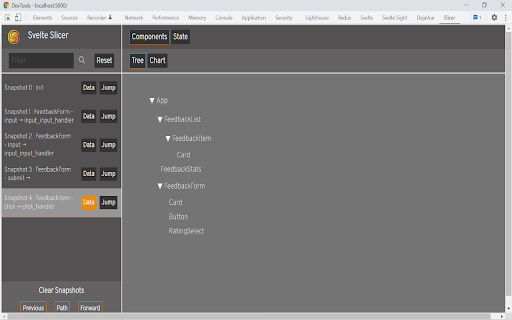
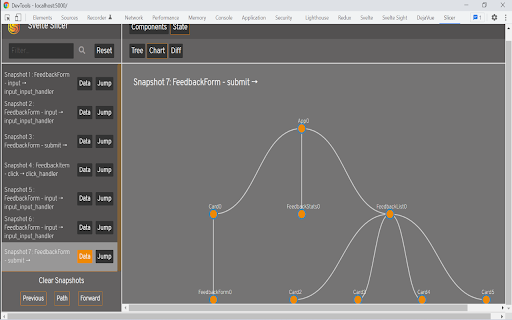
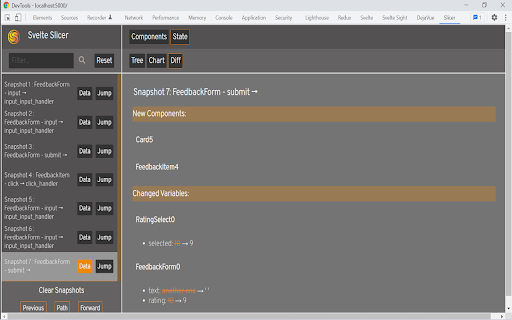
                        Svelte Slicer is an open-source Chrome Developer Tool that allows the user to view and traverse graphical and textual representations throughout its lifecycle, helping developers to more efficiently identify state-related bugs.

Key Features Include:
-Visualization of component relationships
-Moment-by-moment tracking of state variables
-Snapshot diffing to identify specific state changes
-Dynamic time travel through past state snapshots

To read more on Svelte Slicer, head over to our article on Medium.com at:

https://svelteslicer.medium.com/svelte-slicer-df5263a8e76f

Svelte Slicer is currently a work in progress and undergoing continual improvements. Please feel free to contribute at https://github.com/oslabs-beta/SvelteSlicer or contact one of our authors listed on GitHub.
扩展基本信息
| 名称 |  Svelte Slicer Svelte Slicer |
| ID | ohimeoplnpnoeapbnmgeddijpfobbijl |
| 官方URL | https://chromewebstore.google.com/detail/svelte-slicer/ohimeoplnpnoeapbnmgeddijpfobbijl |
| 简介 | Browser devtools extension for time traveling and visualizing Svelte applications. |
| 文件大小 | 213 KB |
| 安装次数 | 143 |
| 当前版本 | 0.0.0.1 |
| 更新时间 | 2022-02-18 |
| 上架时间 | 2022-02-17 |
| 开发者 | https://svelteslicer.io |
| 电子邮箱 | [email protected] |
| 付费类型 | free |
| 支持的语言 | en-US |
| manifest.json | |
{
    "update_url": "https:\/\/clients2.google.com\/service\/update2\/crx",
    "manifest_version": 3,
    "name": "Svelte Slicer",
    "version": "0.0.0.1",
    "minimum_chrome_version": "88",
    "description": "Browser devtools extension for time traveling and visualizing Svelte applications.",
    "devtools_page": "devtools\/index.html",
    "background": {
        "service_worker": "devtools\/background.js"
    },
    "content_scripts": [
        {
            "matches": [
                "*:\/\/localhost\/*"
            ],
            "js": [
                "devtools\/listener.js"
            ],
            "run_at": "document_start"
        }
    ],
    "action": {
        "default_icon": {
            "16": "devtools\/public\/images\/icon16.png",
            "128": "devtools\/public\/images\/icon128.png"
        }
    },
    "icons": {
        "16": "devtools\/public\/images\/icon16.png",
        "128": "devtools\/public\/images\/icon128.png"
    }
} | |