Multiple File Download
This extension enables the user to select all the documents present in the web page for download.
什么是Multiple File Download?
Multiple File Download是由prabhushan开发的Chrome扩展程序,该扩展的主要功能是“This extension enables the user to select all the documents present in the web page for download.”。
扩展截图

下载Multiple File Download扩展crx文件
下载Multiple File Download扩展crx格式的文件,手动将Chrome插件安装到浏览器中,也可以将crx文件分享给朋友,轻松安装Chrome插件。
扩展使用说明
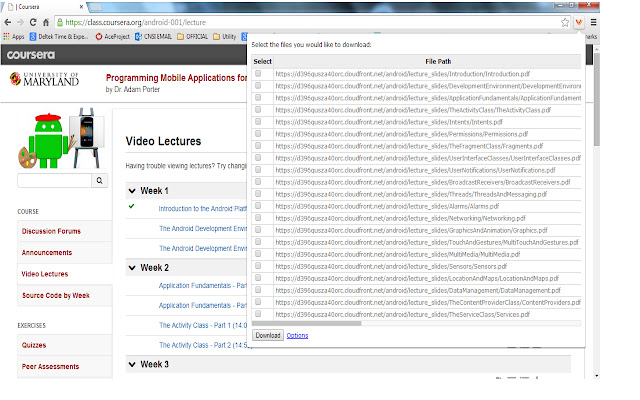
                        Many times we encounter situations where multiple files need to be downloaded from a web page. For example, user can download all the files in Coursera lessons in one shot. This would save lot of time.

Multiple file downloader facilitates the same. It scans through the web page and displays all the files, which user can download. User can select multiple files and click download.
It allows user to customize what file extensions should be downloaded in the web page.The user can also add custom extensions using the options page. User can also decide whether files need to be downloaded to default folder set in Chrome browser or prompt for each file.
BENEFITS FOR END USERS
1) Multi Select files in one go
2) Customise and also add your own extensions to download
KNOWN ISSUE
The extension scans for hyperlink across the web page. As per the design of the page, the hyperlink can be a button or image or both. So there are chances that duplicate links can appear on the extension.
扩展基本信息
| 名称 |  Multiple File Download Multiple File Download |
| ID | opncjdadngnekakilfcgjlgbmekljdbm |
| 官方URL | https://chrome.google.com/webstore/detail/multiple-file-download/opncjdadngnekakilfcgjlgbmekljdbm |
| 简介 | This extension enables the user to select all the documents present in the web page for download. |
| 文件大小 | 154 KB |
| 安装次数 | 10,000 |
| 当前版本 | 1.3 |
| 更新时间 | 2014-09-09 |
| 上架时间 | 2014-09-09 |
| 评分 | 2.56/5 共55次评分 |
| 开发者 | prabhushan |
| 付费类型 | free |
| 支持的语言 | en-US |
| manifest.json | |
{
"update_url": "https:\/\/clients2.google.com\/service\/update2\/crx",
"manifest_version": 2,
"name": "Multiple File Download",
"description": "This extension enables the user to select all the documents present in the web page for download. ",
"short_name": "File download",
"version": "1.3",
"background": {
"page": "popup.html"
},
"icons": {
"16": "sonicdownload.png",
"48": "sonicdownload.png",
"128": "sonicdownload.png"
},
"permissions": [
"tabs",
" | |