AnyLink
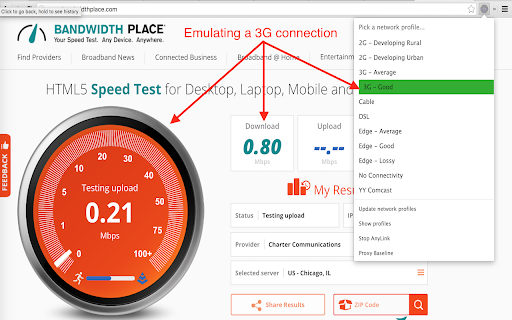
AnyLink lets you emulate your network experience through a set of different profiles.
什么是AnyLink?
AnyLink是由AnyLink开发的Chrome扩展程序,该扩展的主要功能是“AnyLink lets you emulate your network experience through a set of different profiles.”。
扩展截图
下载AnyLink扩展crx文件
下载AnyLink扩展crx格式的文件,手动将Chrome插件安装到浏览器中,也可以将crx文件分享给朋友,轻松安装Chrome插件。
扩展使用说明
                        AnyLink is a cloud-based emulation service. You can emulate web browsing in various conditions by forwarding your traffic through different network links (e.g. a 3G connection, or a DSL connection). AnyLink uses Facebook's Augmented Traffic Control to emulate links, and network cookies to express which link to use.

More information can be found at http://anylink.stanford.edu .
Currently under development. Please report bugs and feature requests.
扩展基本信息
| 名称 |  AnyLink AnyLink |
| ID | pecadkopongafgmgphnmohaoenbglilk |
| 官方URL | https://chromewebstore.google.com/detail/anylink/pecadkopongafgmgphnmohaoenbglilk |
| 简介 | AnyLink lets you emulate your network experience through a set of different profiles. |
| 文件大小 | 708 KB |
| 安装次数 | 44 |
| 当前版本 | 0.0.15 |
| 更新时间 | 2016-08-09 |
| 上架时间 | 2016-08-09 |
| 评分 | 2.00/5 共1次评分 |
| 开发者 | AnyLink |
| 付费类型 | free |
| 扩展官网 | http://anylink.stanford.edu |
| 支持的语言 | en-US |
| manifest.json | |
{
"update_url": "https:\/\/clients2.google.com\/service\/update2\/crx",
"name": "AnyLink",
"version": "0.0.15",
"manifest_version": 2,
"short_name": "Network Emulation",
"icons": {
"16": "img\/icon16.png",
"48": "img\/icon48.png",
"128": "img\/icon128.png"
},
"description": "AnyLink lets you emulate your network experience through a set of different profiles.",
"browser_action": {
"default_title": "AnyLink: Network Emulation Service",
"default_popup": "popup_menu.html"
},
"permissions": [
" | |