QuizCheck
This extension helps increase efficiency of checking answers on your online open-notes homework
什么是QuizCheck?
QuizCheck是由quiz-check开发的Chrome扩展程序,该扩展的主要功能是“This extension helps increase efficiency of checking answers on your online open-notes homework”。
扩展截图



下载QuizCheck扩展crx文件
下载QuizCheck扩展crx格式的文件,手动将Chrome插件安装到浏览器中,也可以将crx文件分享给朋友,轻松安装Chrome插件。
扩展使用说明
                        🚨Save time and stop losing unnecessary points on homework assignments

📚 You will find that you no longer need to flip back through your notes or through the assignment chapter to find or double-check your answers.

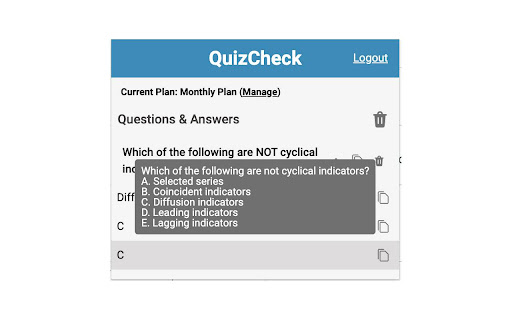
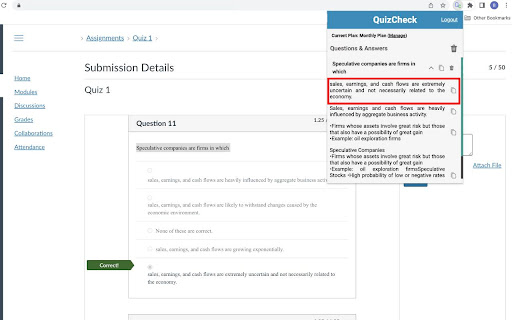
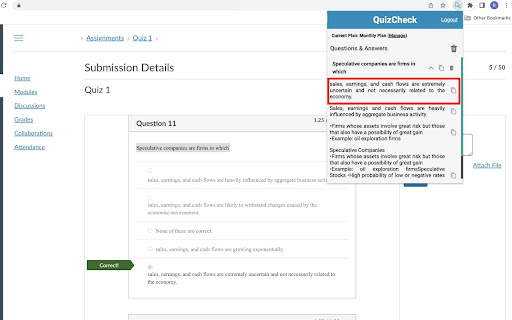
✔️ Simply highlight the question with your mouse, right click and click “Search with QuizCheck” wait a couple seconds and click the pinned icon in the top right of Google Chrome and the answer will be right there, as simple as that!

➡️ You may have to complete a captcha from time to time but this is completely normal and takes a minimal amount of time.

❗ Works on both mac and PC
扩展基本信息
| 名称 |  QuizCheck QuizCheck |
| ID | phdnednhiaokcioenfnmfnbkkpnamppp |
| 官方URL | https://chromewebstore.google.com/detail/quizcheck/phdnednhiaokcioenfnmfnbkkpnamppp |
| 简介 | This extension helps increase efficiency of checking answers on your online open-notes homework |
| 文件大小 | 252 KB |
| 安装次数 | 537 |
| 当前版本 | 1.2.0 |
| 更新时间 | 2023-05-31 |
| 上架时间 | 2022-12-08 |
| 评分 | 5.00/5 共16次评分 |
| 开发者 | quiz-check |
| 电子邮箱 | [email protected] |
| 付费类型 | in_app |
| 支持的语言 | en |
| manifest.json | |
{
    "update_url": "https:\/\/clients2.google.com\/service\/update2\/crx",
    "name": "__MSG_appName__",
    "short_name": "__MSG_appShortName__",
    "description": "__MSG_appDescription__",
    "version": "1.2.0",
    "manifest_version": 3,
    "default_locale": "en",
    "minimum_chrome_version": "88",
    "icons": {
        "128": "assets\/img\/128.png"
    },
    "background": {
        "service_worker": "background.js"
    },
    "action": {
        "default_icon": {
            "128": "assets\/img\/128.png"
        },
        "default_title": "__MSG_appName__",
        "default_popup": "popup.html"
    },
    "permissions": [
        "storage",
        "contextMenus",
        "tabs",
        "identity"
    ],
    "host_permissions": [
        "*:\/\/*.google.com\/*",
        "*:\/\/*.quizlet.com\/*"
    ],
    "oauth2": {
        "client_id": "701243410138-ugoh6h5fpvhs18hhkh3po8aude4g75mr.apps.googleusercontent.com",
        "scopes": [
            "https:\/\/www.googleapis.com\/auth\/userinfo.email",
            "https:\/\/www.googleapis.com\/auth\/userinfo.profile"
        ]
    }
} | |