Scraper.AI - An AI powered web scraper
Scraping data from the web is hard. We can automate extracting data from websites for you!
什麼是Scraper.AI - An AI powered web scraper?
Scraper.AI - An AI powered web scraper是由http://scraper.ai開發的Chrome擴展程式,該擴展的主要功能是“Scraping data from the web is hard. We can automate extracting data from websites for you!”。
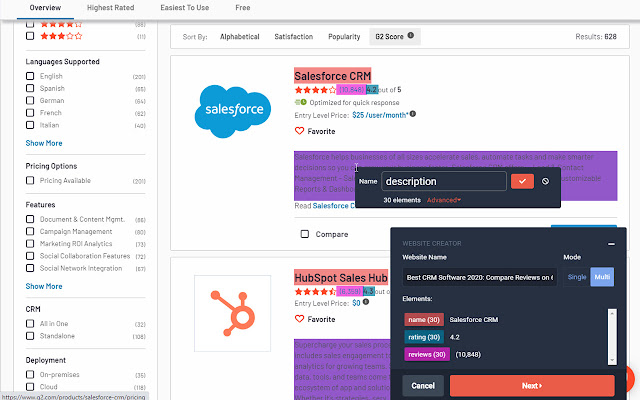
擴展截圖



下載Scraper.AI - An AI powered web scraper擴展crx文件
下載Scraper.AI - An AI powered web scraper擴展crx格式的文件,手動將Chrome擴充功能安裝到瀏覽器中,也可以將crx文件分享給朋友,輕鬆安裝Chrome擴充功能。
擴展使用說明
                        Scraper.AI is a data scraper that allows you to scrape any content from any website. It's a complementary extension to the Scraper.AI SaaS offering where we automate website data extraction for you.

🏷️ Use cases:

- Dataset Creation
  Create your own dataset in just minutes and enjoy an automatically updating dataset by selecting the data you want.

- New Published Articles
  Stay up-to-date with the latest news, get the latest articles delivered to your application instantly through webhooks.

- Stocks and Crypto Monitoring
  Stocks and crypto are changing a fast rhytm, monitor the changes that matter for you and act on them!

- Changelog Automation
  Automatically collect the latest changes, so that we do the repetitive work of collecting them manually for you!

- Sales Lead Generation
  Generating sales leads can be cumbersome and repetitive, now it can be done in a more automated way!

- Price Monitoring
  Stay on top of the competition and monitor your competitors prices. Don't let your customers go to a cheaper alternative

- view more at https://blog.scraper.ai/

😃 Features:

- Select element, Scraper.AI will take care of selecting all similar elements in one go
- Element Highlighting
- Tag your elements for an easy overview
- Get notified when an update to your data is available
- Scrape multiple pages
- Export to CSV, Excel or JSON
- Automatic pagination detection

💪 Getting started:

Getting started is easy, register for an account at https://scraper.ai/
Afterwards log in to this extension and start selecting the elements you want to extract. Scraper.AI will take care of the rest and update you whenever updated information is available.

⚡ Updates:

Oct, 2020

- Refine selector algorithms
- Add support for recipes, from now on recipes will be recommended for sites that support it, speeding up selections and ensuring reliability for those sites.

For more changelog information, please visit https://scraper.ai/extension/updated?v=1.0.0

❓ Help:

We have a variety of articles and video's to help you get started in no time

- https://blog.scraper.ai/
- https://youtu.be/NxCuC5b9VS4
- https://youtu.be/DBT3gCQZ3Z4
- https://youtu.be/XeiBqRgoToQ

Uninstall:

1. Click on the icon given in the upper right-hand side of your Chrome browser.
2. Go to the “settings”.
3. Click on “extensions”.
4. Find the extension that you want to uninstall.
5. Click on the trash can icon to the right of “enable”, when you find the extension you want to remove.
6. The extension is removed.

Requests/Feedback:

We listen to you! Let us know what you want next in the feedback!

privacy policy: https://scraper.ai/privacy-extension
擴展基本資訊
| 名稱 |  Scraper.AI - An AI powered web scraper Scraper.AI - An AI powered web scraper |
| ID | acffgfiikphcopeiadpdmlpageboncak |
| 官方網址 | https://chrome.google.com/webstore/detail/scraperai-an-ai-powered-w/acffgfiikphcopeiadpdmlpageboncak |
| 簡介 | Scraping data from the web is hard. We can automate extracting data from websites for you! |
| 檔案大小 | 279 KB |
| 安裝次數 | 3,018 |
| 目前版本 | 1.2.1 |
| 更新時間 | 2021-01-20 |
| 上架時間 | 2020-07-04 |
| 評分 | 3.00/5 共 9 次評分 |
| 開發者 | http://scraper.ai |
| 電子郵箱 | [email protected] |
| 付費類型 | free |
| 擴展官網 | https://scraper.ai |
| 說明頁面URL | https://scraper.ai |
| 隱私政策頁面URL | https://scraper.ai/privacy-extension |
| 支援的語言 | en,nl,es |
| manifest.json | |
{
"update_url": "https:\/\/clients2.google.com\/service\/update2\/crx",
"version": "1.2.1",
"name": "__MSG_appName__",
"description": "__MSG_appDesc__",
"default_locale": "en",
"options_page": "options.html",
"background": {
"page": "background.html"
},
"browser_action": {
"default_popup": "popup.html",
"default_icon": "128.png"
},
"icons": {
"128": "128.png"
},
"manifest_version": 2,
"permissions": [
"notifications",
"activeTab",
"cookies",
"storage",
" | |