Browse LinkedIn in Dark Theme
This extension implements dark theme for LinkedIn
什麼是Browse LinkedIn in Dark Theme?
Browse LinkedIn in Dark Theme是由appsbay開發的Chrome擴展程式,該擴展的主要功能是“This extension implements dark theme for LinkedIn”。
擴展截圖
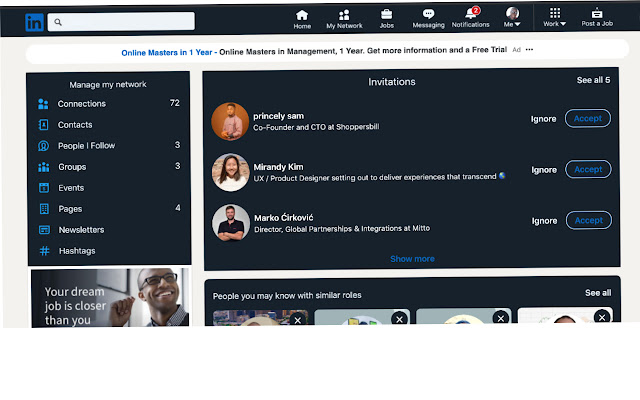
下載Browse LinkedIn in Dark Theme擴展crx文件
下載Browse LinkedIn in Dark Theme擴展crx格式的文件,手動將Chrome擴充功能安裝到瀏覽器中,也可以將crx文件分享給朋友,輕鬆安裝Chrome擴充功能。
擴展使用說明
                        Have you always squinted your eyes whenever you browse through Linkedin?
Have you always wished there is a way to enable a dark mode for your Linkedin page?
Well, worry no more!
With this extension, you can begin to consume your Linkedin in dark mode...you can even toggle it on and off.
Now, we know that all it takes for this extension to break down is if the Linkedin team decided to change the structure of their front-end code.
They can.
And this is why the extension installed a toggle button in the first place.
In case a page is broken, just toggle it off and notify the developer.
He promise to fix it asap.

Why, you can even tinker with the css/js code here and submit a pull request:

https://github.com/wtoalabi/dark_link

This is a labour of love.

Enjoy and give a thumbs up.
擴展基本資訊
| 名稱 |  Browse LinkedIn in Dark Theme Browse LinkedIn in Dark Theme |
| ID | akekijglinhhpimighhmmbhkkleffcdn |
| 官方網址 | https://chrome.google.com/webstore/detail/browse-linkedin-in-dark-t/akekijglinhhpimighhmmbhkkleffcdn |
| 簡介 | This extension implements dark theme for LinkedIn |
| 檔案大小 | 271 KB |
| 安裝次數 | 790 |
| 目前版本 | 0.0.3 |
| 更新時間 | 2020-11-26 |
| 上架時間 | 2020-11-26 |
| 評分 | 3.33/5 共 6 次評分 |
| 開發者 | appsbay |
| 電子郵箱 | [email protected] |
| 付費類型 | free |
| 支援的語言 | en-US |
| manifest.json | |
{
    "update_url": "https:\/\/clients2.google.com\/service\/update2\/crx",
    "manifest_version": 2,
    "name": "Browse LinkedIn in Dark Theme",
    "description": "This extension implements dark theme for LinkedIn",
    "version": "0.0.3",
    "web_accessible_resources": [
        "src\/assets\/images\/*"
    ],
    "browser_action": {
        "default_icon": "src\/assets\/images\/icon.png"
    },
    "icons": {
        "16": "src\/assets\/images\/icon16.png",
        "48": "src\/assets\/images\/icon48.png",
        "128": "src\/assets\/images\/icon128.png"
    },
    "content_scripts": [
        {
            "css": [
                "src\/assets\/app.css"
            ],
            "js": [
                "src\/assets\/app.js"
            ],
            "matches": [
                "https:\/\/www.linkedin.com\/*"
            ]
        }
    ]
} | |