Browser Clipboard
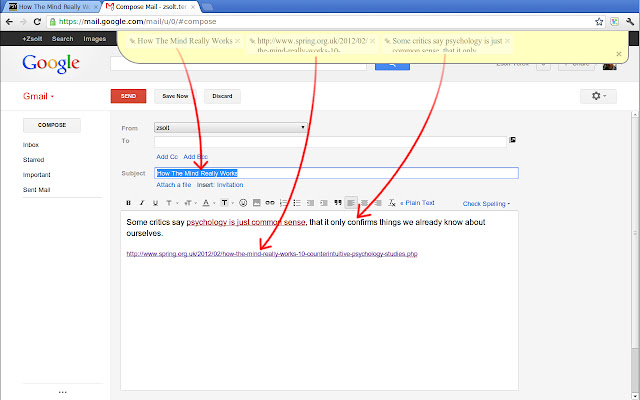
Browser Clipboard makes copy/paste easy by providing a panel that can hold multiple items.
什麼是Browser Clipboard?
Browser Clipboard是由Zsolt Terek (Google)開發的Chrome擴展程式,該擴展的主要功能是“Browser Clipboard makes copy/paste easy by providing a panel that can hold multiple items.”。
擴展截圖

下載Browser Clipboard擴展crx文件
下載Browser Clipboard擴展crx格式的文件,手動將Chrome擴充功能安裝到瀏覽器中,也可以將crx文件分享給朋友,輕鬆安裝Chrome擴充功能。
擴展使用說明
                        1. Select some text or pick an image and start dragging. Browser Clipboard will appear and the items can be dropped on it.

2. Now you can go to any other page and drag the copied items from the Browser Clipboard into the elements of the page.

Instead of dragging, the selection or an image/link can also be copied to the Browser Clipboard using the context menu.

Text items can be edited by double-clicking on them. Double-clicking on the Browser Clipboard creates a new item.

If you need to copy the same item multiple times, you can make it sticky using the pin icon. Sticky items are not automatically removed from the Browser Clipboard when being dragged off.

Any data copied to the Browser Clipboard is stored only in your browser's memory, on your local machine. Once an item is removed from the Browser Clipboard, or the browser is closed, the data is automatically deleted and there is no way to restore it.

Do not use Browser Clipboard for storing sensitive data (passwords, credit card numbers). Since the Browser Clipboard is technically injected into the webpages you visit, those might be able access the data without being drag'n'dropped.

This extension was developed by a Google engineer in 20% time. It is not an official Google extension.
擴展基本資訊
| 名稱 |  Browser Clipboard Browser Clipboard |
| ID | bkghojmamekkhbgcjmegbmnfclpfihem |
| 官方網址 | https://chrome.google.com/webstore/detail/browser-clipboard/bkghojmamekkhbgcjmegbmnfclpfihem |
| 簡介 | Browser Clipboard makes copy/paste easy by providing a panel that can hold multiple items. |
| 檔案大小 | 360 KB |
| 安裝次數 | 10,000 |
| 目前版本 | 1.0.15 |
| 更新時間 | 2014-01-20 |
| 上架時間 | 2014-01-20 |
| 評分 | 2.88/5 共 178 次評分 |
| 開發者 | Zsolt Terek (Google) |
| 付費類型 | free |
| 支援的語言 | en |
| manifest.json | |
{
    "update_url": "http:\/\/clients2.google.com\/service\/update2\/crx",
    "manifest_version": 2,
    "name": "Browser Clipboard",
    "version": "1.0.15",
    "description": "__MSG_DROPBAR_DESCRIPTION__",
    "default_locale": "en",
    "permissions": [
        "contextMenus",
        "tabs",
        "http:\/\/*\/*",
        "https:\/\/*\/*"
    ],
    "icons": {
        "16": "icon-16.png",
        "48": "icon-48.png",
        "128": "icon-128.png"
    },
    "background": {
        "scripts": [
            "background-compiled.js"
        ]
    },
    "browser_action": {
        "default_icon": "icon-16.png",
        "default_title": "__MSG_SHOW_HIDE_DROPBAR__"
    },
    "content_scripts": [
        {
            "js": [
                "content-script-compiled.js"
            ],
            "css": [
                "browser-clipboard.css"
            ],
            "matches": [
                "http:\/\/*\/*",
                "https:\/\/*\/*"
            ],
            "run_at": "document_end"
        }
    ],
    "web_accessible_resources": [
        "pin0.png",
        "pin0_p.png",
        "pin1.png",
        "pin1_p.png",
        "close.png",
        "close_p.png"
    ],
    "options_page": "options.html"
} | |