Gmail & Office 365 Plugin for VTiger
VTExperts the most trusted Extension developer for VTiger. Gmail & Office 365 Plugin for VTiger (Corrensa).
什麼是Gmail & Office 365 Plugin for VTiger?
Gmail & Office 365 Plugin for VTiger是由offered by https://www.vtexperts.com開發的Chrome擴展程式,該擴展的主要功能是“VTExperts the most trusted Extension developer for VTiger. Gmail & Office 365 Plugin for VTiger (Corrensa).”。
擴展截圖
下載Gmail & Office 365 Plugin for VTiger擴展crx文件
下載Gmail & Office 365 Plugin for VTiger擴展crx格式的文件,手動將Chrome擴充功能安裝到瀏覽器中,也可以將crx文件分享給朋友,輕鬆安裝Chrome擴充功能。
擴展使用說明
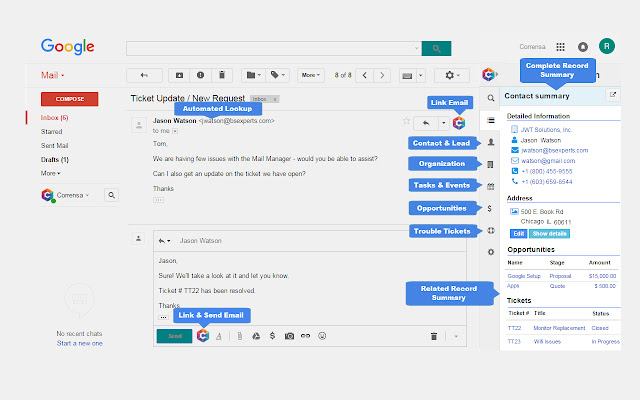
                        Corrensa is an extension integrating vTiger Open Source & Gmail/Outlook It enables users to view, create and update vTiger records without leaving their email(Gmail/Outlook).

Features:

- Create/Edit/View VTiger records from your email
- Advanced Email Linking
- Email Tracking
- Attach & Save email attachments as documents in VTiger
- Add Comments & Updates to any VTiger record
- View Invoices/Quotes/Orders right from your email
- Search your vtiger database


To get started go to our website: https://www.corrensa.com

Thanks!
擴展基本資訊
| 名稱 |  Gmail & Office 365 Plugin for VTiger Gmail & Office 365 Plugin for VTiger |
| ID | cjflincdpnkojalcgfemcddkbclfoiff |
| 官方網址 | https://chrome.google.com/webstore/detail/gmail-office-365-plugin-f/cjflincdpnkojalcgfemcddkbclfoiff |
| 簡介 | VTExperts the most trusted Extension developer for VTiger. Gmail & Office 365 Plugin for VTiger (Corrensa). |
| 檔案大小 | 27.4 KB |
| 安裝次數 | 593 |
| 目前版本 | 2.3 |
| 更新時間 | 2018-02-05 |
| 上架時間 | 2018-02-05 |
| 評分 | 4.63/5 共 24 次評分 |
| 開發者 | offered by https://www.vtexperts.com |
| 電子郵箱 | [email protected] |
| 付費類型 | free |
| 擴展官網 | http://www.corrensa.com |
| 說明頁面URL | http://www.corrensa.com/faq/ |
| 支援的語言 | en |
| manifest.json | |
{
    "update_url": "https:\/\/clients2.google.com\/service\/update2\/crx",
    "manifest_version": 2,
    "name": "Gmail & Office 365 Plugin for VTiger",
    "short_name": "Corrensa",
    "description": "VTExperts the most trusted Extension developer for VTiger. Gmail & Office 365 Plugin for VTiger (Corrensa).",
    "version": "2.3",
    "permissions": [
        "tabs",
        "storage",
        "http:\/\/*\/",
        "https:\/\/*\/"
    ],
    "background": {
        "scripts": [
            "js\/utils.js",
            "js\/startup.js"
        ],
        "persistent": false
    },
    "icons": {
        "16": "icons\/16.png",
        "48": "icons\/48.png",
        "128": "icons\/128.png"
    },
    "content_scripts": [
        {
            "matches": [
                "*:\/\/mail.google.com\/*",
                "*:\/\/outlook.office.com\/*",
                "*:\/\/outlook.office365.com\/*"
            ],
            "js": [
                "js\/contentscript.js"
            ],
            "css": []
        }
    ],
    "web_accessible_resources": [
        "*"
    ]
} | |