Messenger Preview
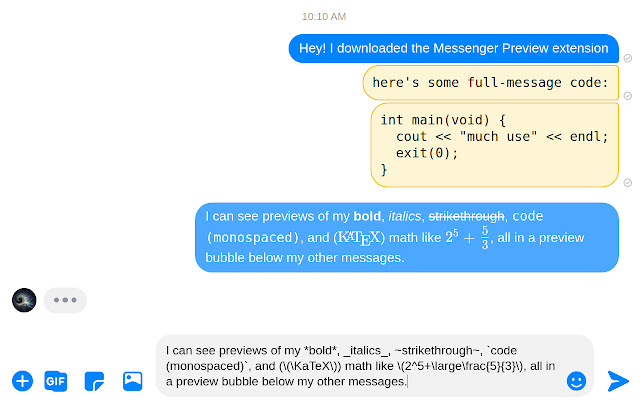
Preview the appearance of messages sent in Facebook Messenger. Know how bold, italics, strikethrough, code, and math will appear.
什麼是Messenger Preview?
Messenger Preview是由Jared Hughes開發的Chrome擴展程式,該擴展的主要功能是“Preview the appearance of messages sent in Facebook Messenger. Know how bold, italics, strikethrough, code, and math will appear.”。
擴展截圖
下載Messenger Preview擴展crx文件
下載Messenger Preview擴展crx格式的文件,手動將Chrome擴充功能安裝到瀏覽器中,也可以將crx文件分享給朋友,輕鬆安裝Chrome擴充功能。
擴展使用說明
▶ Update:
This extension no longer works as of December 16th, 2020. Messenger made extensive changes to their user interface, including disabling KaTeX. Since the KaTeX preview was my main motivation for making this, I have no intentions to fix this extension.
However, the number of users has tripled (~30 to 100) since it broke, so I'm leaving this published on the off-chance that it still works for some people.
————————————————————————
————————————————————————
Messenger has many different formatting options, such as bold, italics, strikethrough, monospaced code, and math formatting through KaTeX (a subset of LaTeX). It can be hard to know what a message will look like without sending it once, so this extension shows a preview of how each message will appear before you send it.
Note: the formatting only renders properly on web Messenger. Mobile Messenger does not show any of the formatting.
All previews are performed client-side. None of your information is sent to any third-party server.
See https://www.facebook.com/help/147348452522644 for details on formatting text.
Supported functions in the LaTeX math formatting are at https://www.facebook.com/help/147348452522644.
▶ Usage
Write messages as normal. As you type, you should see a light message appear about where it will appear when you send the message (when it actually sends, your message might attach to the group above it). Sometimes, the preview is a bit hidden, requiring you to scroll down within the chat.
Warning: Sometimes the preview does not show at first. Reload the messenger page once, and it should appear at least until you open another conversation. Reloading the page does *not* delete the contents of the message box.
As usual in Messenger chats, write
• *bold*
• _italics_
• ~strikethrough~
• \( 擴展基本資訊
| 名稱 |  Messenger Preview Messenger Preview |
| ID | cpimjhhigdjabaeklhlehfaghfeacibn |
| 官方網址 | https://chrome.google.com/webstore/detail/messenger-preview/cpimjhhigdjabaeklhlehfaghfeacibn |
| 簡介 | Preview the appearance of messages sent in Facebook Messenger. Know how bold, italics, strikethrough, code, and math will appear. |
| 檔案大小 | 12.63 KB |
| 安裝次數 | 126 |
| 目前版本 | 0.1 |
| 更新時間 | 2021-04-02 |
| 上架時間 | 2019-12-24 |
| 評分 | 5.00/5 共 3 次評分 |
| 開發者 | Jared Hughes |
| 電子郵箱 | [email protected] |
| 付費類型 | free |
| 支援的語言 | en |
| manifest.json | |
{
    "update_url": "https:\/\/clients2.google.com\/service\/update2\/crx",
    "name": "Messenger Preview",
    "version": "0.1",
    "description": "Preview the appearance of messages sent in Facebook Messenger. Know how bold, italics, strikethrough, code, and math will appear.",
    "permissions": [
        "*:\/\/www.messenger.com\/**",
        "*:\/\/www.facebook.com\/messages\/**"
    ],
    "icons": {
        "128": "images\/icon128.png"
    },
    "content_scripts": [
        {
            "matches": [
                "*:\/\/www.messenger.com\/t\/*",
                "*:\/\/www.facebook.com\/messages\/**"
            ],
            "js": [
                "content.js"
            ]
        }
    ],
    "web_accessible_resources": [
        "script.js"
    ],
    "manifest_version": 2
} | |