Salesforce OmniLogin
Free and Open Source extension for store and manage Salesforce logins using OAuth2.
什麼是Salesforce OmniLogin?
Salesforce OmniLogin是由Javier Martínez de Pissón Caruncho開發的Chrome擴展程式,該擴展的主要功能是“Free and Open Source extension for store and manage Salesforce logins using OAuth2.”。
擴展截圖
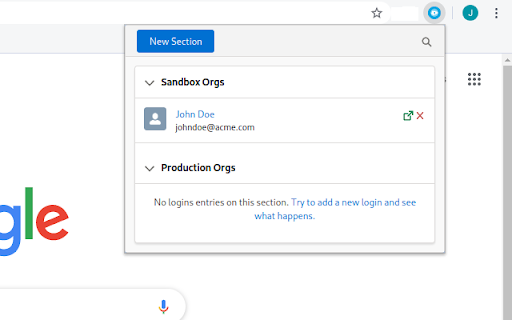
下載Salesforce OmniLogin擴展crx文件
下載Salesforce OmniLogin擴展crx格式的文件,手動將Chrome擴充功能安裝到瀏覽器中,也可以將crx文件分享給朋友,輕鬆安裝Chrome擴充功能。
擴展使用說明
                        Salesforce OmniLogin provides Salesforce admins and developers a tool to manage accesses to their orgs using standard OAuth2, avoiding the use of passwords to login in Salesforce - you only have to enter its username/password once!

All your usernames are foldered in sections, keeping your orgs always organized and filterable; by using the Salesforce OAuth2 flow, you or your admin can revoke the access from the extension at any time, securing all your accesses.

Salesforce OmniLogin is written using Open Source Lightning Web Components, as a proof of concept to test LWC Framework outside Salesforce Platform or the more frequent "Web app" context - as this was the original idea, the extension is Free and Open Source. You can browse the code in GitHub.

Keep in mind that the extension is still experimental - don't use it in production environments!
擴展基本資訊
| 名稱 |  Salesforce OmniLogin Salesforce OmniLogin |
| ID | daknjjebdbcihmlfifnaflconldlhhpl |
| 官方網址 | https://chromewebstore.google.com/detail/salesforce-omnilogin/daknjjebdbcihmlfifnaflconldlhhpl |
| 簡介 | Free and Open Source extension for store and manage Salesforce logins using OAuth2. |
| 檔案大小 | 291 KB |
| 安裝次數 | 95 |
| 目前版本 | 0.7.4 |
| 更新時間 | 2020-06-20 |
| 上架時間 | 2020-06-19 |
| 評分 | 5.00/5 共 1 次評分 |
| 開發者 | Javier Martínez de Pissón Caruncho |
| 電子郵箱 | [email protected] |
| 付費類型 | free |
| 支援的語言 | en |
| manifest.json | |
{
    "update_url": "https:\/\/clients2.google.com\/service\/update2\/crx",
    "name": "Salesforce OmniLogin",
    "version": "0.7.4",
    "description": "Free and Open Source extension for store and manage Salesforce logins using OAuth2.",
    "permissions": [
        "storage",
        "identity",
        "https:\/\/login.salesforce.com\/services\/oauth2\/*",
        "https:\/\/test.salesforce.com\/services\/oauth2\/*",
        "https:\/\/*.my.salesforce.com\/services\/oauth2\/*",
        "https:\/\/*.force.com\/*\/services\/oauth2\/*",
        "https:\/\/*.salesforce.com\/services\/oauth2\/*"
    ],
    "icons": {
        "32": "icons\/32.png",
        "128": "icons\/128.png"
    },
    "background": {
        "scripts": [
            "background.js"
        ],
        "persistent": false
    },
    "browser_action": {
        "default_title": "Salesforce OmniLogin",
        "default_popup": "index.html"
    },
    "manifest_version": 2
} | |