Ocean HD Wallpapers Underwater New Tab Theme
For fans of nature, ocean & underwater. Install to get new ocean wallpaper in every new tab
什麼是Ocean HD Wallpapers Underwater New Tab Theme?
Ocean HD Wallpapers Underwater New Tab Theme是由https://alfawallpapers.com開發的Chrome擴展程式,該擴展的主要功能是“For fans of nature, ocean & underwater. Install to get new ocean wallpaper in every new tab”。
擴展截圖
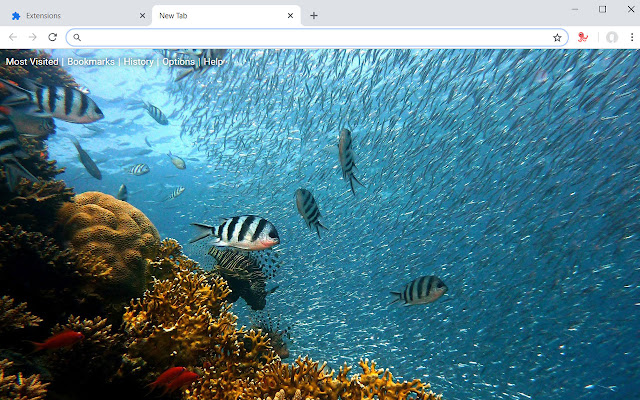


下載Ocean HD Wallpapers Underwater New Tab Theme擴展crx文件
下載Ocean HD Wallpapers Underwater New Tab Theme擴展crx格式的文件,手動將Chrome擴充功能安裝到瀏覽器中,也可以將crx文件分享給朋友,輕鬆安裝Chrome擴充功能。
擴展使用說明
                        Enjoy a wide variety of beautiful wallpapers of jellyfish, coral, clownfish, sea turtles and more underwater life with every new tab.

*Features*
- Great selection of hand picked HD wallpapers of octopus, starfish, seahorse and other marine creatures
- Links to most visited, bookmarks, history and more
- Randomly selected ocean underwater background for each new tab.
- Clean and simple interface, no distracting elements
- Works offline (no internet required, images are served locally)

For more wallpapers and new tab themes visit our homepage https://alfawallpapers.com/
擴展基本資訊
| 名稱 |  Ocean HD Wallpapers Underwater New Tab Theme Ocean HD Wallpapers Underwater New Tab Theme |
| ID | ddlljdkiadbdkmfoocnmbbgghmoaibee |
| 官方網址 | https://chrome.google.com/webstore/detail/ocean-hd-wallpapers-under/ddlljdkiadbdkmfoocnmbbgghmoaibee |
| 簡介 | For fans of nature, ocean & underwater. Install to get new ocean wallpaper in every new tab |
| 檔案大小 | 15.15 MB |
| 安裝次數 | 102 |
| 目前版本 | 1.1.0.0 |
| 更新時間 | 2018-12-08 |
| 上架時間 | 2018-12-08 |
| 評分 | 5.00/5 共 1 次評分 |
| 開發者 | https://alfawallpapers.com |
| 電子郵箱 | [email protected] |
| 付費類型 | free |
| 擴展官網 | https://alfawallpapers.com/ocean-hd-wallpapers-underwater-new-tab-theme/ |
| 隱私政策頁面URL | https://alfawallpapers.com/privacy |
| 支援的語言 | en |
| manifest.json | |
{
    "update_url": "https:\/\/clients2.google.com\/service\/update2\/crx",
    "default_locale": "en",
    "name": "__MSG_name__",
    "description": "__MSG_description__",
    "version": "1.1.0.0",
    "manifest_version": 2,
    "homepage_url": "https:\/\/alfawallpapers.com\/",
    "icons": {
        "16": "24.png",
        "48": "48.png",
        "128": "128.png"
    },
    "permissions": [
        "topSites"
    ],
    "chrome_url_overrides": {
        "newtab": "new-tab.html"
    },
    "offline_enabled": true,
    "browser_action": {
        "default_icon": "24.png",
        "default_title": "New Tab"
    },
    "incognito": "split",
    "background": {
        "scripts": [
            "background.js"
        ],
        "persistent": false
    },
    "options_page": "settings.html"
} | |