Click and Password
Tired of coming up with good passwords? Click and get a random password!
什麼是Click and Password?
Click and Password是由Yubeko開發的Chrome擴展程式,該擴展的主要功能是“Tired of coming up with good passwords? Click and get a random password!”。
擴展截圖
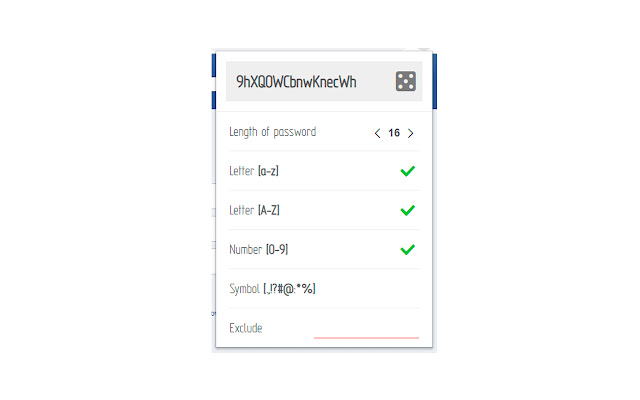

下載Click and Password擴展crx文件
下載Click and Password擴展crx格式的文件,手動將Chrome擴充功能安裝到瀏覽器中,也可以將crx文件分享給朋友,輕鬆安裝Chrome擴充功能。
擴展使用說明
                        A simple program in the browser to create a password. Recently, cases of hacking personal accounts on the Internet due to a weak password have become frequent. It is necessary to agree that it is difficult to come up with a strong password. Have to spend time, money, memory... Or search for a resource on the Internet that will do it for you. But thanks to this simple tool, you can quickly get a random password of any complexity.
Advantages:
+ ease of use;
+ automatically add the password you like to the clipboard;
+ password generation directly in the password field;
+ work offline;
+ passwords are not recorded anywhere;
+ there is an advertisement, but it is not intrusive and just turn it off;
+ does not require large resources to work.
+ dark theme
+ records the last 20 passwords created
Thank you very much if you decide to support the project and do not turn off advertising and collecting information on the program. This will help to further develop the project.
擴展基本資訊
| 名稱 |  Click and Password Click and Password |
| ID | dhlnfeiipkhiijfekfjodcmcnhfogmao |
| 官方網址 | https://chrome.google.com/webstore/detail/click-and-password/dhlnfeiipkhiijfekfjodcmcnhfogmao |
| 簡介 | Tired of coming up with good passwords? Click and get a random password! |
| 檔案大小 | 111 KB |
| 安裝次數 | 15,921 |
| 目前版本 | 0.3.7 |
| 更新時間 | 2019-11-20 |
| 上架時間 | 2019-11-20 |
| 評分 | 4.00/5 共 3 次評分 |
| 開發者 | Yubeko |
| 付費類型 | free |
| 支援的語言 | en |
| manifest.json | |
{
    "update_url": "https:\/\/clients2.google.com\/service\/update2\/crx",
    "author": "Yubeko",
    "background": {
        "persistent": true,
        "page": "background.html"
    },
    "browser_action": {
        "default_icon": {
            "16": "image\/icon16.png",
            "24": "image\/icon24.png",
            "32": "image\/icon32.png"
        },
        "default_popup": "window.html",
        "default_title": "__MSG_name__"
    },
    "content_scripts": [
        {
            "all_frames": true,
            "css": [
                "style\/tooltip.css"
            ],
            "js": [
                "script\/common.js",
                "script\/content.js"
            ],
            "matches": [
                "http:\/\/*\/*",
                "https:\/\/*\/*"
            ],
            "run_at": "document_end"
        }
    ],
    "content_security_policy": "script-src 'self' 'unsafe-eval' https:\/\/www.googletagmanager.com https:\/\/ssl.google-analytics.com; object-src 'self'",
    "default_locale": "en",
    "description": "__MSG_description__",
    "icons": {
        "128": "image\/icon128.png",
        "16": "image\/icon16.png",
        "48": "image\/icon48.png"
    },
    "manifest_version": 2,
    "minimum_chrome_version": "51",
    "name": "__MSG_name__",
    "offline_enabled": true,
    "options_page": "option.html",
    "options_ui": {
        "open_in_tab": false,
        "page": "option.html"
    },
    "permissions": [
        "http:\/\/*\/*",
        "https:\/\/*\/*",
        "clipboardWrite",
        "storage",
        "activeTab",
        "webRequest",
        "webRequestBlocking"
    ],
    "short_name": "__MSG_name__",
    "version": "0.3.7"
} | |