Chrome Robot
Writes Selenium automated tests for the Robot Framework
什麼是Chrome Robot?
Chrome Robot是由João Carloto開發的Chrome擴展程式,該擴展的主要功能是“Writes Selenium automated tests for the Robot Framework”。
擴展截圖
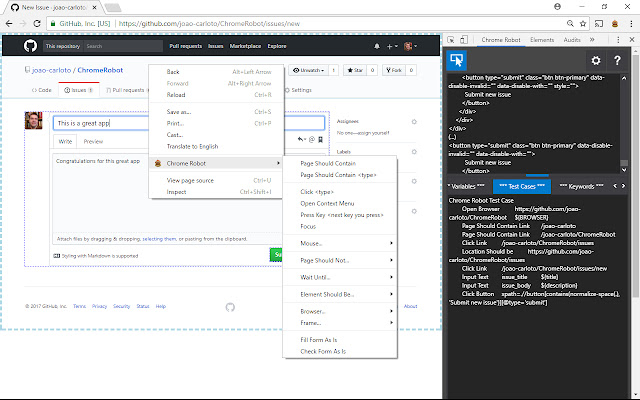


下載Chrome Robot擴展crx文件
下載Chrome Robot擴展crx格式的文件,手動將Chrome擴充功能安裝到瀏覽器中,也可以將crx文件分享給朋友,輕鬆安裝Chrome擴充功能。
擴展使用說明
                        Chrome Robot will boost your test automation productivity by helping you create high level custom keywords in an efficient manner.

Here are some of the features:
- Bulk selection of elements and creation of test steps in an adaptative way.
- Filling and verification of forms based on their current state.
- Easy preference definition for the page element locators.
- Element localization thru automatically generated XPath, based on an element's own text or text of a nearby element.
- Automatic creation of variables based on the value of inputs.
- Test script download, so you can run it directly or incorporate the code on your test automation project.
擴展基本資訊
| 名稱 |  Chrome Robot Chrome Robot |
| ID | dihdbpkpgdkioobahfpnkondnekhbmlo |
| 官方網址 | https://chrome.google.com/webstore/detail/dihdbpkpgdkioobahfpnkondnekhbmlo |
| 簡介 | Writes Selenium automated tests for the Robot Framework |
| 檔案大小 | 1.1 MB |
| 安裝次數 | 2,517 |
| 目前版本 | 0.0.5 |
| 更新時間 | 2021-12-30 |
| 上架時間 | 2019-05-26 |
| 評分 | 5.00/5 共 5 次評分 |
| 開發者 | João Carloto |
| 電子郵箱 | [email protected] |
| 付費類型 | free |
| 擴展官網 | https://github.com/joao-carloto/ChromeRobot |
| 說明頁面URL | https://github.com/joao-carloto/ChromeRobot/issues |
| 支援的語言 | en |
| manifest.json | |
{
    "update_url": "https:\/\/clients2.google.com\/service\/update2\/crx",
    "name": "Chrome Robot",
    "version": "0.0.5",
    "description": "Writes Selenium automated tests for the Robot Framework",
    "default_locale": "en",
    "devtools_page": "devtools.html",
    "background": {
        "scripts": [
            "background.js"
        ]
    },
    "permissions": [
        "tabs",
        "storage",
        "contextMenus",
        "http:\/\/*\/*",
        "https:\/\/*\/*",
        "*:\/\/*\/*"
    ],
    "icons": {
        "16": "gui\/skin\/icon16.png",
        "48": "gui\/skin\/icon48.png",
        "128": "gui\/skin\/icon128.png"
    },
    "browser_action": {
        "default_icon": "gui\/skin\/icon16.png",
        "default_popup": "gui\/redirect_popup.html",
        "default_title": "Chrome Robot"
    },
    "commands": {
        "toggle-select": {
            "suggested_key": {
                "default": "Alt+Shift+Z",
                "windows": "Alt+Shift+Z",
                "mac": "Alt+Shift+Z"
            },
            "description": "Toggles select mode"
        }
    },
    "content_security_policy": "script-src 'self' https:\/\/ssl.google-analytics.com; object-src 'self'",
    "manifest_version": 2
} | |