Tiny Break
Created to take care of you while you work on the computer. It reminds you to take care of your mind, body and spirit.
什麼是Tiny Break?
Tiny Break是由snarklin開發的Chrome擴展程式,該擴展的主要功能是“Created to take care of you while you work on the computer. It reminds you to take care of your mind, body and spirit.”。
擴展截圖

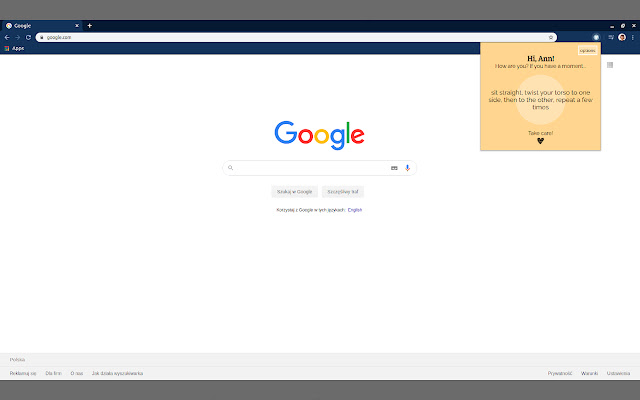
下載Tiny Break擴展crx文件
下載Tiny Break擴展crx格式的文件,手動將Chrome擴充功能安裝到瀏覽器中,也可以將crx文件分享給朋友,輕鬆安裝Chrome擴充功能。
擴展使用說明
                        Tiny Break is a Google Chrome extension created to take care of you while you work on the computer.
We often get so absorbed in work or even in browsing the internet that we forget about the little things like breathing deeply, stretching the body or drinking water to start with.
Tiny Break uses those short moments when you open a new tab in the browser to remind you to take care of your mind, body and spirit. It remembers all those small activities which are good for you and it tells you nice things :) It's quiet, non-invasive and always polite, a good work buddy.
擴展基本資訊
| 名稱 |  Tiny Break Tiny Break |
| ID | dkbcdbbjnacachlkaknpceopcohglcda |
| 官方網址 | https://chrome.google.com/webstore/detail/tiny-break/dkbcdbbjnacachlkaknpceopcohglcda |
| 簡介 | Created to take care of you while you work on the computer. It reminds you to take care of your mind, body and spirit. |
| 檔案大小 | 48.42 KB |
| 安裝次數 | 78 |
| 目前版本 | 1.1 |
| 更新時間 | 2020-03-26 |
| 上架時間 | 2020-03-26 |
| 評分 | 5.00/5 共 2 次評分 |
| 開發者 | snarklin |
| 付費類型 | free |
| 支援的語言 | en |
| manifest.json | |
{
    "update_url": "https:\/\/clients2.google.com\/service\/update2\/crx",
    "manifest_version": 2,
    "name": "Tiny Break",
    "description": "Created to take care of you while you work on the computer. It reminds you to take care of your mind, body and spirit.",
    "version": "1.1",
    "author": "Julia Lojek",
    "icons": {
        "16": "images\/logo-16.png",
        "32": "images\/logo-32.png",
        "48": "images\/logo-48.png",
        "128": "images\/logo-128.png"
    },
    "browser_action": {
        "deafult_title": "Tiny Break",
        "default_popup": "popup.html",
        "default_icon": {
            "16": "images\/logo-16.png",
            "32": "images\/logo-32.png",
            "48": "images\/logo-48.png",
            "128": "images\/logo-128.png"
        }
    },
    "permissions": [
        "storage",
        "activeTab"
    ],
    "chrome_url_overrides": {
        "newtab": "newtab.html"
    },
    "options_ui": {
        "chrome_style": true,
        "page": "options.html",
        "open_in_tab": false
    }
} | |