LEGION Trinity
Automatically schedule your posts on Facebook
什麼是LEGION Trinity?
LEGION Trinity是由Pantheon Marketing開發的Chrome擴展程式,該擴展的主要功能是“Automatically schedule your posts on Facebook”。
擴展截圖



下載LEGION Trinity擴展crx文件
下載LEGION Trinity擴展crx格式的文件,手動將Chrome擴充功能安裝到瀏覽器中,也可以將crx文件分享給朋友,輕鬆安裝Chrome擴充功能。
擴展使用說明
                        LEGION Trinity is the world's most advanced Chrome Extension for powering up your Facebook!

List of LEGION Trinity features:

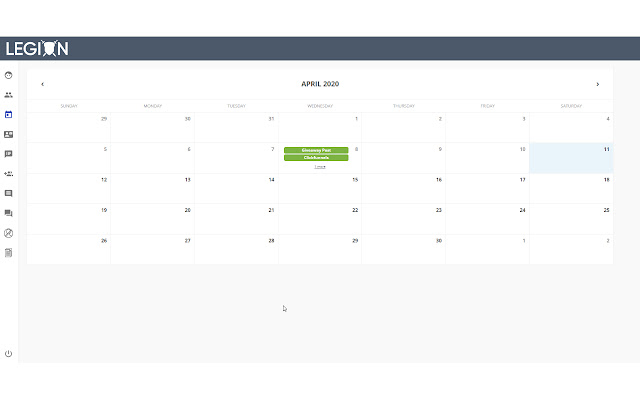
1- Calendar: schedule posts to be automatically posted either on your wall or in a group.
2- Find friends from Post interactions: choose a post where people with similar interests are liking or commenting and automatically add them to your friends.
3- Accept or remove received friend requests: choose to accept or remove all or selected friend requests you have received.
4- Remove sent friend requests.
5- Auto reply post comments: choose a post and automatically reply to all the comments.
6- Canned Responses: load all the messages you usually repetitively send to your friends and LEGION Trinity will display in Messenger for you to choose them and send them swiftly.
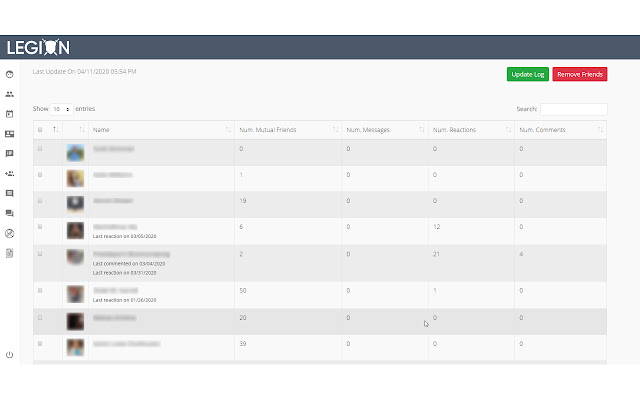
7- Inactive Friends: find your friends who are inactive and safely remove them.
8- Scraper: analyze all the posts of a friend or all the comments from a post.
擴展基本資訊
| 名稱 |  LEGION Trinity LEGION Trinity |
| ID | eaaoeahhogahendoigiaipcmdkldmhng |
| 官方網址 | https://chrome.google.com/webstore/detail/legion-trinity/eaaoeahhogahendoigiaipcmdkldmhng |
| 簡介 | Automatically schedule your posts on Facebook |
| 檔案大小 | 2.93 MB |
| 安裝次數 | 232 |
| 目前版本 | 2.16.23 |
| 更新時間 | 2021-05-13 |
| 上架時間 | 2020-06-21 |
| 評分 | 4.25/5 共 8 次評分 |
| 開發者 | Pantheon Marketing |
| 電子郵箱 | [email protected] |
| 付費類型 | free |
| 隱私政策頁面URL | https://www.legionsoftware.io/legal |
| 支援的語言 | en-US |
| manifest.json | |
{
    "update_url": "https:\/\/clients2.google.com\/service\/update2\/crx",
    "manifest_version": 2,
    "name": "LEGION Trinity",
    "short_name": "LEGION Trinity",
    "version": "2.16.23",
    "description": "Automatically schedule your posts on Facebook",
    "icons": {
        "16": "icons\/16.png",
        "32": "icons\/32.png",
        "48": "icons\/48.png",
        "64": "icons\/64.png",
        "128": "icons\/128.png"
    },
    "browser_action": {
        "default_title": "LEGION Trinity",
        "default_popup": "popup.html"
    },
    "permissions": [
        "cookies",
        "activeTab",
        "storage",
        "clipboardRead",
        "clipboardWrite",
        "webRequest",
        "webRequestBlocking",
        "http:\/\/*.facebook.com\/*",
        "https:\/\/*.facebook.com\/*"
    ],
    "background": {
        "scripts": [
            "scripts\/background\/headers.js",
            "scripts\/background\/app.js",
            "scripts\/background\/friender.js",
            "scripts\/background\/postDelivery.js",
            "scripts\/background\/postsFriends.js",
            "scripts\/background\/cancelRequests.js",
            "scripts\/background\/arcHandler.js",
            "scripts\/background\/cannedResponses.js"
        ],
        "persistent": true
    },
    "content_scripts": [
        {
            "matches": [
                "*:\/\/*.facebook.com\/*",
                "*:\/\/*.messenger.com\/*"
            ],
            "js": [
                "libs\/jquery-3.4.1.min.js",
                "scripts\/content\/cannedResponses.js",
                "scripts\/content\/sendMessage.js"
            ]
        },
        {
            "matches": [
                "*:\/\/m.facebook.com\/composer\/mbasic\/?csid=*"
            ],
            "js": [
                "libs\/jquery-3.4.1.min.js",
                "scripts\/content\/alternatePhotoUpload.js"
            ]
        },
        {
            "matches": [
                "*:\/\/www.facebook.com\/*"
            ],
            "js": [
                "libs\/jquery-3.4.1.min.js",
                "scripts\/content\/alternateInteractions.js"
            ]
        }
    ]
} | |