HKU Moodle Helper
This extension allows HKU students to show your current courses (in a semester) in a separate entry in HKU Moodle. By: Andrew Z
什麼是HKU Moodle Helper?
HKU Moodle Helper是由andrewzhku開發的Chrome擴展程式,該擴展的主要功能是“This extension allows HKU students to show your current courses (in a semester) in a separate entry in HKU Moodle. By: Andrew Z”。
擴展截圖
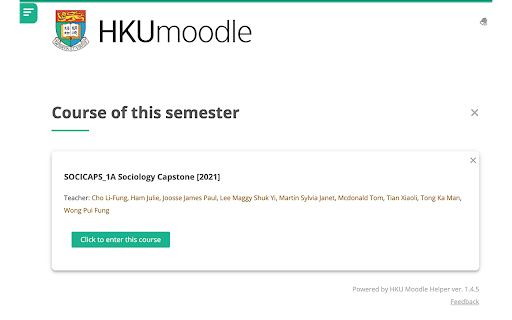
下載HKU Moodle Helper擴展crx文件
下載HKU Moodle Helper擴展crx格式的文件,手動將Chrome擴充功能安裝到瀏覽器中,也可以將crx文件分享給朋友,輕鬆安裝Chrome擴充功能。
擴展使用說明
                        1⃣️Click "Add to this semester" on a course
2⃣️Voilà! You'll see the course on the top of the page. Under "Course of this semester".

🎉Your semester list is synced across devices (any chrome browser that is logged into the same Google account)
🎉After a semester ends, you can empty your selection on one click.
🎉You can choose to "Remove from this semester" anytime!
🎉 UI improvements from the vanilla Moodle!

❓Suggestions? Or feedbacks? Please do not hesitate to contact me at [email protected], or WeChat me @andrew7746!!!

This project is open-sourced on GitHub.
擴展基本資訊
| 名稱 |  HKU Moodle Helper HKU Moodle Helper |
| ID | einenigpmpgopefpkfbmnlcjmoamijap |
| 官方網址 | https://chromewebstore.google.com/detail/hku-moodle-helper/einenigpmpgopefpkfbmnlcjmoamijap |
| 簡介 | This extension allows HKU students to show your current courses (in a semester) in a separate entry in HKU Moodle. By: Andrew Z |
| 檔案大小 | 28.2 KB |
| 安裝次數 | 1,140 |
| 目前版本 | 1.4.6 |
| 更新時間 | 2022-02-13 |
| 上架時間 | 2019-11-06 |
| 評分 | 5.00/5 共 4 次評分 |
| 開發者 | andrewzhku |
| 付費類型 | free |
| 支援的語言 | en |
| manifest.json | |
{
    "update_url": "https:\/\/clients2.google.com\/service\/update2\/crx",
    "name": "HKU Moodle Helper",
    "version": "1.4.6",
    "description": "This extension allows HKU students to show your current courses (in a semester) in a separate entry in HKU Moodle. By: Andrew Z",
    "permissions": [
        "storage"
    ],
    "content_scripts": [
        {
            "matches": [
                "http:\/\/moodle.hku.hk\/*",
                "https:\/\/moodle.hku.hk\/*",
                "http:\/\/121.37.222.164:8091\/*",
                "https:\/\/121.37.222.164:8091\/*"
            ],
            "css": [
                "myStyle.css"
            ],
            "js": [
                "browser-polyfill.js",
                "feedback.js",
                "messageBox.js",
                "contentScript.js"
            ],
            "run_at": "document_end"
        }
    ],
    "icons": {
        "16": "images\/16.png",
        "32": "images\/32.png",
        "48": "images\/48.png",
        "128": "images\/128.png"
    },
    "manifest_version": 2
} | |