gifstasher
Store your reaction gifs for quick and easy access!
什麼是gifstasher?
gifstasher是由cloudbuster開發的Chrome擴展程式,該擴展的主要功能是“Store your reaction gifs for quick and easy access!”。
擴展截圖
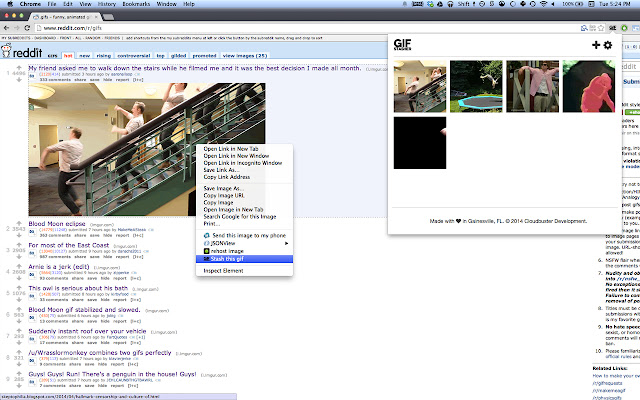
下載gifstasher擴展crx文件
下載gifstasher擴展crx格式的文件,手動將Chrome擴充功能安裝到瀏覽器中,也可以將crx文件分享給朋友,輕鬆安裝Chrome擴充功能。
擴展使用說明
                        Quickly stash gifs while browsing simply by right-clicking and selecting "Stash this gif." Select from your stash and copy the link simply by clicking the gif!

Latest update:

1.0.6
 - Bug fixes

1.0.5
 - Now you can "Copy and Stash" from the Chrome context menu
 - Various bug fixes and performance fixes
擴展基本資訊
| 名稱 |  gifstasher gifstasher |
| ID | enegbanenghjkfmmkjimbckfihbamcfi |
| 官方網址 | https://chrome.google.com/webstore/detail/gifstasher/enegbanenghjkfmmkjimbckfihbamcfi |
| 簡介 | Store your reaction gifs for quick and easy access! |
| 檔案大小 | 407 KB |
| 安裝次數 | 47 |
| 目前版本 | 1.0.7 |
| 更新時間 | 2014-04-21 |
| 上架時間 | 2014-04-21 |
| 評分 | 3.67/5 共 3 次評分 |
| 開發者 | cloudbuster |
| 付費類型 | free |
| 支援的語言 | en-US |
| manifest.json | |
{
    "update_url": "https:\/\/clients2.google.com\/service\/update2\/crx",
    "manifest_version": 2,
    "name": "gifstasher",
    "description": "Store your reaction gifs for quick and easy access!",
    "version": "1.0.7",
    "permissions": [
        "storage",
        "contextMenus",
        "clipboardRead",
        "clipboardWrite",
        "notifications"
    ],
    "icons": {
        "16": "img\/icon-bitty.png",
        "48": "img\/icon-small.png",
        "128": "img\/icon-large.png"
    },
    "options_page": "options.html",
    "browser_action": {
        "default_icon": "img\/icon.png",
        "default_popup": "popup.html"
    },
    "background": {
        "scripts": [
            "js\/require.js",
            "js\/background.js"
        ]
    },
    "web_accessible_resources": [
        "img\/icon-small.png"
    ]
} | |