Cloud Carbon
Calculate and show the energy you've spent browsing Facebook, Netflix, and YouTube.
什麼是Cloud Carbon?
Cloud Carbon是由chrisallick開發的Chrome擴展程式,該擴展的主要功能是“Calculate and show the energy you've spent browsing Facebook, Netflix, and YouTube.”。
擴展截圖
下載Cloud Carbon擴展crx文件
下載Cloud Carbon擴展crx格式的文件,手動將Chrome擴充功能安裝到瀏覽器中,也可以將crx文件分享給朋友,輕鬆安裝Chrome擴充功能。
擴展使用說明
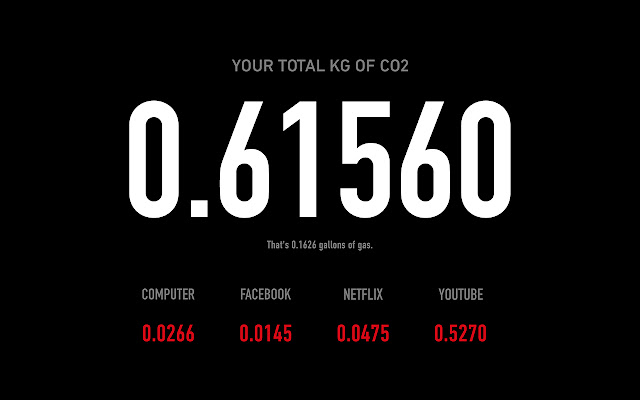
                        Cloud Carbon is a Chrome Extension that calculates the carbon footprint created by your use of Facebook, YouTube, and Netflix. Each time you open a new tab in Chrome you'll see your stats as well as reference to how many gallons of gas you could have used.

Cloud computing allows us to have virtual selves, digital doppelgängers, but, because of the fossil fuels burnt in order to power the data centers which store our personal data, our digital selves have a very real-world impact.

Cloud Carbon was created over a 24 hour period for Art Hack Day 2015

http://www.arthackday.net/events/deluge

by Chris Allick and Dan Savage

Thanks,
Chris Allick

ps - Hack The Planet
擴展基本資訊
| 名稱 |  Cloud Carbon Cloud Carbon |
| ID | engfdahohpcdnnhmpgmedgehbbgeheho |
| 官方網址 | https://chrome.google.com/webstore/detail/cloud-carbon/engfdahohpcdnnhmpgmedgehbbgeheho |
| 簡介 | Calculate and show the energy you've spent browsing Facebook, Netflix, and YouTube. |
| 檔案大小 | 448 KB |
| 安裝次數 | 95 |
| 目前版本 | 0.1.2 |
| 更新時間 | 2016-01-30 |
| 上架時間 | 2016-01-30 |
| 評分 | 4.50/5 共 4 次評分 |
| 開發者 | chrisallick |
| 付費類型 | free |
| 支援的語言 | en-US |
| manifest.json | |
{
    "update_url": "https:\/\/clients2.google.com\/service\/update2\/crx",
    "name": "Cloud Carbon",
    "description": "Calculate and show the energy you've spent browsing Facebook, Netflix, and YouTube.",
    "version": "0.1.2",
    "manifest_version": 2,
    "incognito": "split",
    "chrome_url_overrides": {
        "newtab": "blank.html"
    },
    "background": {
        "scripts": [
            "background.js"
        ],
        "persistent": true
    },
    "permissions": [
        "tabs",
        "http:\/\/*\/*",
        "https:\/\/*\/*",
        "storage",
        "management"
    ],
    "browser_action": {
        "default_icon": "icon128.png"
    },
    "icons": {
        "16": "icon16.png",
        "48": "icon48.png",
        "64": "icon64.png",
        "128": "icon128.png"
    }
} | |