Email Tracking for Gmail
Gmail email tracker software
什麼是Email Tracking for Gmail?
Email Tracking for Gmail是由http://trackemail.co開發的Chrome擴展程式,該擴展的主要功能是“Gmail email tracker software”。
擴展截圖

下載Email Tracking for Gmail擴展crx文件
下載Email Tracking for Gmail擴展crx格式的文件,手動將Chrome擴充功能安裝到瀏覽器中,也可以將crx文件分享給朋友,輕鬆安裝Chrome擴充功能。
擴展使用說明
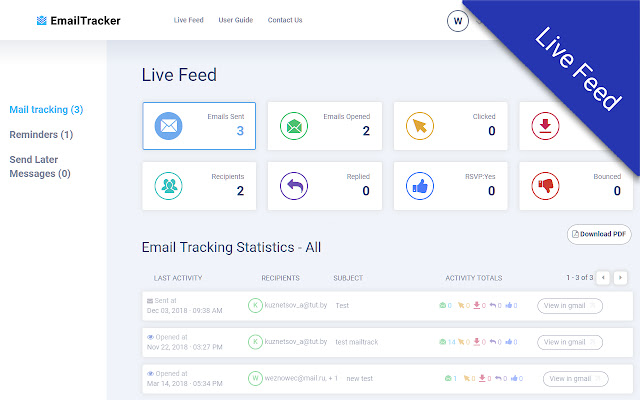
                        EmailTrack allows you to schedule emails to be sent  at a later date. Write a message now, send it whenever you want, even if you're not online. Track messages to make sure you hear back.

Track when your e-mails are being opened & whether the recipient responded to your e-mail. Other cool features include choosing exactly when you want an email sent, an interface which is directly integrated into Gmail

If you do not get a response from your e-mail, our extension can give you a reminder so you can follow up without forgetting. Archive e-mails which are not important and remove the clutter from your inbox. It is free to use EmailTrack, up to a limited number of messages per month.
擴展基本資訊
| 名稱 |  Email Tracking for Gmail Email Tracking for Gmail |
| ID | fabfdddokobbiakghpeejlchelppgkcj |
| 官方網址 | https://chrome.google.com/webstore/detail/email-tracking-for-gmail/fabfdddokobbiakghpeejlchelppgkcj |
| 簡介 | Gmail email tracker software |
| 檔案大小 | 609 KB |
| 安裝次數 | 2,058 |
| 目前版本 | 2.2 |
| 更新時間 | 2022-09-28 |
| 上架時間 | 2020-05-27 |
| 評分 | 3.57/5 共 14 次評分 |
| 開發者 | http://trackemail.co |
| 電子郵箱 | [email protected] |
| 付費類型 | free |
| 擴展官網 | https://www.trackemail.co |
| 說明頁面URL | https://www.trackemail.co/faq |
| 隱私政策頁面URL | https://trackemail.co/privacy-policy |
| 支援的語言 | en |
| manifest.json | |
{
    "update_url": "https:\/\/clients2.google.com\/service\/update2\/crx",
    "name": "Email Tracking for Gmail",
    "short_name": "EmailTrack",
    "description": "Gmail email tracker software",
    "version": "2.2",
    "icons": {
        "16": "icons\/icon-16x16.png",
        "48": "icons\/icon-48x48.png",
        "128": "icons\/icon-128x128.png"
    },
    "web_accessible_resources": [
        "styles\/*",
        "scripts\/*",
        "icons\/*",
        "images\/*"
    ],
    "homepage_url": "https:\/\/trackemail.co\/",
    "background": {
        "page": "background.html"
    },
    "content_scripts": [
        {
            "matches": [
                "https:\/\/mail.google.com\/*",
                "http:\/\/mail.google.com\/*",
                "https:\/\/inbox.google.com\/*",
                "http:\/\/inbox.google.com\/*"
            ],
            "css": [
                "styles\/bootstrap.min.css",
                "styles\/sb-admin-2.min.css",
                "styles\/righttasks.min.css",
                "styles\/jquery-ui.min.css",
                "styles\/composeStatus.min.css"
            ],
            "js": [
                "scripts\/tippy.all.min.js",
                "scripts\/jquery-1.12.4.min.js",
                "scripts\/bootstrap.min.js",
                "scripts\/inboxsdk.js",
                "scripts\/jquery-ui.min.js",
                "scripts\/moment.min.js",
                "scripts\/common.js",
                "scripts\/jsmd5.js",
                "scripts\/fontawessome.js",
                "scripts\/content.js"
            ],
            "run_at": "document_end",
            "all_frames": true
        }
    ],
    "permissions": [
        "storage",
        "tabs",
        "https:\/\/*.trackemail.co\/*",
        "identity"
    ],
    "manifest_version": 2,
    "oauth2": {
        "client_id": "555150528464-snlb32b3scthg23hsejt7voi1fc5er2h.apps.googleusercontent.com",
        "scopes": [
            "profile",
            "email"
        ]
    }
} | |