Amazon AWS Quick Links
Quickly and conveniently open AWS Services from here
什麼是Amazon AWS Quick Links?
Amazon AWS Quick Links是由Tab Manager Plus開發的Chrome擴展程式,該擴展的主要功能是“Quickly and conveniently open AWS Services from here”。
擴展截圖

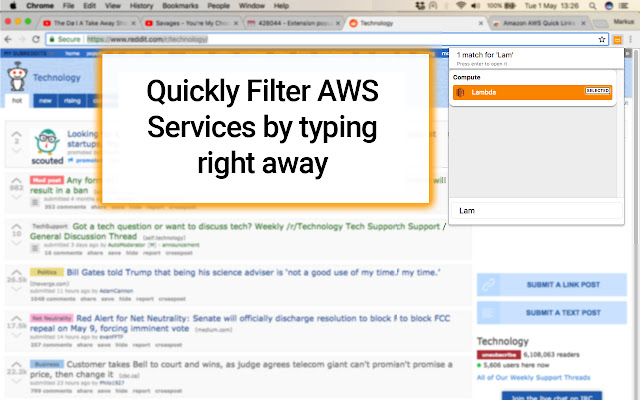
下載Amazon AWS Quick Links擴展crx文件
下載Amazon AWS Quick Links擴展crx格式的文件,手動將Chrome擴充功能安裝到瀏覽器中,也可以將crx文件分享給朋友,輕鬆安裝Chrome擴充功能。
擴展使用說明
                        Quickly switch to Amazon AWS Webservices without having to go through the Amazon Console first. Once you visit an Amazon Webservice, the extension will remember your frequently used Services and highlight them first ( A permission for "https://*.aws.amazon.com/" is necessary due to this )

This app does not contact any 3rd party services and only works locally in your browser. This extension is not affiliated with Amazon.

Currently supports links to the following services :

Compute
 => EC2
 => Lightsail
 => Elastic Container Service
 => Lambda
 => Batch
 => Elastic Beanstalk

Analytics
 => Athena
 => EMR
 => CloudSearch
 => Elasticsearch Service
 => Kinesis
 => QuickSight
 => Data Pipeline
 => AWS Glue

Security, Identity & Compliance
 => IAM
 => Cognito
 => Secrets Manager
 => GuardDuty
 => Inspector
 => Amazon Macie
 => AWS Single Sign-On
 => Certificate Manager
 => CloudHSM
 => Directory Service
 => WAF & Shield
 => Artifact

Mobile Services
 => Mobile Hub
 => AWS AppSync
 => Device Farm
 => Mobile Analytics

AR & VR
 => Amazon Sumerian

Application Integration
 => Step Functions
 => Amazon MQ
 => Simple Notification Service
 => Simple Queue Service
 => SWF

Customer Engagement
 => Amazon Connect
 => Pinpoint
 => Simple Email Service

Business Productivity
 => Alexa for Business
 => Amazon Chime
 => WorkDocs
 => WorkMail

Desktop & App Streaming
 => WorkSpaces
 => AppStream 2.0

Internet of Things
 => IoT Core
 => IoT Device Management
 => IoT Analytics
 => Greengrass
 => Amazon FreeRTOS

Game Development
 => Amazon GameLift

Storage
 => S3
 => EFS
 => Glacier
 => Storage Gateway

Database
 => RDS
 => DynamoDB
 => ElastiCache
 => Amazon Redshift

Migration
 => AWS Migration Hub
 => Application Discovery Service
 => Database Migration Service
 => Server Migration Service
 => Snowball

Networking & Content Delivery
 => VPC
 => CloudFront
 => Route 53
 => API Gateway
 => Direct Connect

Developer Tools
 => CodeStar
 => CodeCommit
 => CodeBuild
 => CodeDeploy
 => CodePipeline
 => Cloud9
 => X-Ray

Management Tools
 => CloudWatch
 => AWS Auto Scaling
 => CloudFormation
 => CloudTrail
 => Config
 => OpsWorks
 => Service Catalog
 => Systems Manager
 => Trusted Advisor
 => Managed Services

Media Services
 => Elastic Transcoder
 => Kinesis Video Streams
 => MediaConvert
 => MediaLive
 => MediaPackage
 => MediaStore
 => MediaTailor

Machine Learning
 => Amazon SageMaker
 => Amazon Comprehend
 => AWS DeepLens
 => Amazon Lex
 => Machine Learning
 => Amazon Polly
 => Rekognition
 => Amazon Transcribe
 => Amazon Translate
擴展基本資訊
| 名稱 |  Amazon AWS Quick Links Amazon AWS Quick Links |
| ID | fklkdeiiapbakigkagblkiaigibanmdm |
| 官方網址 | https://chrome.google.com/webstore/detail/amazon-aws-quick-links/fklkdeiiapbakigkagblkiaigibanmdm |
| 簡介 | Quickly and conveniently open AWS Services from here |
| 檔案大小 | 823 KB |
| 安裝次數 | 2,000 |
| 目前版本 | 1 |
| 更新時間 | 2018-05-03 |
| 上架時間 | 2018-05-03 |
| 評分 | 4.78/5 共 9 次評分 |
| 開發者 | Tab Manager Plus |
| 電子郵箱 | [email protected] |
| 付費類型 | free |
| 擴展官網 | https://github.com/stefanXO/Amazon-AWS-Quick-Links |
| 說明頁面URL | https://github.com/stefanXO/Amazon-AWS-Quick-Links/issues |
| 隱私政策頁面URL | https://github.com/stefanXO/Tab-Manager-Plus/blob/master/PRIVACY.md |
| 支援的語言 | en |
| manifest.json | |
{
    "update_url": "https:\/\/clients2.google.com\/service\/update2\/crx",
    "name": "Amazon AWS Quick Links",
    "short_name": "AWS Quick Links",
    "version": "1",
    "manifest_version": 2,
    "description": "Quickly and conveniently open AWS Services from here",
    "author": "stefanXO",
    "icons": {
        "16": "icons\/General_AWScloud.png",
        "48": "icons\/General_AWScloud.png",
        "64": "icons\/General_AWScloud.png",
        "128": "icons\/General_AWScloud.png",
        "256": "icons\/General_AWScloud.png"
    },
    "permissions": [
        "activeTab",
        "https:\/\/*.aws.amazon.com\/",
        "tabs",
        "storage"
    ],
    "incognito": "spanning",
    "background": {
        "scripts": [
            "lib\/background.js"
        ]
    },
    "content_scripts": [
        {
            "matches": [
                "https:\/\/*.aws.amazon.com\/*"
            ],
            "js": [
                "lib\/worker.js"
            ]
        }
    ],
    "browser_action": {
        "default_icon": {
            "16": "icons\/General_AWScloud.png",
            "48": "icons\/General_AWScloud.png",
            "64": "icons\/General_AWScloud.png",
            "128": "icons\/General_AWScloud.png",
            "256": "icons\/General_AWScloud.png"
        },
        "default_popup": "popup.html"
    },
    "commands": {
        "_execute_browser_action": {
            "suggested_key": {
                "default": "Ctrl+Shift+A",
                "windows": "Ctrl+Shift+A",
                "mac": "Command+Shift+A"
            }
        }
    }
} | |