Email Lookup and Email Search by Webspotter
Find emails behind any website
什麼是Email Lookup and Email Search by Webspotter?
Email Lookup and Email Search by Webspotter是由webspotter.io開發的Chrome擴展程式,該擴展的主要功能是“Find emails behind any website”。
擴展截圖
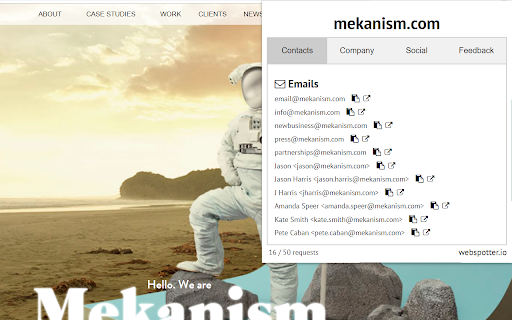


下載Email Lookup and Email Search by Webspotter擴展crx文件
下載Email Lookup and Email Search by Webspotter擴展crx格式的文件,手動將Chrome擴充功能安裝到瀏覽器中,也可以將crx文件分享給朋友,輕鬆安裝Chrome擴充功能。
擴展使用說明
                        Email Lookup and Email Search Chrome extension lets you uncover emails without much effort. Collect the contact data for your email and lead-generation campaigns.
Webspotter Email Lookup is a perfect alternative to email search software, services, and plugins such as Snov.io (Snovio) Email Finder, Hunter, GetProspect, BuiltWith, Email Extractor, WhatRuns, and RocketReach.
Here are some Webspotter benefits:
⌚ Save time by quickly finding any email address
📧 Receive verified and actual emails
📌 Copy emails to clipboard
This product will suit a wide range of professionals, helping them work more productively and quickly:
✓ Marketers can find contact information for thousands of potential leads, journalists, website owners, and bloggers.
New:
* uncover links to Linkedin, Facebook, Instagram accounts
* view company information such as employees count, industry and location
* view email source
擴展基本資訊
| 名稱 |  Email Lookup and Email Search by Webspotter Email Lookup and Email Search by Webspotter |
| ID | gpbhhjnhdfmdjephhladopnjpelhmplc |
| 官方網址 | https://chromewebstore.google.com/detail/email-lookup-and-email-se/gpbhhjnhdfmdjephhladopnjpelhmplc |
| 簡介 | Find emails behind any website |
| 檔案大小 | 646 KB |
| 安裝次數 | 1,748 |
| 目前版本 | 1.01 |
| 更新時間 | 2019-10-03 |
| 上架時間 | 2019-10-02 |
| 評分 | 4.00/5 共 5 次評分 |
| 開發者 | webspotter.io |
| 電子郵箱 | [email protected] |
| 付費類型 | free |
| 擴展官網 | https://webspotter.io |
| 隱私政策頁面URL | https://webspotter.io/privacypolicy |
| 支援的語言 | en-US |
| manifest.json | |
{
    "update_url": "https:\/\/clients2.google.com\/service\/update2\/crx",
    "manifest_version": 2,
    "name": "Email Lookup and Email Search by Webspotter",
    "description": "Find emails behind any website",
    "version": "1.01",
    "icons": {
        "16": "img\/icon16.png",
        "32": "img\/icon32.png",
        "48": "img\/icon48.png",
        "128": "img\/icon128.png"
    },
    "options_page": "options.html",
    "browser_action": {
        "default_icon": "img\/icon16.png",
        "default_popup": "popup.html"
    },
    "background": {
        "scripts": [
            "js\/Components\/Helper\/Helper.js",
            "js\/Services\/HttpService\/HttpService.js",
            "js\/Components\/EmailFinder\/EmailFinder.js",
            "js\/background.js"
        ]
    },
    "permissions": [
        "tabs",
        "storage",
        "cookies",
        "http:\/\/*.webspotter.io\/*",
        "https:\/\/*.webspotter.io\/*"
    ],
    "content_scripts": [
        {
            "matches": [
                "https:\/\/www.google.com\/search*"
            ],
            "css": [
                "css\/font-awesome.css",
                "css\/email-finder.css",
                "css\/popup.css",
                "css\/content.css"
            ],
            "js": [
                "js\/Components\/Helper\/Helper.js",
                "js\/Services\/HttpService\/HttpService.js",
                "js\/Components\/EmailFinder\/EmailFinder.js",
                "js\/content.js"
            ]
        }
    ],
    "web_accessible_resources": [
        "fonts\/*.*"
    ]
} | |