Picture-in-Picture with Playback Controls
Picture-in-Picture mode allows you to watch video in a floating window with playback video controls. Floating video extension
什麼是Picture-in-Picture with Playback Controls?
Picture-in-Picture with Playback Controls是由http://picinpic.net開發的Chrome擴展程式,該擴展的主要功能是“Picture-in-Picture mode allows you to watch video in a floating window with playback video controls. Floating video extension”。
擴展截圖
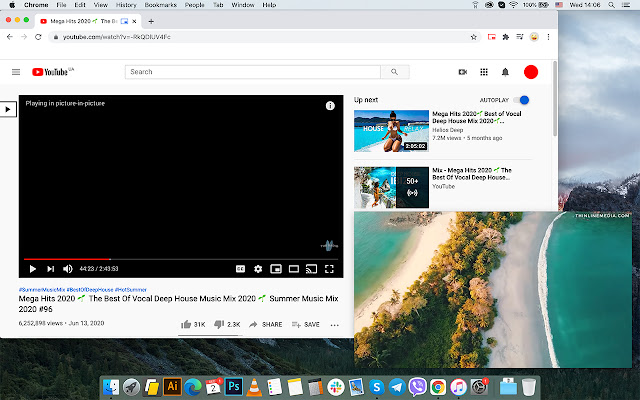


下載Picture-in-Picture with Playback Controls擴展crx文件
下載Picture-in-Picture with Playback Controls擴展crx格式的文件,手動將Chrome擴充功能安裝到瀏覽器中,也可以將crx文件分享給朋友,輕鬆安裝Chrome擴充功能。
擴展使用說明
                        Play video in a floating window with no interruption from work or searching the web. Called picture-in-picture mode creates a fully working video player that will float with you across the browser and always on the top of other windows.

After clicking the icon selected video is opened outside the browser in a mini player with all functionality of the original player and general playback video controls. Fully customized settings suppose to resize the floating window as much as you want and set it at any place on the screen.

Picture-in-picture mode supports all video formats and works with popular video hubs like Youtube, Vimeo, Facebook and many others. Floating Video extension equipped with bunch of useful features, such as the following:

- Broad playback controls allow you to manage video files like on the original video player: advanced/ rewind, play/ stop video, etc.
- custom settings concerning window: set it in any place on the screen.
- supports all video formats
- resize floating window for convenient watching
- play video in a pop-up from all websites including all popular
- Hotkeys (Keyboard shortcut) function added

Watch video in a window that is always on the top of other websites and opened applications. Keep watching the video while browsing other websites or review sheets and graphics. Opened video will always upper other windows and float from site to site.
擴展基本資訊
| 名稱 |  Picture-in-Picture with Playback Controls Picture-in-Picture with Playback Controls |
| ID | gpeaojhfeejplchbhmhpcecpfginfnhk |
| 官方網址 | https://chrome.google.com/webstore/detail/picture-in-picture-with-p/gpeaojhfeejplchbhmhpcecpfginfnhk |
| 簡介 | Picture-in-Picture mode allows you to watch video in a floating window with playback video controls. Floating video extension |
| 檔案大小 | 449 KB |
| 安裝次數 | 400,000 |
| 目前版本 | 1.2.2 |
| 更新時間 | 2022-07-05 |
| 上架時間 | 2020-12-19 |
| 評分 | 4.59/5 共 396 次評分 |
| 開發者 | http://picinpic.net |
| 電子郵箱 | [email protected] |
| 付費類型 | free |
| 擴展官網 | https://picinpic.net/ |
| 隱私政策頁面URL | https://picinpic.net/privacy |
| 支援的語言 | de,en,cs |
| manifest.json | |
{
"update_url": "https:\/\/clients2.google.com\/service\/update2\/crx",
"name": "__MSG_name__",
"description": "__MSG_description__",
"version": "1.2.2",
"default_locale": "en",
"icons": {
"32": "assets\/32.png",
"64": "assets\/64.png",
"128": "assets\/128.png"
},
"background": {
"scripts": [
"js\/background.js"
]
},
"content_scripts": [
{
"js": [
".\/js\/content-script.js"
],
"matches": [
" | |