Music CAT for Google Play Music™
Music CAT (Control from All Tabs) gives you control of your Google Play Music™ from any tab and with your keyboard.
什麼是Music CAT for Google Play Music™?
Music CAT for Google Play Music™是由Krazy Kitten Inc開發的Chrome擴展程式,該擴展的主要功能是“Music CAT (Control from All Tabs) gives you control of your Google Play Music™ from any tab and with your keyboard.”。
擴展截圖
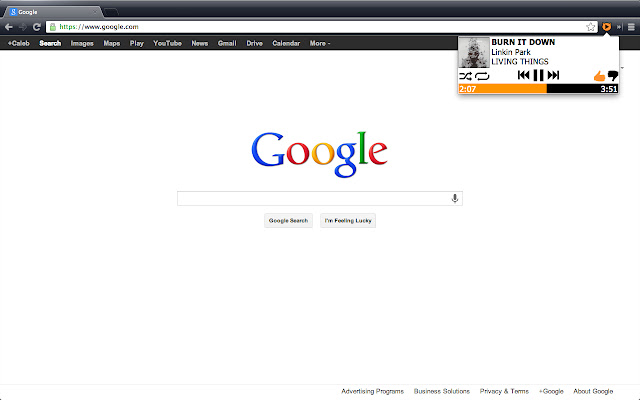
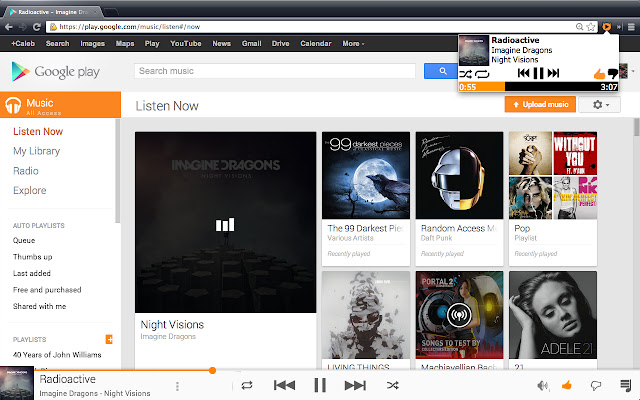
下載Music CAT for Google Play Music™擴展crx文件
下載Music CAT for Google Play Music™擴展crx格式的文件,手動將Chrome擴充功能安裝到瀏覽器中,也可以將crx文件分享給朋友,輕鬆安裝Chrome擴充功能。
擴展使用說明
                        Compatible with Google Play Music™ including the new All Access service!

Keyboard Controls (extension must be open)
Pause/Play - Space
Skip - Right Arrow
Previous - Left Arrow
Thumb Up - Up Arrow
Thumb Down - Down Arrow
Shuffle - S
Repeat - R

To avoid the mouse entirely, you can set a shortcut to open the extension by going to Chrome -> Settings/Preferences -> Extensions -> Keyboard Shortcuts (scroll to the bottom)

Change Logs:

Update 1.3:
- Fixed the album art issue
- Fixed other small fixes

Update 1.2:
-Random fixes

Update 1.1:
-Added new keyboard shortcuts
-Progress Bar is now scrollable
-Other Bug fixes

Initial Version 1.0

If you find any issues, please tell us here: https://github.com/calebgomer/Music-CAT/issues or email (look on github)
Ryan McNamee
Chinmay Ghotkar
Caleb Gomer
擴展基本資訊
| 名稱 |  Music CAT for Google Play Music™ Music CAT for Google Play Music™ |
| ID | hfmgndgkfjenffplhbcaaacnodoichdo |
| 官方網址 | https://chrome.google.com/webstore/detail/music-cat-for-google-play/hfmgndgkfjenffplhbcaaacnodoichdo |
| 簡介 | Music CAT (Control from All Tabs) gives you control of your Google Play Music™ from any tab and with your keyboard. |
| 檔案大小 | 648 KB |
| 安裝次數 | 53 |
| 目前版本 | 1.3 |
| 更新時間 | 2014-11-05 |
| 上架時間 | 2014-11-05 |
| 評分 | 5.00/5 共 7 次評分 |
| 開發者 | Krazy Kitten Inc |
| 付費類型 | free |
| 支援的語言 | en-US |
| manifest.json | |
{
    "update_url": "https:\/\/clients2.google.com\/service\/update2\/crx",
    "manifest_version": 2,
    "name": "Music CAT for Google Play Music\u2122",
    "description": "Music CAT (Control from All Tabs) gives you control of your Google Play Music\u2122 from any tab and with your keyboard.",
    "version": "1.3",
    "browser_action": {
        "default_icon": "images\/icon128V2.png",
        "default_popup": "popup.html"
    },
    "content_scripts": [
        {
            "matches": [
                "https:\/\/play.google.com\/music\/*"
            ],
            "run_at": "document_end",
            "js": [
                "scripts\/jquery.js",
                "scripts\/music.js"
            ]
        }
    ],
    "permissions": [
        "tabs",
        "https:\/\/play.google.com\/music\/*"
    ],
    "icons": {
        "16": "images\/icon16V2.png",
        "48": "images\/icon48V2.png",
        "128": "images\/icon128V2.png",
        "256": "images\/icon256V2.png",
        "512": "images\/icon512V2.png"
    }
} | |