DatPart [Extension]
DatPart extension.
什麼是DatPart [Extension]?
DatPart [Extension]是由Hugh Isaacs II開發的Chrome擴展程式,該擴展的主要功能是“DatPart extension.”。
擴展截圖
下載DatPart [Extension]擴展crx文件
下載DatPart [Extension]擴展crx格式的文件,手動將Chrome擴充功能安裝到瀏覽器中,也可以將crx文件分享給朋友,輕鬆安裝Chrome擴充功能。
擴展使用說明
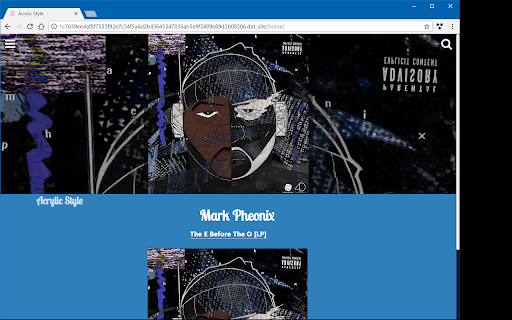
                        Lets you view Dat sites in Chrome.

Requires the DatPart App to work.

Get the app here for Windows:
https://github.com/HughIsaacs2/DatPart/releases
擴展基本資訊
| 名稱 | ![DatPart [Extension]](https://lh3.googleusercontent.com/NJqBOO0nqIpGO_gRH27QKAunsyL3KOKMxiSf7Rg7SPDyuK6NUAoTEh5XRJquiFdzDrVjvwCQF5YiKRGKUF-ETFX8) DatPart [Extension] DatPart [Extension] |
| ID | hnblaajbillhajijlbaepnjglfgepdgm |
| 官方網址 | https://chromewebstore.google.com/detail/datpart-extension/hnblaajbillhajijlbaepnjglfgepdgm |
| 簡介 | DatPart extension. |
| 檔案大小 | 119 KB |
| 安裝次數 | 30 |
| 目前版本 | 0.0.20 alpha |
| 更新時間 | 2019-03-30 |
| 上架時間 | 2019-03-30 |
| 評分 | 4.50/5 共 2 次評分 |
| 開發者 | Hugh Isaacs II |
| 電子郵箱 | [email protected] |
| 付費類型 | free |
| 擴展官網 | https://github.com/HughIsaacs2/DatPart/ |
| 支援的語言 | en |
| manifest.json | |
{
    "update_url": "https:\/\/clients2.google.com\/service\/update2\/crx",
    "name": "DatPart [Extension]",
    "short_name": "DatPart",
    "description": "DatPart extension.",
    "manifest_version": 2,
    "version": "0.0.20",
    "version_name": "0.0.20 alpha",
    "permissions": [
        "tabs",
        "activeTab",
        "webRequestBlocking",
        "webRequest",
        "webNavigation",
        "proxy",
        "http:\/\/127.0.0.1:9989\/*",
        "http:\/\/127.0.0.1:9988\/*",
        "http:\/\/localhost:9989\/",
        "http:\/\/localhost:9988\/",
        "*:\/\/*.dat_site\/*",
        "*:\/\/*.torrent_site\/*",
        "storage",
        "nativeMessaging"
    ],
    "optional_permissions": [
        "tabs",
        "notifications",
        "background",
        "http:\/\/localhost\/",
        "https:\/\/*\/.well-known\/dat"
    ],
    "externally_connectable": {
        "ids": [
            "pgdnnmekclkafnpfofleebhhnmolopgl"
        ]
    },
    "omnibox": {
        "keyword": "DatPart"
    },
    "web_accessible_resources": [
        "redirector.html",
        "redirector_script.js"
    ],
    "options_page": "options.html",
    "background": {
        "persistent": true,
        "scripts": [
            "background.js"
        ]
    },
    "content_scripts": [
        {
            "matches": [
                "*:\/\/*.dat_site\/*"
            ],
            "run_at": "document_start",
            "all_frames": true,
            "js": [
                "datsite.js"
            ]
        }
    ],
    "icons": {
        "16": "logo_16.png",
        "24": "logo.png",
        "32": "logo.png",
        "128": "logo_128.png"
    },
    "browser_action": {
        "default_icon": {
            "16": "logo_16.png",
            "24": "logo.png",
            "32": "logo.png",
            "128": "logo_128.png"
        },
        "default_title": "DatPart",
        "default_popup": "popup.html"
    }
} | |