ListGPT - Save & Share ChatGPT chats
Save & Share ChatGPT chats in private, protected or public mode
什麼是ListGPT - Save & Share ChatGPT chats?
ListGPT - Save & Share ChatGPT chats是由https://listgpt.com開發的Chrome擴展程式,該擴展的主要功能是“Save & Share ChatGPT chats in private, protected or public mode”。
擴展截圖
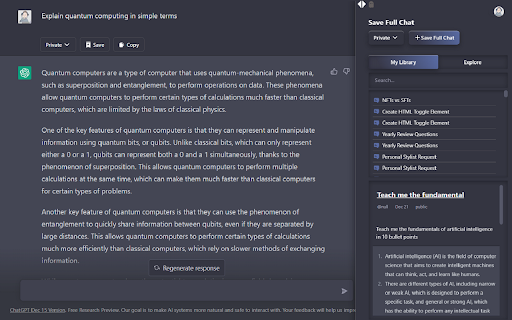
下載ListGPT - Save & Share ChatGPT chats擴展crx文件
下載ListGPT - Save & Share ChatGPT chats擴展crx格式的文件,手動將Chrome擴充功能安裝到瀏覽器中,也可以將crx文件分享給朋友,輕鬆安裝Chrome擴充功能。
擴展使用說明
                        Supercharge your productivity in ChatGPT.

Save your ChatGPT chats in Public, Private or Protected mode.
You can also explore other public chats people had with AI.

How it works:

Step 1) Download the extension and login to Listgpt.com
Step 2) Go to https://chat.openai.com/chat
Step 3) A sidebar will automatically open, enabling you to save your chats.

Features:

- Save private chatgpt chats.
- Set privacy to Public, Private or Protected (share link with people)
- Get access to prompt library
- Save your whole conversation with ChatGPT
- Save only certain messages
- Download messages as text files
- Share a private link with others
- Explore public conversations
- Access your chats faster

You can automatically save your chats in private, public or protected mode.
擴展基本資訊
| 名稱 |  ListGPT - Save & Share ChatGPT chats ListGPT - Save & Share ChatGPT chats |
| ID | igfmhikgjcmmaidhfdpcfbdjcbmabfac |
| 官方網址 | https://chromewebstore.google.com/detail/listgpt-save-share-chatgp/igfmhikgjcmmaidhfdpcfbdjcbmabfac |
| 簡介 | Save & Share ChatGPT chats in private, protected or public mode |
| 檔案大小 | 58.47 KB |
| 安裝次數 | 223 |
| 目前版本 | 1.1.2 |
| 更新時間 | 2023-02-11 |
| 上架時間 | 2022-12-21 |
| 評分 | 5.00/5 共 1 次評分 |
| 開發者 | https://listgpt.com |
| 電子郵箱 | [email protected] |
| 付費類型 | free |
| 擴展官網 | https://listgpt.com |
| 說明頁面URL | https://listgpt.com/privacy |
| 支援的語言 | en |
| manifest.json | |
{
    "update_url": "https:\/\/clients2.google.com\/service\/update2\/crx",
    "name": "ListGPT - Save & Share ChatGPT chats",
    "description": "Save & Share ChatGPT chats in private, protected or public mode",
    "version": "1.1.2",
    "manifest_version": 3,
    "background": {
        "service_worker": "background.js"
    },
    "content_scripts": [
        {
            "matches": [
                "https:\/\/chat.openai.com\/chat",
                "https:\/\/chat.openai.com\/chat\/*"
            ],
            "js": [
                ".\/lib\/jquery.min.js",
                "index.js",
                ".\/lib\/marked.min.js"
            ],
            "run_at": "document_end"
        }
    ],
    "action": {
        "default_icon": "icons\/icon.png",
        "default_popup": "index.html"
    },
    "host_permissions": [
        "https:\/\/chat.openai.com\/chat"
    ],
    "permissions": []
} | |