CanvasFingerprintBlock

Protect your privacy. Prevent webpages from tracking you by your browser's HTML canvas fingerprint.

什麼是CanvasFingerprintBlock?

CanvasFingerprintBlock是由http://appodrome.net開發的Chrome擴展程式,該擴展的主要功能是“Protect your privacy. Prevent webpages from tracking you by your browser's HTML canvas fingerprint.”。

擴展截圖

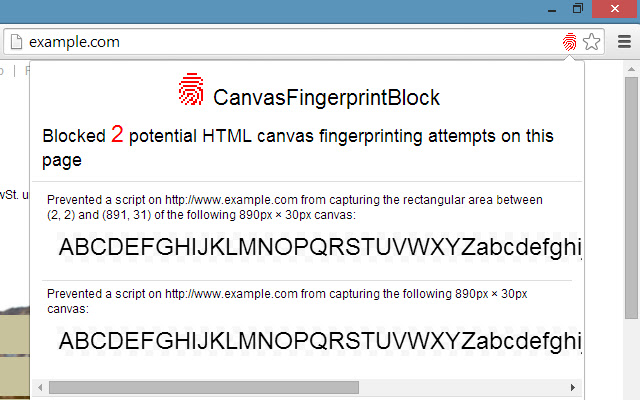
screenshot
screenshot

下載CanvasFingerprintBlock擴展crx文件

下載CanvasFingerprintBlock擴展crx格式的文件,手動將Chrome擴充功能安裝到瀏覽器中,也可以將crx文件分享給朋友,輕鬆安裝Chrome擴充功能。

擴展使用說明

                        IMPORTANT: If the extension does not work on a specific site, please post the details in the SUPPORT section, as this will help me fix it. It is pointless to complain that it doesn’t work without posting the details. Thank you.

RELEASES

Version 1.5 (2016-Mar-06)
  • Updated script-injection technique so that it works also on pages with strict CSP.

Version 1.4 (2016-Mar-05)
  • Extension was (unnecessarily) trying to patch functions in a cross-origin frame (like Hangouts frame in GMail, Disqus frame in several sites, etc.) from within the outer window. This was breaking the sites’ functionality; now this is avoided.

Version 1.3 (2016-Feb-28)
  • Blocked iframe[@sandbox] canvas reads are now shown properly inside popup
  • More detailed information per blocking

Version 1.2 (2016-Feb-27)
  • Now also blocks read attempts from canvas inside a sandboxed iframe element

DETAILS

Canvas Fingerprinting is one of latest technologies being adopted by websites to track visitors without using cookies. Such websites do this by painting an image on a hidden HTML  element and then taking a snapshot of it and posting the snapshot back to themselves. Because the exact pixel values in the drawn canvas can differ subtly from one set of hardware to another, these websites can use those differences to distinguish between visitors as well as to recognize specific visitors from one visit to the next. Which is what tracking cookies are normally used for, except that cookies may be disabled or deleted or avoided by browsing in Incognito mode, whereas to avoid Canvas Fingerprinting you need to use a tool like CanvasFingerprintBlock.

The HTML  element exposes two types of JavaScript functions: functions to draw to the canvas, and functions to export data from the canvas (for the nerds, these are toDataURL() and getImageData()). The canvas-drawing functions are not affected by CanvasFingerprintBlock, so websites that use the canvas for basic drawing will not be affected. On the other hand, when a website tries to export data from the canvas, CanvasFingerprintBlock will “fool” the website by showing it a blank canvas instead of the canvas containing the actual pixels. If the website is reading the canvas data to generate a fingerprint, the generated fingerprint will be useless because CanvasFingerprintBlock makes everyone’s fingerprint look the same.

If a little red fingerprint icon appears in the address bar beside the Bookmark ☆ icon, it means that the website you are visiting has tried to access the data of at least one canvas, and CanvasFingerprintBlock has blocked it. You will be surprised to discover how many websites employ Canvas Fingerprinting! Most websites are quite sneaky in how they create the fingerprint; the canvas is always hidden, and usually the canvas would have already been created, read and removed by the time the website has finished loading! Of course you will be curious to inspect what was being drawn right under your nose, and CanvasFingerprintBlock will let you see it by clicking on the little red fingerprint icon.

Lastly, it is noteworthy to mention that not all websites that are trying to export data from a canvas are doing it maliciously. For example, some photo uploaders will let you edit your photo on a canvas and when you are ready will export the edited photo and upload it to the server. Or some other websites will use a “rough” canvas to draw a gradient or pattern, and will then export the canvas to use that pattern somewhere else on the page. When you see the little red fingerprint icon, by clicking on it it is usually easy to tell whether the blocked canvas was drawn for fingerprinting purposes or not. However it is not so simple to detect this automatically. So for the time being, CanvasFingerprintBlock will block all canvas data exports, and the only way of allowing a canvas read is to disable the extension temporarily. This will be fixed in a future update of CanvasFingerprintBlock.

You may test CanvasFingerprintBlock on this website: http://www.browserleaks.com/canvas

Note: If you are a user of Chrome’s Incognito mode, then to be fully protected it is advisable to enable the CanvasFingerprintBlock extension also in Incognito mode (check “Allow in Incognito”).                    

擴展基本資訊

名稱 CanvasFingerprintBlock CanvasFingerprintBlock
ID ipmjngkmngdcdpmgmiebdmfbkcecdndc
官方網址 https://chrome.google.com/webstore/detail/canvasfingerprintblock/ipmjngkmngdcdpmgmiebdmfbkcecdndc
簡介 Protect your privacy. Prevent webpages from tracking you by your browser's HTML canvas fingerprint.
檔案大小 12.71 KB
安裝次數 10,000
目前版本 1.5
更新時間 2016-03-06
上架時間 2016-03-06
評分 3.27/5 共 60 次評分
開發者 http://appodrome.net
付費類型 free
擴展官網 http://www.appodrome.net
支援的語言 en-US
manifest.json
{
    "update_url": "https:\/\/clients2.google.com\/service\/update2\/crx",
    "manifest_version": 2,
    "name": "CanvasFingerprintBlock",
    "version": "1.5",
    "description": "Protect your privacy. Prevent webpages from tracking you by your browser's HTML canvas fingerprint.",
    "icons": {
        "16": "icon-16.png",
        "32": "icon-32.png",
        "48": "icon-48.png",
        "128": "icon-128.png"
    },
    "page_action": {
        "default_icon": {
            "19": "icon-19.png",
            "38": "icon-38.png"
        }
    },
    "author": "Edward Grech",
    "background": {
        "scripts": [
            "background.js"
        ]
    },
    "content_scripts": [
        {
            "matches": [
                ""
            ],
            "js": [
                "contentscript.js"
            ],
            "run_at": "document_start",
            "all_frames": true,
            "match_about_blank": true
        }
    ],
    "sandbox": [],
    "permissions": []
}