PLANIWEB CONTROL LABORAL
Control del trabajo ejecutado de manera remota, utilizando reconocimiento facial y registro de la navegación.
什麼是PLANIWEB CONTROL LABORAL?
PLANIWEB CONTROL LABORAL是由https://planiweb.pe開發的Chrome擴展程式,該擴展的主要功能是“Control del trabajo ejecutado de manera remota, utilizando reconocimiento facial y registro de la navegación.”。
擴展截圖

下載PLANIWEB CONTROL LABORAL擴展crx文件
下載PLANIWEB CONTROL LABORAL擴展crx格式的文件,手動將Chrome擴充功能安裝到瀏覽器中,也可以將crx文件分享給朋友,輕鬆安裝Chrome擴充功能。
擴展使用說明
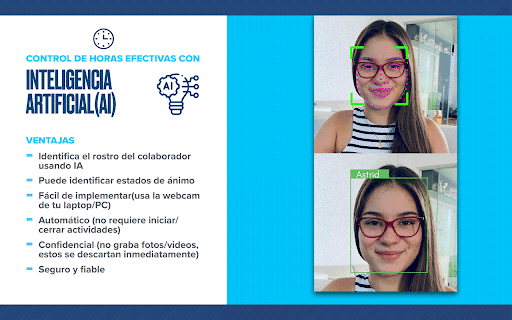
                        Controla el trabajo ejecutado de manera remota por tus colaboradores, utilizando para ello solamente la cámara web del computador y nuestro software de Inteligencia Artificial que reconoce el rostro de la persona y cuantifica el tiempo que esta se encuentra laborando frente a la computadora.
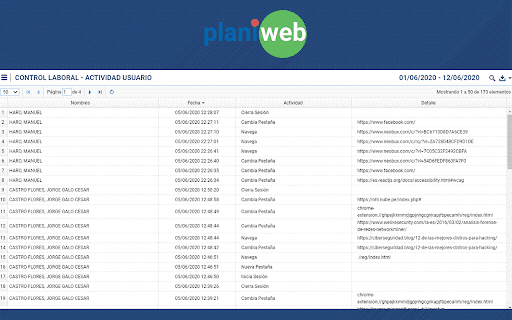
Durante el tiempo en que PLANIWEB está activado, se registran también las páginas web que son visitadas en el navegador Chrome.
Respeta la privacidad del usuario ya que no guarda vídeos y/o fotografías para el reconocimiento facial.
擴展基本資訊
| 名稱 |  PLANIWEB CONTROL LABORAL PLANIWEB CONTROL LABORAL |
| ID | jgekboologmapgccbcgbhncackpedlaf |
| 官方網址 | https://chromewebstore.google.com/detail/planiweb-control-laboral/jgekboologmapgccbcgbhncackpedlaf |
| 簡介 | Control del trabajo ejecutado de manera remota, utilizando reconocimiento facial y registro de la navegación. |
| 檔案大小 | 8.99 MB |
| 安裝次數 | 60 |
| 目前版本 | 1.0.2 |
| 更新時間 | 2020-09-15 |
| 上架時間 | 2020-06-13 |
| 開發者 | https://planiweb.pe |
| 電子郵箱 | [email protected] |
| 付費類型 | free |
| 擴展官網 | http://planiweb.pe/planiweb_ia.php |
| 說明頁面URL | http://planiweb.pe/planiweb_ia.php |
| 支援的語言 | es-419 |
| manifest.json | |
{
    "update_url": "https:\/\/clients2.google.com\/service\/update2\/crx",
    "manifest_version": 2,
    "name": "PLANIWEB CONTROL LABORAL",
    "description": "Control del trabajo ejecutado de manera remota, utilizando reconocimiento facial y registro de la navegaci\u00f3n.",
    "version": "1.0.2",
    "icons": {
        "128": ".\/images\/planiweb.png"
    },
    "background": {
        "scripts": [
            ".\/js\/nube.js",
            ".\/js\/moment.min.js",
            "background.js"
        ],
        "persistent": false
    },
    "browser_action": {
        "default_icon": ".\/images\/apagado.png"
    },
    "commands": {
        "_execute_browser_action": {
            "suggested_key": {
                "default": "Ctrl+Shift+P",
                "mac": "MacCtrl+Shift+P"
            },
            "description": "Ir a PLANIWEB"
        }
    },
    "permissions": [
        "tabs",
        "activeTab",
        "storage",
        "cookies",
        "https:\/\/*.nube.pe\/"
    ],
    "options_ui": {
        "page": ".\/options.html",
        "open_in_tab": false
    }
} | |