soundscape
The best way to listen to tunes while browsing through the internet.
什麼是soundscape?
soundscape是由madhur acharya開發的Chrome擴展程式,該擴展的主要功能是“The best way to listen to tunes while browsing through the internet.”。
擴展截圖
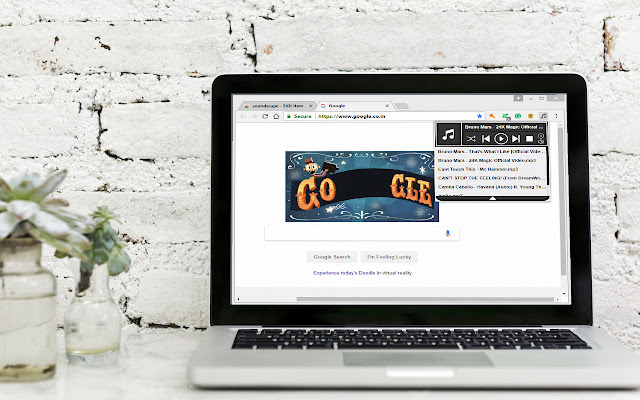


下載soundscape擴展crx文件
下載soundscape擴展crx格式的文件,手動將Chrome擴充功能安裝到瀏覽器中,也可以將crx文件分享給朋友,輕鬆安裝Chrome擴充功能。
擴展使用說明
                        Soundscape is a music player that can play music on your web browser in the background.
Now you can check up on your emails, update your social media or just browse through the internet, all while listening to your favourite songs.

Click on the logo to initiate the file selector and select the songs you want to play.
A playlist will be created with the songs that you choose. to access the playlist, click on the dropdown arrow button at the player.
And that's it your all set.

Oh and one last thing, make sure you refresh the player when you are not using it. this will clear up your RAM.
To refresh just click on the little cross button on the right side.
擴展基本資訊
| 名稱 |  soundscape soundscape |
| ID | jiehhlimfkjahackdmbcnnajpmeihlmn |
| 官方網址 | https://chrome.google.com/webstore/detail/soundscape/jiehhlimfkjahackdmbcnnajpmeihlmn |
| 簡介 | The best way to listen to tunes while browsing through the internet. |
| 檔案大小 | 133 KB |
| 安裝次數 | 20 |
| 目前版本 | 1.0 |
| 更新時間 | 2018-05-04 |
| 上架時間 | 2018-05-04 |
| 開發者 | madhur acharya |
| 電子郵箱 | [email protected] |
| 付費類型 | free |
| 支援的語言 | en |
| manifest.json | |
{
    "update_url": "https:\/\/clients2.google.com\/service\/update2\/crx",
    "manifest_version": 2,
    "name": "soundscape",
    "description": "The best way to listen to tunes while browsing through the internet.",
    "version": "1.0",
    "background": {
        "scripts": [
            "background.js"
        ]
    },
    "permissions": [
        "activeTab",
        "tabs",
        "storage"
    ],
    "browser_action": {
        "default_popup": "popup.html",
        "default_icon": "icon.png"
    },
    "icons": {
        "16": "resources\/icon16.png",
        "48": "resources\/icon48.png",
        "128": "resources\/icon128.png"
    }
} | |