YouTube Music Mode
Automatically reduces video quality when you are not watching video. Thus, saving your internet bandwidth.
什麼是YouTube Music Mode?
YouTube Music Mode是由http://www.ameyanaik.com開發的Chrome擴展程式,該擴展的主要功能是“Automatically reduces video quality when you are not watching video. Thus, saving your internet bandwidth.”。
擴展截圖
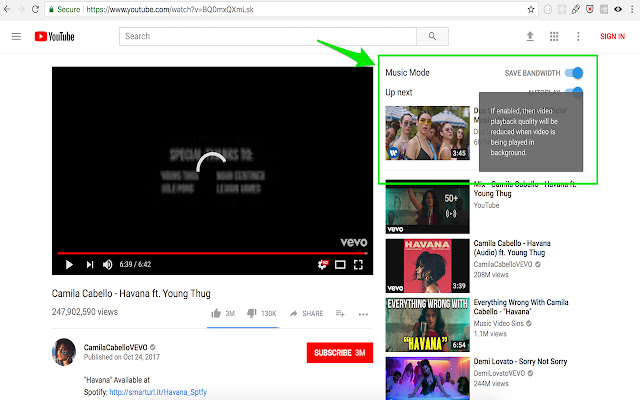


下載YouTube Music Mode擴展crx文件
下載YouTube Music Mode擴展crx格式的文件,手動將Chrome擴充功能安裝到瀏覽器中,也可以將crx文件分享給朋友,輕鬆安裝Chrome擴充功能。
擴展使用說明
                        How to use it?
1) Install 'YouTube Music Mode'
2) When you watch a video, click 'Music Mode' button to enable or disable.

Note: This product is not endorsed, certified or otherwise approved in any way by Youtube or any of its affiliates.

Updates:
v 2.1.0 (2018-07-24)
- (Bug Fix) Reduce/restore Youtube playback quality
- Set 'Youtube Music Mode' enabled by default
擴展基本資訊
| 名稱 |  YouTube Music Mode YouTube Music Mode |
| ID | jilljhdedkalicogkbdpjaaelofihagl |
| 官方網址 | https://chrome.google.com/webstore/detail/youtube-music-mode/jilljhdedkalicogkbdpjaaelofihagl |
| 簡介 | Automatically reduces video quality when you are not watching video. Thus, saving your internet bandwidth. |
| 檔案大小 | 150 KB |
| 安裝次數 | 799 |
| 目前版本 | 2.1.0 |
| 更新時間 | 2018-07-24 |
| 上架時間 | 2018-07-24 |
| 評分 | 4.00/5 共 20 次評分 |
| 開發者 | http://www.ameyanaik.com |
| 付費類型 | free |
| 支援的語言 | en |
| manifest.json | |
{
    "background": {
        "page": "background.html"
    },
    "content_scripts": [
        {
            "css": [
                "inject_style.css"
            ],
            "js": [
                "v2\/injector.js"
            ],
            "matches": [
                "*:\/\/*.youtube.com\/*"
            ],
            "run_at": "document_idle"
        }
    ],
    "content_security_policy": "script-src 'self' https:\/\/ssl.google-analytics.com https:\/\/cdn.mxpnl.com https:\/\/apis.google.com https:\/\/www.youtube.com\/ https:\/\/s.ytimg.com\/yt\/jsbin\/www-widgetapi-vfl9Ni0ki.js; object-src 'self'",
    "default_locale": "en",
    "description": "__MSG_description__",
    "externally_connectable": {
        "matches": [
            "*:\/\/*.youtube.com\/*"
        ]
    },
    "icons": {
        "128": "icon.png",
        "256": "icon.png",
        "48": "icon.png"
    },
    "manifest_version": 2,
    "minimum_chrome_version": "18",
    "name": "__MSG_name__",
    "permissions": [
        "storage"
    ],
    "update_url": "https:\/\/clients2.google.com\/service\/update2\/crx",
    "version": "2.1.0",
    "web_accessible_resources": [
        "v2\/injected.js",
        "v2\/jquery-3.2.1-min.js"
    ]
} | |