Signup Block
Remove signup dialogs and view the content of some websites without signing up.
什麼是Signup Block?
Signup Block是由Mohamed Moussa開發的Chrome擴展程式,該擴展的主要功能是“Remove signup dialogs and view the content of some websites without signing up.”。
擴展截圖

下載Signup Block擴展crx文件
下載Signup Block擴展crx格式的文件,手動將Chrome擴充功能安裝到瀏覽器中,也可以將crx文件分享給朋友,輕鬆安裝Chrome擴充功能。
擴展使用說明
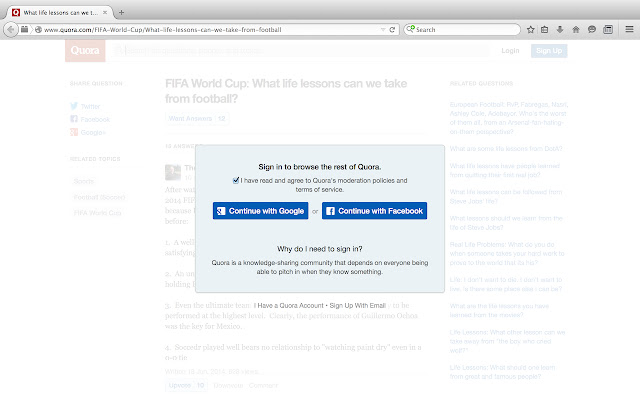
                        Signup Block removes signup pop-ups and allows you to view the content of some websites without signing up. It currently supports almost two dozen websites, including Quora, Pinterest, and the National Post. This extension has two modes: manual and automatic. It comes installed in manual mode, in which the user needs to click the Signup Block icon to remove the signup requirement on the page. To change the extension into automatic mode, go to the extensions section, under Signup Block click "Options", and then check the available checkbox. In automatic mode, the Signup Block extension will be automatically run when a page is loaded.

To run Signup Block, you can use the keyboard shortcut Alt + Shift + X.

To toggle Signup Block between automatic and manual mode, you can use the keyboard shortcut Alt + T.

Full list of supported sites: https://github.com/mmmoussa/Signup-Block/blob/master/Supported%20sites.md
擴展基本資訊
| 名稱 |  Signup Block Signup Block |
| ID | joiaigcocfbhjbgeajdmmgchlbepelco |
| 官方網址 | https://chrome.google.com/webstore/detail/signup-block/joiaigcocfbhjbgeajdmmgchlbepelco |
| 簡介 | Remove signup dialogs and view the content of some websites without signing up. |
| 檔案大小 | 48.53 KB |
| 安裝次數 | 2,000 |
| 目前版本 | 1.1 |
| 更新時間 | 2015-06-08 |
| 上架時間 | 2015-06-08 |
| 評分 | 1.80/5 共 25 次評分 |
| 開發者 | Mohamed Moussa |
| 付費類型 | free |
| 支援的語言 | en |
| manifest.json | |
{
    "update_url": "https:\/\/clients2.google.com\/service\/update2\/crx",
    "manifest_version": 2,
    "name": "Signup Block",
    "description": "Remove signup dialogs and view the content of some websites without signing up.",
    "version": "1.1",
    "icons": {
        "16": "icon-16.png",
        "48": "icon-48.png",
        "128": "icon-128.png"
    },
    "options_ui": {
        "page": "options.html",
        "chrome_style": true
    },
    "browser_action": {
        "default_icon": "icon-128.png",
        "default_title": "Signup Block"
    },
    "background": {
        "scripts": [
            "jquery-2.1.3.min.js",
            "background.js"
        ]
    },
    "commands": {
        "toggle-feature-foo": {
            "suggested_key": {
                "default": "Alt+T"
            },
            "description": "Toggle automatic signup removal feature"
        },
        "_execute_browser_action": {
            "suggested_key": {
                "windows": "Alt+Shift+X",
                "mac": "Alt+Shift+X",
                "chromeos": "Alt+Shift+X",
                "linux": "Alt+Shift+X"
            }
        }
    },
    "permissions": [
        "tabs",
        "activeTab",
        "http:\/\/*\/*",
        "storage"
    ]
} | |