Auto background remover by object recognition
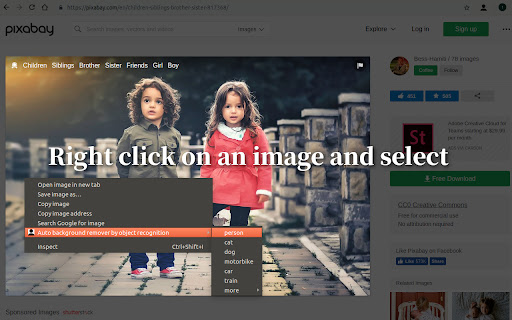
Fully automatic image clipping to make a transparent PNG image in just a few seconds. Recognizing person, cat, dog, etc.
什麼是Auto background remover by object recognition?
Auto background remover by object recognition是由niko開發的Chrome擴展程式,該擴展的主要功能是“Fully automatic image clipping to make a transparent PNG image in just a few seconds. Recognizing person, cat, dog, etc.”。
擴展截圖


下載Auto background remover by object recognition擴展crx文件
下載Auto background remover by object recognition擴展crx格式的文件,手動將Chrome擴充功能安裝到瀏覽器中,也可以將crx文件分享給朋友,輕鬆安裝Chrome擴充功能。
擴展使用說明
                        - Input image size and output image size are not limited. You can make 4k resolution images.

- Fast image processing in a few seconds. If you have a GPU in your PC, please turn on the hardware acceleration.

- Basically free to use. If it has exceeded a certain number of image processing, the watermark will be added to images. You need to subscribe to remove the watermark.

ver.1.2.0
・Added to make multiple image selection possible

ver.1.1.0
- Added a feature that Image processing mode. If your computer is freezing during image processing, select the mode of Fast processing and Low precision.
擴展基本資訊
| 名稱 |  Auto background remover by object recognition Auto background remover by object recognition |
| ID | kpkaocloobmfnkbfjenchjopkcochdgj |
| 官方網址 | https://chromewebstore.google.com/detail/auto-background-remover-b/kpkaocloobmfnkbfjenchjopkcochdgj |
| 簡介 | Fully automatic image clipping to make a transparent PNG image in just a few seconds. Recognizing person, cat, dog, etc. |
| 檔案大小 | 149 MB |
| 安裝次數 | 2,211 |
| 目前版本 | 1.2.0 |
| 更新時間 | 2019-03-08 |
| 上架時間 | 2019-03-08 |
| 評分 | 2.24/5 共 17 次評分 |
| 開發者 | niko |
| 電子郵箱 | [email protected] |
| 付費類型 | free |
| 隱私政策頁面URL | https://sites.google.com/view/privacypolicy-niko/%E3%83%9B%E3%83%BC%E3%83%A0 |
| 支援的語言 | en,ja |
| manifest.json | |
{
    "update_url": "https:\/\/clients2.google.com\/service\/update2\/crx",
    "name": "__MSG_ext_name__",
    "version": "1.2.0",
    "description": "__MSG_ext_description__",
    "manifest_version": 2,
    "permissions": [
        "contextMenus",
        "downloads",
        "storage",
        "identity",
        "https:\/\/www.googleapis.com\/",
        "file:\/\/\/*\/*",
        "http:\/\/*\/*",
        "https:\/\/*\/*"
    ],
    "background": {
        "scripts": [
            "background.js"
        ]
    },
    "browser_action": {
        "default_icon": "images\/icon128.png"
    },
    "icons": {
        "16": "images\/icon16.png",
        "32": "images\/icon32.png",
        "128": "images\/icon128.png"
    },
    "web_accessible_resources": [
        "web\/*"
    ],
    "default_locale": "en",
    "content_security_policy": "script-src 'self' 'unsafe-eval'; object-src 'self'",
    "options_page": "options.html",
    "oauth2": {
        "client_id": "866346487419-hqbqptlke5qchssvo2dtp58fq7tkl1gr.apps.googleusercontent.com",
        "scopes": [
            "https:\/\/www.googleapis.com\/auth\/chromewebstore.readonly"
        ]
    },
    "key": "MIIBIjANBgkqhkiG9w0BAQEFAAOCAQ8AMIIBCgKCAQEAkmj2TjOP94YB0hbuT77XKlUfNDmJ2b3zujSfaxqbuZLB5NpIdiQo9wIBySYCxk\/Ae\/U+vSYWjh18LcbpZvUIinZ36n0Synh4STaeIS6YdK8iZIKbzDvqILsAruMH0I6BzHpn8Nw77ZIaIUf\/VkeXW01LBF4koB57qirh+IE4KHZKqTS3Qm+NKJmjdAmxnyJXoPVb1Que00WkD3LttQGhRaD708eB0KWjeucSQg2VqoMiiamhi2swJ9oleLK5k7yJ8lgLDbdGK1d2cJbTD3WzdSlr9YEE6nKYU8NMBq1eCem3TKW2FY9QS58ufyKzOp8m3ChbqY8yCljSRTZ3jeKgywIDAQAB"
} | |